18
TV Installation and Connection Guide
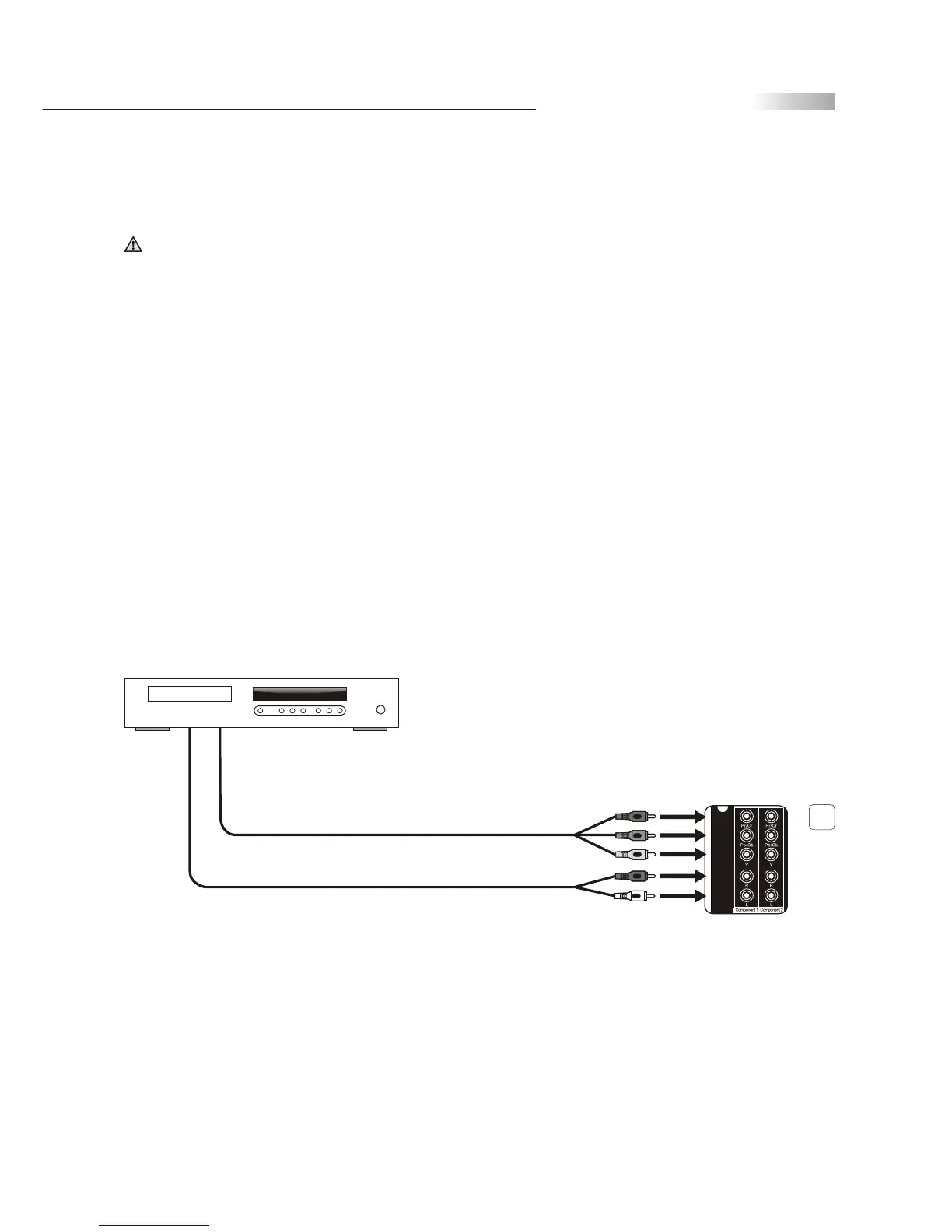
Connecting to a DVD Player with Component
Cables
Use this method of connection if your DVD Player has component
(Y, Pb, Pr) jacks.
1.Using a component video cable, connect the DVD Player's Y, Pb and
Pr jacks to the Y, Pb and Pr jacks on the TV.
Colors on Component Video connectors:
Y: Green
Pb (also identified as Cb, CB or B-Y): Blue
Pr (also identified as Cr, CR or R-Y): Red
Note: The Y, Pb and Pr jacks on your DVD player are sometimes labeled
as Y, Cb and Cr, or B-Y and R-Y. If so, connect the cables to the
matching colors.
2.Using an Audio cable, connect the DVD player's Audio OUT jacks to
the TV's Audio in jacks.
Note: The Y, Pb and Pr jacks do not provide audio, so audio cables must
be connected to provide sound.
Note: The YPbPr connection provides the best quality of video signal
compared to AV (Composite) and S-Video connection.
Disconnect all power sources before making any connections.
Component cable
with RCA connector
DVD player
Audio cable
Red
Blue
4
Green
Red
White
Rear of TV



 To Next Page