FAX Operation (Advanced)
OPERATION GUIDE 4-35
4
Previewing Images
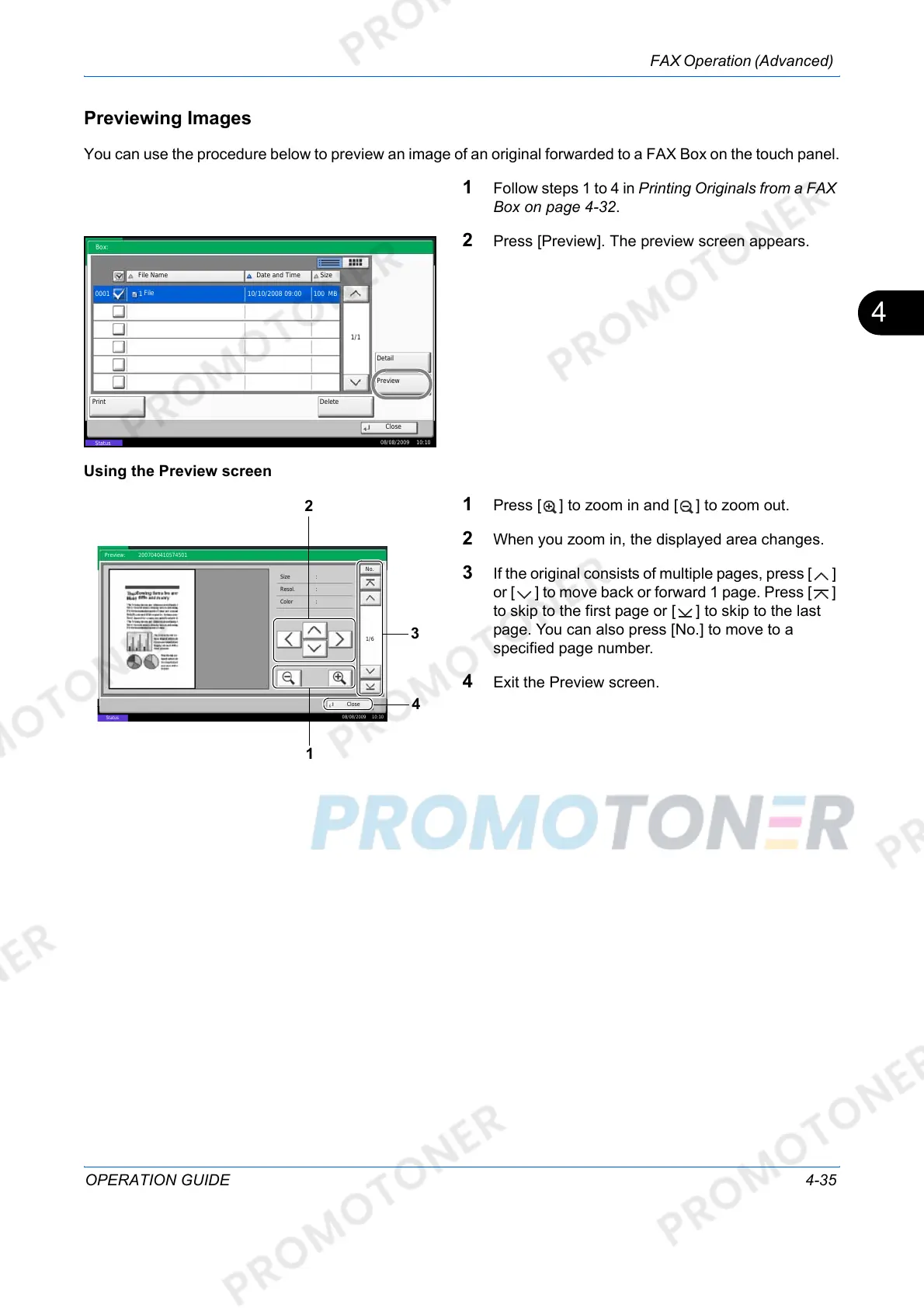
You can use the procedure below to preview an image of an original forwarded to a FAX Box on the touch panel.
1 Follow steps 1 to 4 in Printing Originals from a FAX
Box on page 4-32.
2 Press [Preview]. The preview screen appears.
Using the Preview screen
1 Press [ ] to zoom in and [ ] to zoom out.
2 When you zoom in, the displayed area changes.
3 If the original consists of multiple pages, press [ ]
or [ ] to move back or forward 1 page. Press [ ]
to skip to the first page or [ ] to skip to the last
page. You can also press [No.] to move to a
specified page number.
4 Exit the Preview screen.
Close
File Name
Detail
Date and Time
DeletePrint
Size
1/1
0001 1 10/10/2008 09:00 MB
Box:
Preview
08/08/2009 10:10
Status
100
File
Close
Preview:
No.
1/6
2007040410574501
Status
08/08/2009 10:10
Size :
Resol.
:
:
Color
2
1
3
4













 To Next Page