2-10
Before Using the Fax Machine > Part Names and Functions
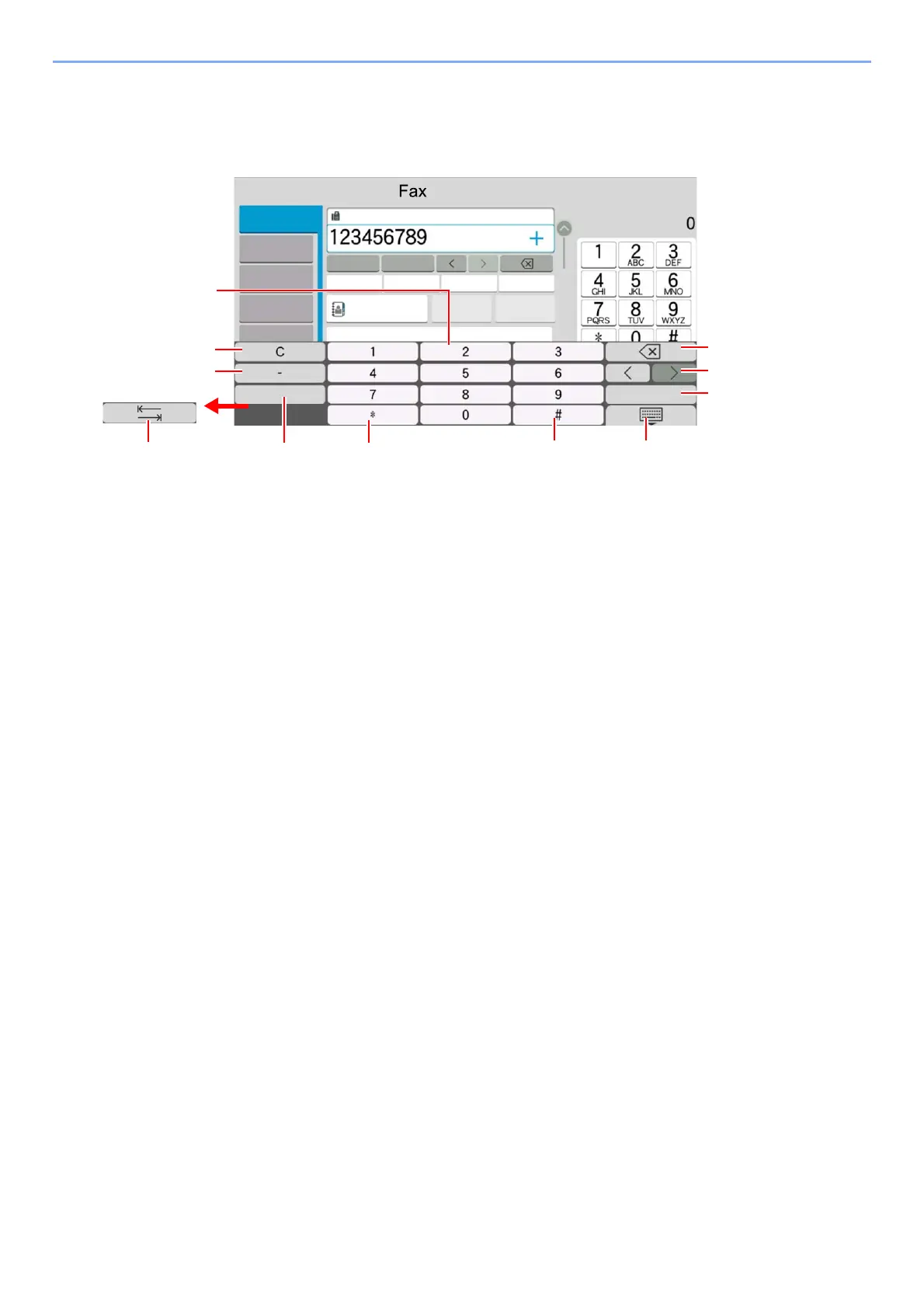
Entering Numbers
When entering numbers, numeric keys appear on the touch panel if you select the area in which the number is entered.
1 Enter numbers.
2 Clear entered numbers.
3 Enter a hyphen (-).
4 Insert a space.
5 Move to the next input box.
6 When [.] is displayed: Enters the decimal point. The numbers entered after selecting this key will be the numbers
after the decimal point.
When [*] is displayed: Enters [*].
7 When [+/-] is displayed: Switches between positive and negative numbers.
When [#] is displayed: Enters [#].
8 Close the numeric keypad.
9 Entry by numeric keys is confirmed.
10 Move the cursor.
11 Delete a character to the left of the cursor.
4XLFN6HWXS
'HVWLQDWLRQ
2UJ6HQG
'DWD)RUPDW
5HFDOO
3DXVH
6SDFH
6SDFH (QWHU
2QH7RXFK'HVWLQDWLRQ
'HVW
+LVWRU\
'HVWLQDWLRQ
$GYDQFHG
,PDJH4XDOLW\
&KDLQ'LUHFW
2Q+RRN 'HWDLO
$GGUHVV%RRN
)$;1R(QWU\



 To Next Page