2-18
Before Using the Fax Machine > Registering Destinations in the Address Book
4
Configure the transmission settings.
1 Select [Mode] and select [Simple] or [Full].
2 Select "Via Server" [On] or [Off].
When this setting is set to [Off], transmission takes place by direct SMTP (not through an
e-mail server).
When this setting is set to [On], transmission takes place by the i-FAX method (through an
e-mail server).
3 Select [Destination Condition]. Specify the destination conditions and select [OK].
5
Check if the destination entry is correct > [Register]
The destination is added to the Address Book.
To add a new address to the One Touch Key, select [Register] and follow the on-screen
instructions to enter the necessary information.
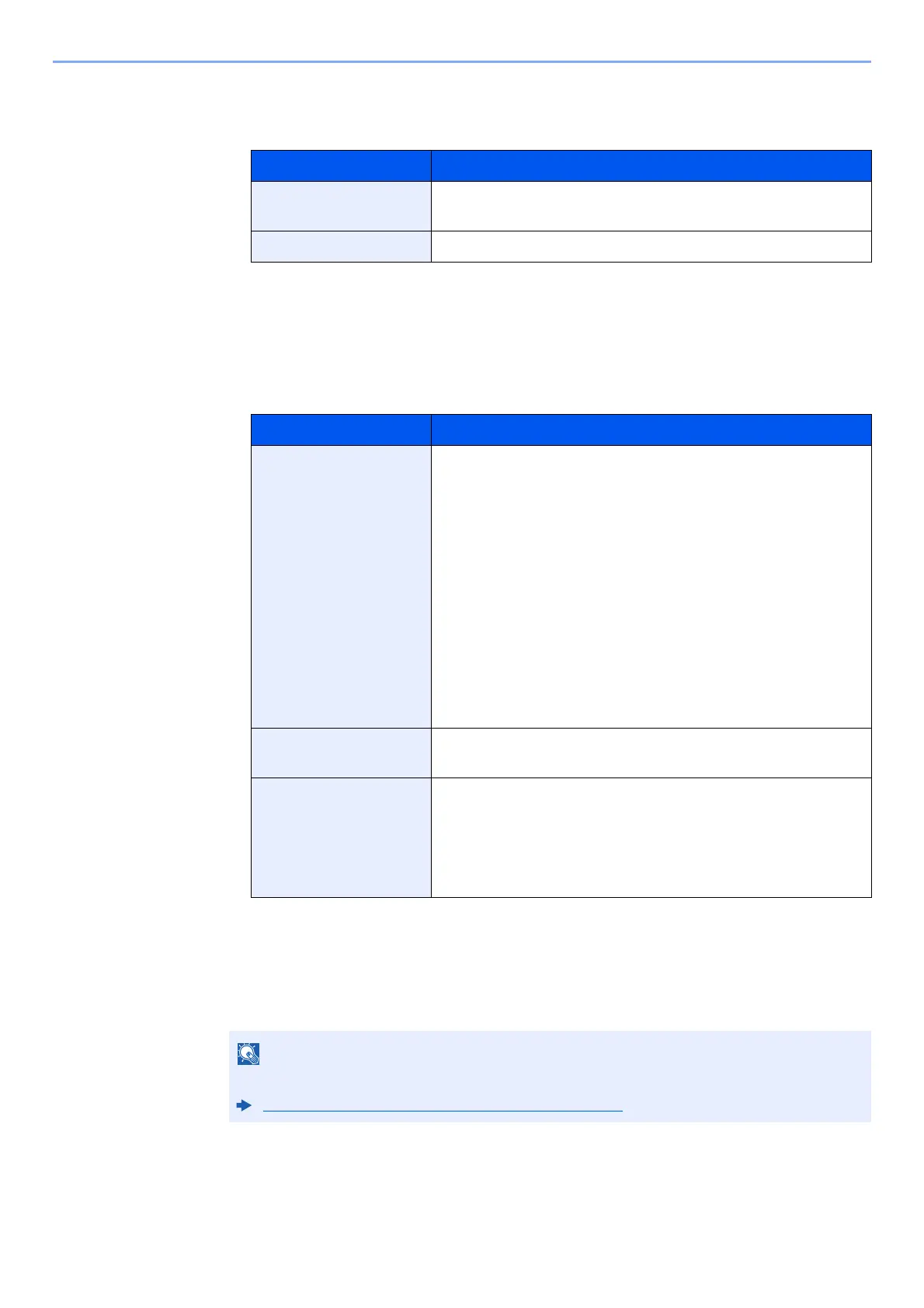
Transmission mode Description
Simple mode Transmission confirmation is not sent to the destination
machine.
Full mode Transmission confirmation is sent to the destination machine.
Item Description
Resolution Specify the resolutions that can be received by the destination
fax machine.
If you try to send an i-FAX using a prohibited resolution, it is
automatically changed to a permitted resolution and then sent.
• 200 × 100 dpi: Permitted (fixed)
• 200 × 200 dpi: Permitted (fixed)
• 200 × 400 dpi: Permitted or prohibited
• 400 × 400 dpi: Permitted or prohibited
• 600 × 600 dpi: Permitted or prohibited
To permit a resolution setting, select the check box to add a
check mark.
To prohibit a resolution setting, select the check box to remove
the check mark.
Compression Select a suitable file format for the destination fax machine.
MH, MR, MMR or JBIG
Paper Size Display the sending paper size for the destination fax
machine.
• A4/Letter: Permitted (fixed)
• B4: Permitted or prohibited
• A3/Ledger: Permitted or prohibited
Refer to the following for registering the One Touch Key.
Adding a Destination on One Touch Key (page 2-22)



 To Next Page