OLYMPUS Viewer 2
Operating Mac OS X v10.4.11-v10.6
System
Processor Intel Core Solo/Duo 1.5 GHz or better
RAM 1 GB or more (2 GB or more
recommended)
Free Hard
1 GB or more
Drive Space
Monitor 1024 x 768 pixels or more
Minimum 32,000 colors (16,770,000
Settings colors recommended)
* Other languages can be selected from the language
combo box. For information on using the software, see
online help.
3 Copy the camera manual.
• Click the "Camera Instruction Manual" button to
open the folder containing the camera manuals.
Copy the manual for your language to the
computer.
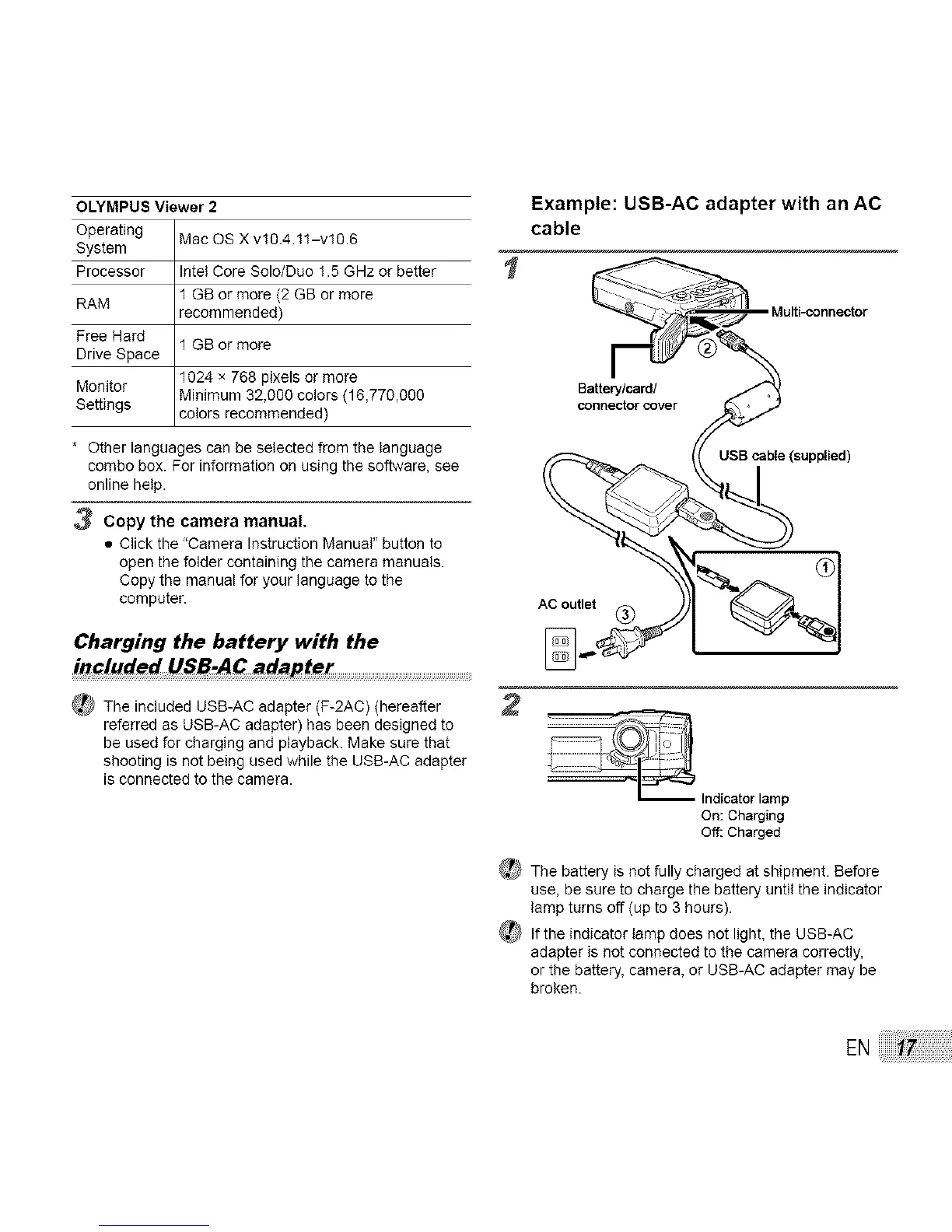
Charging the battery with the
in_luded USB-AC adapter
_ The included USB-AC adapter (F-2AC) (hereafter
referred as USB-AC adapter) has been designed to
be used for charging and playback. Make sure that
shooting is not being used while the USB-AC adapter
is connected to the camera.
1
2
Example: USB-AC adapter with an AC
cable
Multi-connector
On: Charging
Off: Charged
_ The battery isnot fully charged at shipment. Before
use, be sure to charge the battery until the indicator
lamp turns off (up to 3 hours).
_?lf the indicator lamp does not light, the USB-AC
adapter is not connected to the camera correctly,
or the battery, camera, or USB-AC adapter may be
broken.
EN



 To Next Page