_ When set to [Auto] or [Manual], [Image Size]
(p. 40) is fixed to [1_].
_t't The focus, exposure, zoom position (p. 22), and white
balance (p. 37) are locked at the first frame.
(_ The flash (p. 35) is fixed to _) (Flash Off) mode.
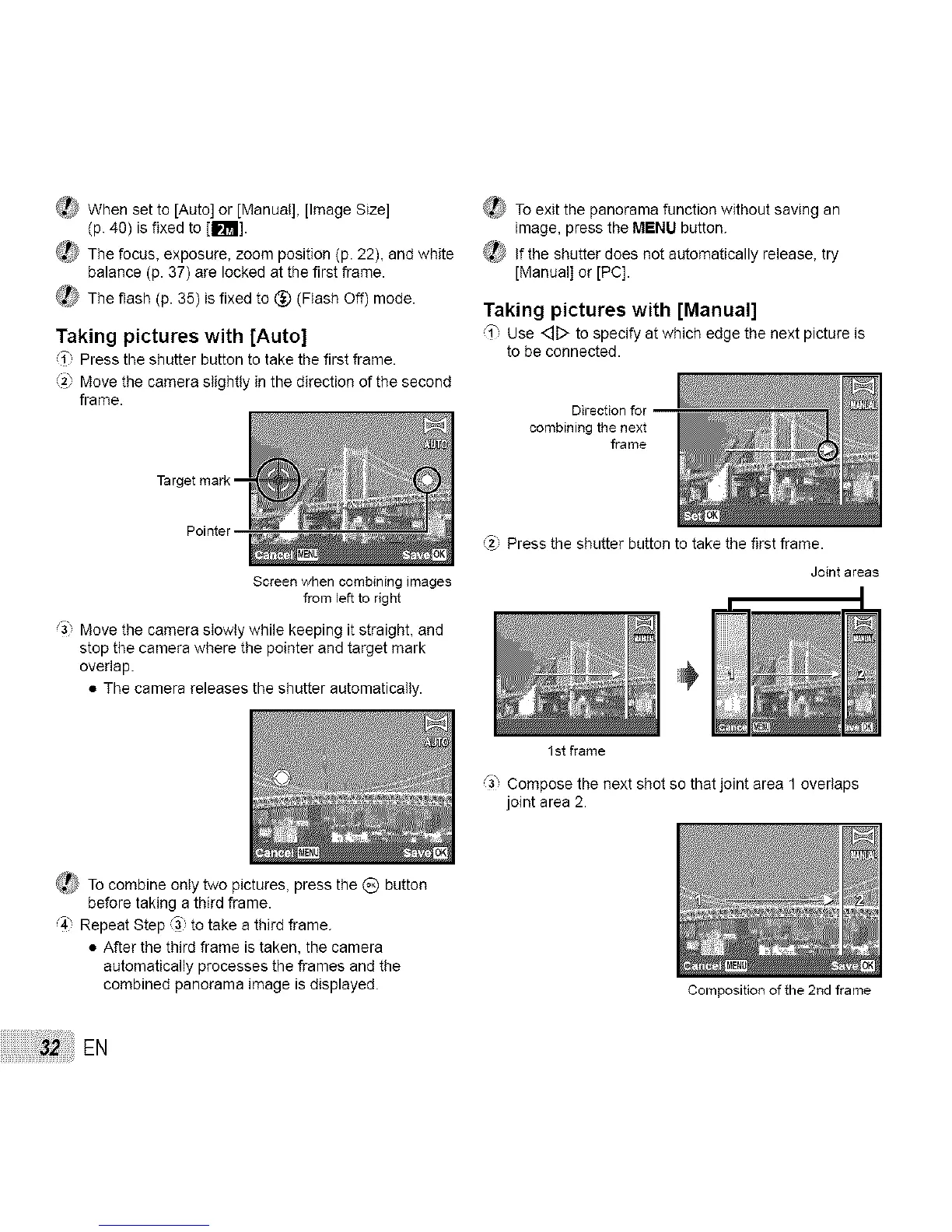
Taking pictures with [Auto]
i Press the shutter button to take the first frame.
2_ Move the camera slightly in the direction of the second
frame.
Pointer
Screen when combining images
from left to right
Move the camera slowly while keeping it straight, and
stop the camera where the pointer and target mark
overlap.
• The camera releases the shutter automatically.
(_ To exit the panorama function without saving an
image, press the MENU button.
_,_ If the shutter does not automatically release, try
[Manual] or [PC].
Taking pictures with [Manual]
'_', Use <::]D to specify at which edge the next picture is
to be connected.
Direction for
combining the next
frame
Press the shutter button to take the first frame.
Joint areas
1 st frame
_3, Compose the next shot so that joint area 1 overlaps
joint area 2.
(_ To combine only two pictures, press the _) button
before taking a third frame.
4" Repeat Step _3 to take a third frame.
• After the third frame is taken, the camera
automatically processes the frames end the
combined panorama image is displayed.
EN
Composition of the 2rid frame



 To Next Page