7 - 5
7 User Calibration
E5@C Digital Temperature Controllers User’s Manual (H174)
7-3 Thermocouple Calibration
7
Additional Information
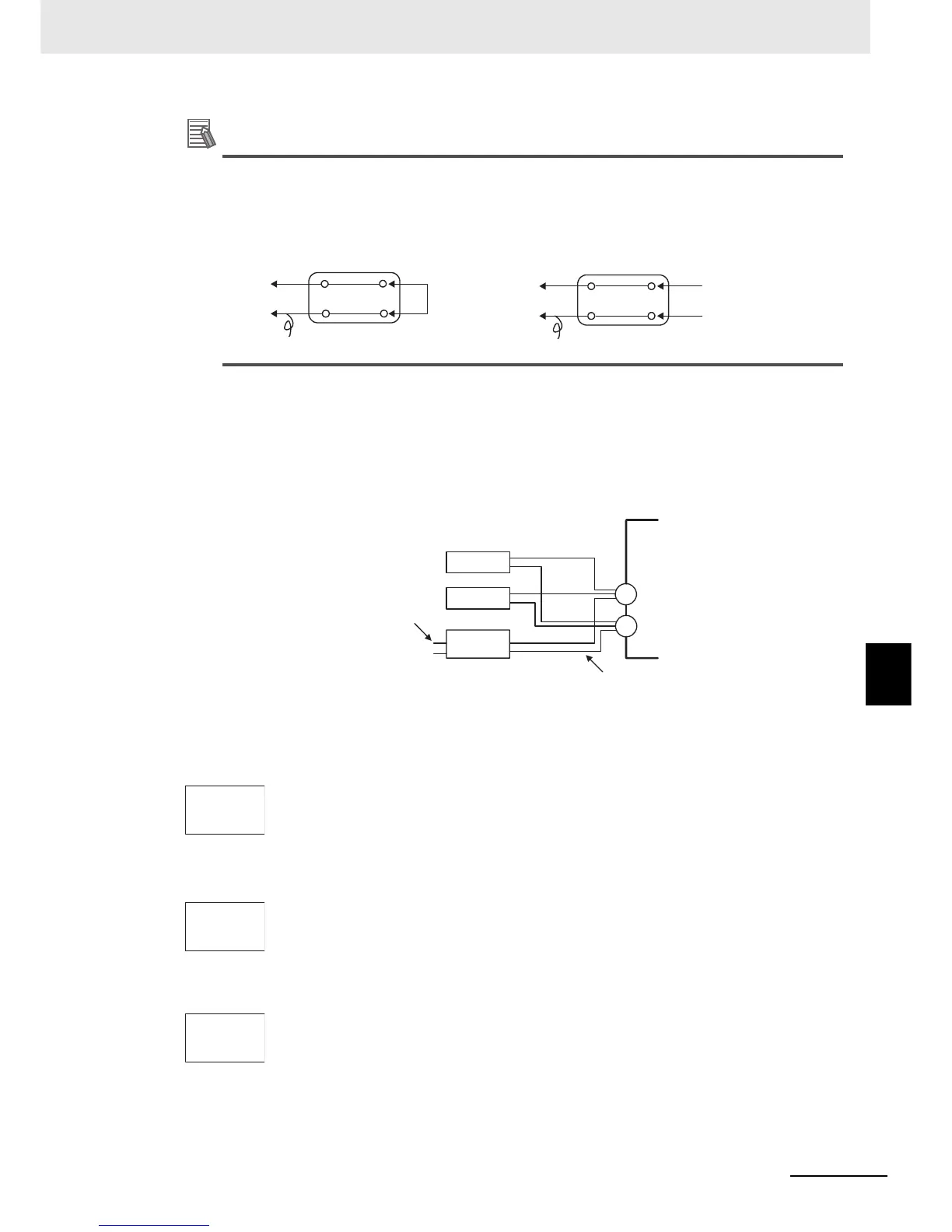
Connecting the Cold Junction Compensator
Correct process values cannot be obtained if you touch the contact ends of the compensating
conductor during calibration of a thermocouple. Accordingly, short-circuit (enable) or open
(disable) the tip of the thermocouple inside the cold junction compensator as shown in the figure
below to create a contact or non-contact state for the cold junction compensator.
In this example, calibration is shown for a Digital Controller with thermocouple/infrared temperature
sensor set as the input type.
1. Connect the power supply.
2. Connect a standard DC current/voltage source (STV), precision digital multimeter
(DMM), and contact junction compensator (e.g., a zero controller as in the figure)
to the thermocouple input terminals, as shown in the figure below.
3. Turn the power ON.
4. Move to the Calibration Level.
This starts the 30-minute aging timer. This timer provides an approximate timer for
aging. After 30 minutes have elapsed, the No. 2 display changes to 0. You can
advance to the next step in this procedure even if 0 is not displayed.
• Input types 5, 7, 11, 12,
15, 19, 20:
• Input types 6, 8, 9, 10, 13,
14, 16, 17, 18, 21, 22, 23,
24:
5. When the M Key is pressed, the status changes as shown to the left.
The No. 2 display at this time shows the currently entered count value in
hexadecimal. Set the STV as follows:
• Input types 5, 7, 11, 12, 15, 19, 20: Set to 54 mV.
• Input types 6, 8, 9, 10, 13, 14, 16, 17, 18, 21, 22, 23, 24: Set to 24 mV.
Allow the count value on the No. 2 display to fully stabilize, then press the D Key to
temporarily register the calibration settings.
If this count value is outside of the specified range, the No. 2 display will flash and
the count value will not be temporarily registered.
E5@C
0°C/32°F
0°C/32°F
Compensating conductor
Compensating conductor
Cold junction compensator
Cold junction compensator
Short-circuit
Open
E5@C
STV
DMM
OUTPUT INPUT
−
+
Leave open.
Compensating conductor of currently selected
thermocouple.
Use K thermocouple compensating conductor
for E, R, S, B, W, and PLII thermocouples and
for an infrared temperature sensor.
Zero
controller
adj
30
t 54
69as
t 24
e220


 To Next Page