7 User Calibration
7 - 4
E5@C Digital Temperature Controllers User’s Manual (H174)
7-3 Thermocouple Calibration
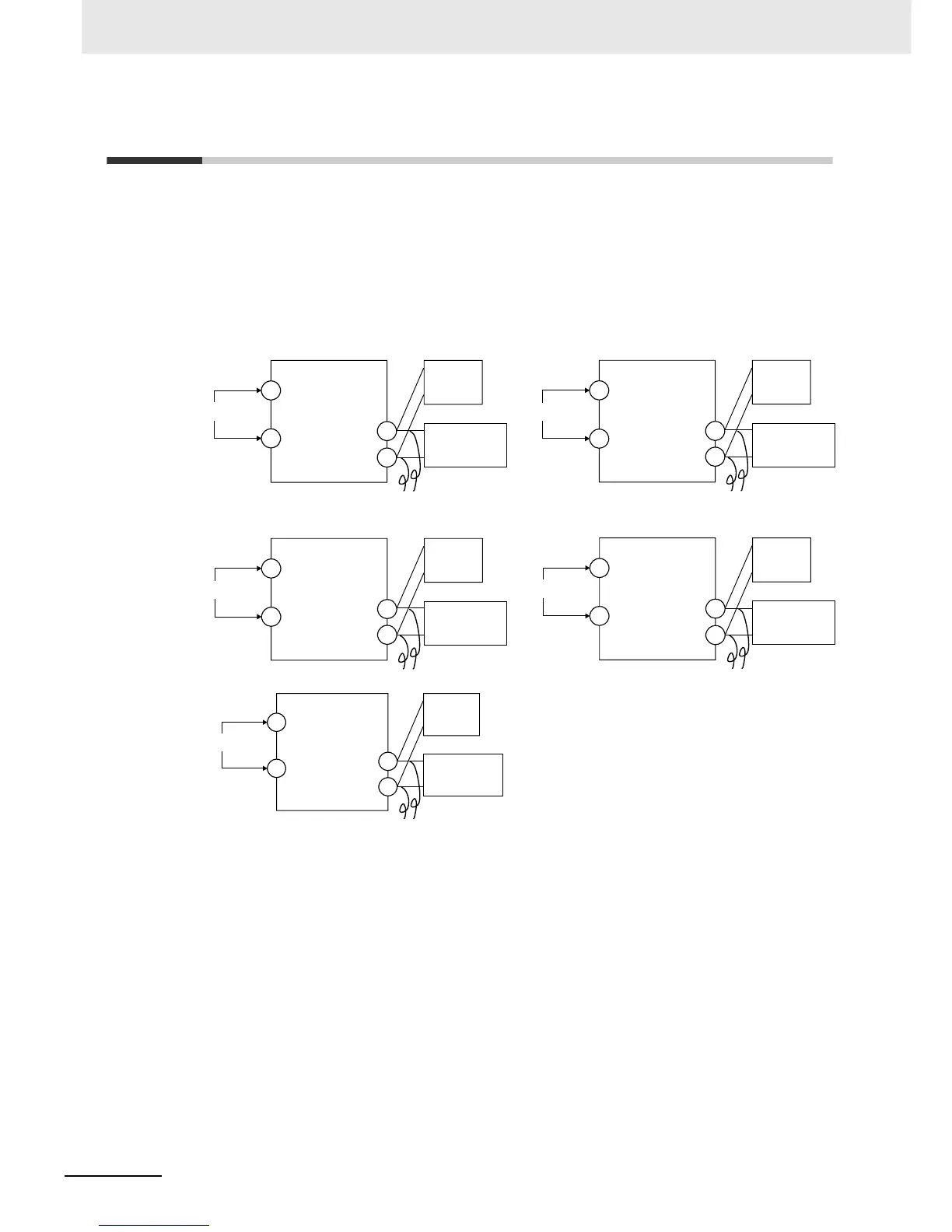
• Calibrate according to the type of thermocouple: thermocouple group 1 (input types 5, 7, 11, 12, 15,
19, and 20) and thermocouple group 2 (input types 6, 8, 9, 10, 13, 14, 16, 17, 18, 21, 22, 23, and 24).
• When calibrating, do not cover the bottom of the Digital Controller. Also, do not touch the input
terminals (terminals 5 and 6 on the E5CC, terminals 1 and 2 on the E5CC-U, terminals 23 and 24 on
the E5EC/E5AC, terminals 13 and 14 on the E5DC, or terminals 11 and 12 on the E5GC) or the
compensating conductors.
z Preparations
• Set the cold junction compensator designed for compensation of internal thermocouples to 0°C.
Make sure that internal thermocouples are disabled (i.e., that tips are open).
• In the above figure, STV indicates a standard DC current/voltage source.
• Use the compensating conductor designed for the selected thermocouple. When thermocouples R,
S, E, B, W, or PLII or an infrared temperature sensor is used, the cold junction compensator and the
compensating conductor can be substituted with the cold junction compensator and the
compensating conductor for thermocouple K.
Compensating conductors
−
−
−
Compensating conductors
Compensating conductors
+
STV
5
6
Input power supply
11
12
E5CC
Input power supply
+
STV
13
14
11
12
E5DC
E5EC/AC
Input power supply
+
1
2
23
STV
24
E5CC-U
Input power supply
+
10
11
2
STV
1
0°C/32°F
Cold junction
compensator
0°C/32°F
Cold junction
compensator
0°C/32°F
Cold junction
compensator
0°C/32°F
Cold junction
compensator
Compensating conductors
−
Input power supply
−
+
STV
11
12
1
2
E5GC
Compensating conductors
0°C/32°F
Cold junction
compensator


 To Next Page