2 Preparations
2 - 10
E5@C Digital Temperature Controllers User’s Manual (H174)
Mounting the Terminal Cover
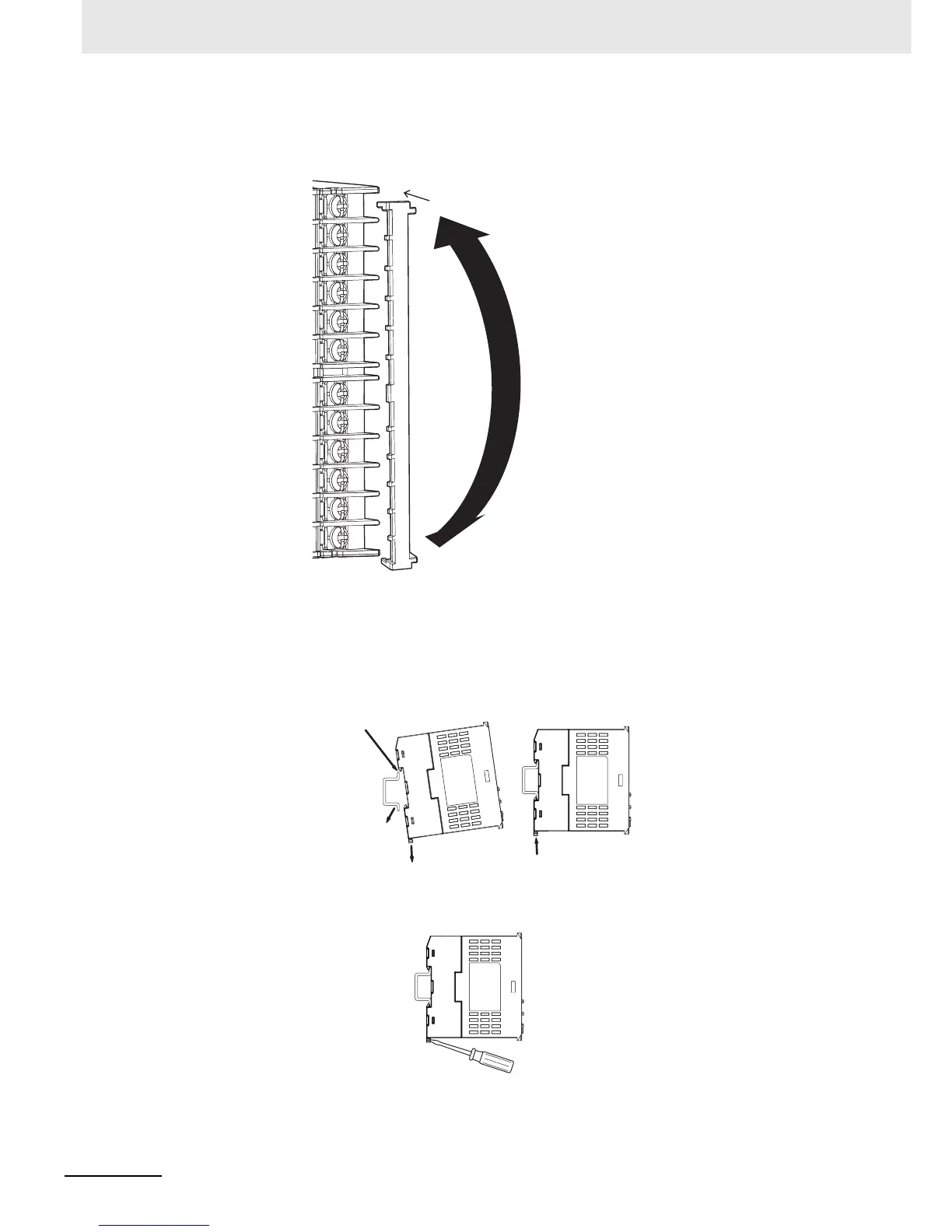
Slightly bend the E53-COV24 Terminal Cover to attach it to the terminal block as shown in the following
diagram. The Terminal Cover cannot be attached in the opposite direction.
z E5DC
Mounting to and Removing from DIN Track
• Mounting a Unit
Pull down the DIN Track hook on the Terminal Unit and catch the top hook on the DIN Track.
Press the Unit onto the DIN Track until the DIN Track hooks are locked in place.
• Removing a Unit
Pull down on the DIN Track Hook with a flat-blade screwdriver and lift up the Unit.
Slightly bend the
E53-COV24
Terminal Cover in
the direction shown
by the arrows to
attach it to the
terminal block.
Enlarged Illustration of Terminal Section
1. Pull down the hook.
2. Catch the top hook on
the DIN Track.
4. Make sure that the hooks
are locked in place.
3. Press the Unit onto
the DIN Track.


 To Next Page