2 Preparations
2 - 42
E5@C Digital Temperature Controllers User’s Manual (H174)
z Communications
RS-485
Models with an option number of 002 to 004, 008, 009, 012, 014, or 015 support RS-485 communications.
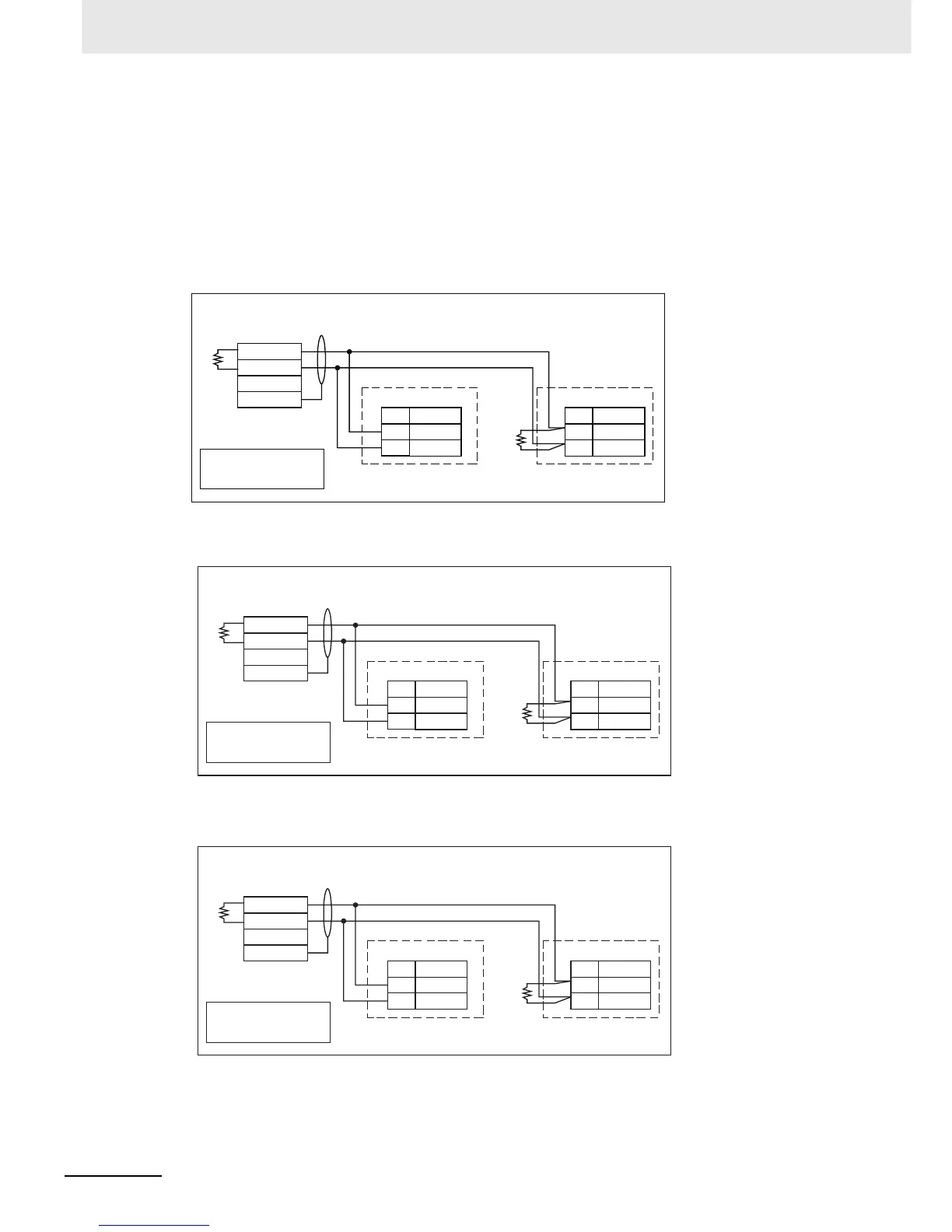
To use communications with the E5CC, E5AC, or E5EC, connect the communications cable to terminals 13 and
14, with the E5DC, to terminals 3 and 4, and with the E5GC, to terminals 7 and 8.
Communications Unit Connection Diagram
E5CC/E5EC/E5AC
E5DC
E5GC
• The RS-485 connection can be either one-to-one or one-to-N. A maximum of 32 Units (including
the host computer) can be connected in one-to-N systems. The maximum total cable length is
No.
14
13
No.
14
13
RS-485
E5CC/E5EC/E5AC (No. 1)
RS-485
E5CC/E5EC/E5AC
(No. 31)
100 Ω
A (−)
B (+)
A (−)
B (+)
−
+
FG
RS-485
Host computer
Shield
Terminator (120 Ω, 1/2 W)
Abbreviation
Abbreviation
A < B: [1] Mark
A > B: [0] Space
Terminator (120 Ω, 1/2 W)
−
+
FG
No.
Abbreviation
4 A(−)
3 B(+)
No.
Abbreviation
4 A(−)
3 B(+)
RS-485
E5DC (No. 1)
RS-485
E5DC (No. 31)
100 Ω
RS-485
host computer
Shield
A < B: "1" Mark
A > B: [0] Space
Terminator (120 Ω, 1/2 W)
−
+
FG
No.
Abbreviation
8 A(
−
)
7 B(+)
No.
Abbreviation
8 A(
−
)
7 B(+)
RS-485
E5GC(No.1)
RS-485
E5GC(No.31)
100 Ω
RS-485
host computer
Shield
A < B: “1” Mark
A > B: “0” Space


 To Next Page