2 - 47
2 Preparations
E5@C Digital Temperature Controllers User’s Manual (H174)
2-4 Using the Setup Tool Port
2
2-4-2 Connection Method
z Connection Procedure
z Setup Tool Ports and Connecting Cables
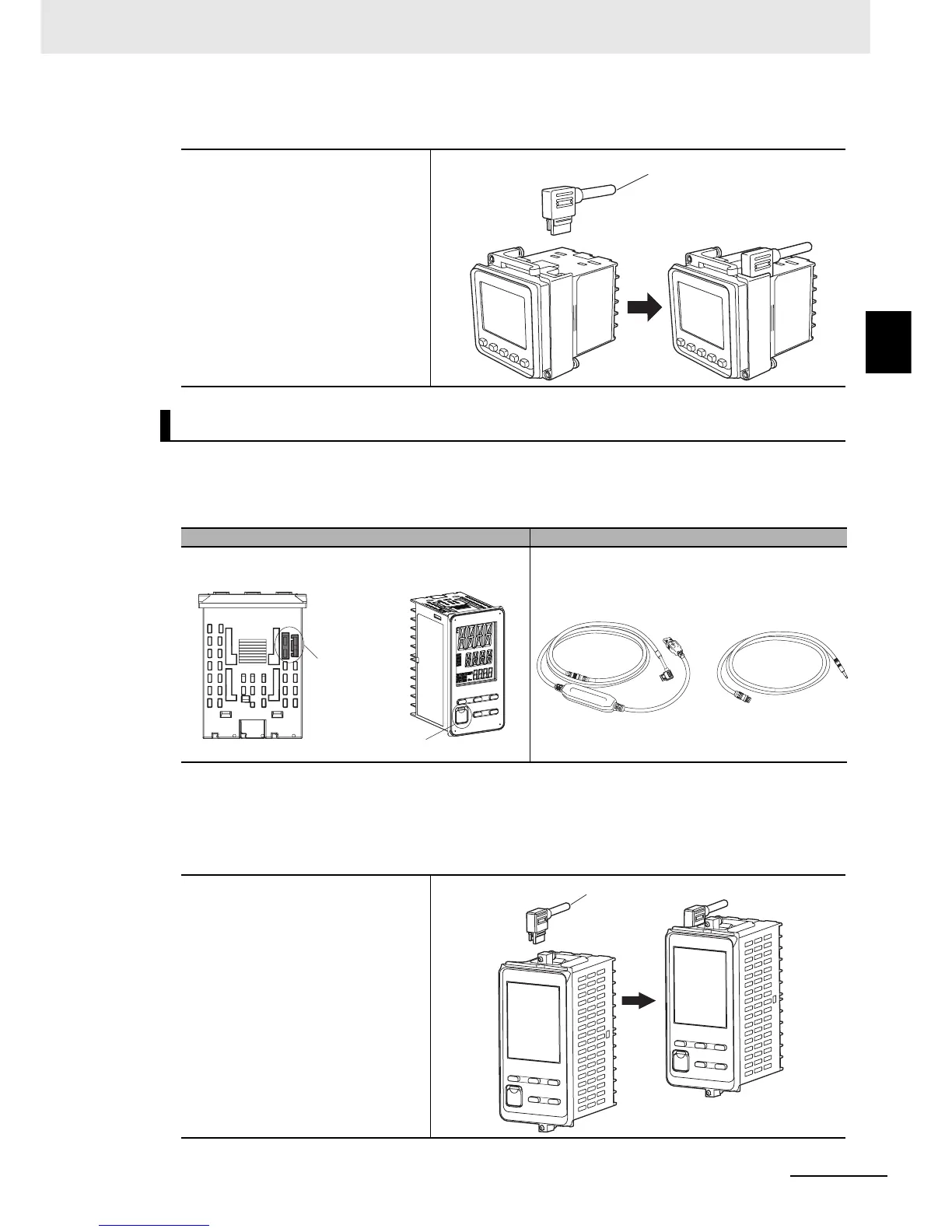
The location of the Setup Tool port on the E5EC/E5AC and the required cable are shown below. There are
Setup Tool ports on both the top panel and front panel of the Digital Controller.
* This Cable is required only to connect to the front-panel Setup Tool port.
z Connection Procedure
• Top-panel Port
1
Connect the serial connector
on the USB-Serial
Conversion Cable to the
Setup Tool port on the top
panel of the Digital
Controller.
E5EC/E5AC
Setup Tool ports Connecting cables
1
Connect the serial connector
to the Setup Tool port on the
top panel of the Digital
Controller.
Serial connector
Top-panel Setup
Tool port
Front-panel
Setup Tool port
• Top panel on the Digital
Controller
• Front panel on the
Digital Controller
E58-CIFQ2-E
Conversion Cable*
E58-CIFQ2
USB-Serial Conversion Cable
Serial connector


 To Next Page