2 - 49
2 Preparations
E5@C Digital Temperature Controllers User’s Manual (H174)
2-4 Using the Setup Tool Port
2
2-4-2 Connection Method
z Setup Tool Port and Connecting Cable
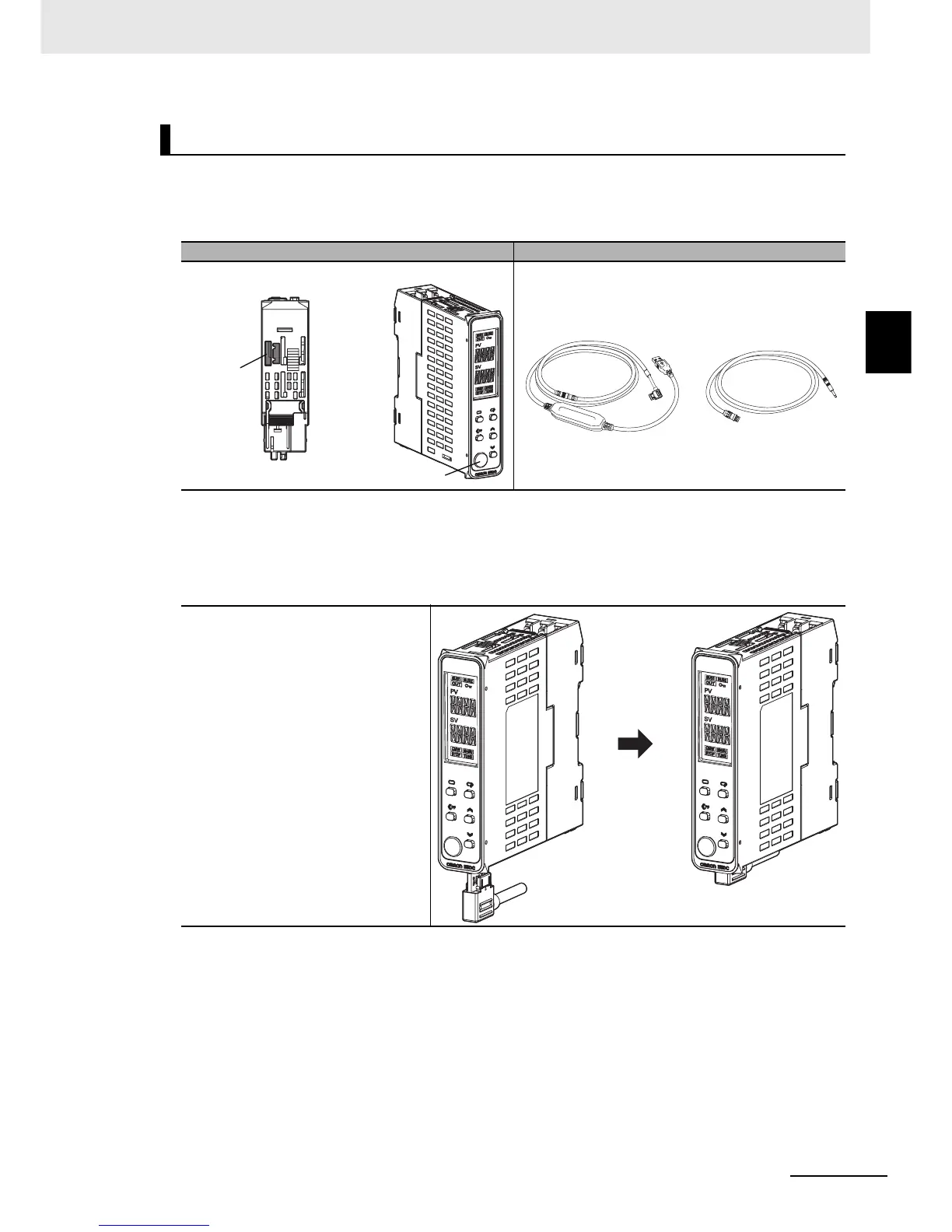
The locations of the Setup Tool ports on the E5DC and the required cables are shown below.
There are Setup Tool ports on both the bottom panel and front panel of the Digital Controller.
* This Cable is required only to connect to the front-panel Setup Tool port.
z Connection Procedure
• Bottom-panel Port
E5DC
Setup Tool port Connecting cables
1
Connect the serial connector
to the Setup Tool port on the
bottom panel of the Digital
Controller.
Main Unit Bottom Panel
Main Unit Front Panel
Bottom-panel
Setup
Tool port
Front-panel
Setup Tool port
E58-CIFQ2-E
Conversion Cable*
E58-CIFQ2
USB-Serial Conversion Cable


 To Next Page