AUTO BASS
If this function is activated the automatic chords will be accompanied by a bass line.
To play the bass manually turn off the AUTO BASS and use the BASS Section sounds.
AUTO CHORD
If this function is activated the chords played will be accompanied by a beautiful automatic
arrangement. If you would rather play the chords manually in your own style turn off AUTO CHORD
and use the SPECIAL and/or the LOWER ORCHESTRA sounds.
Auto Bass and Auto Chord only operate when either the MFC or OFC are switched on.
MFC - MULTI FINGER CHORDS
With this feature it is possible to play the Auto Accompaniment using three or more fingers playing
your favorite chords. The display will indicate the chord played on the lower keyboard when MFC
button is switched ON.
ONE FINGER CHORD
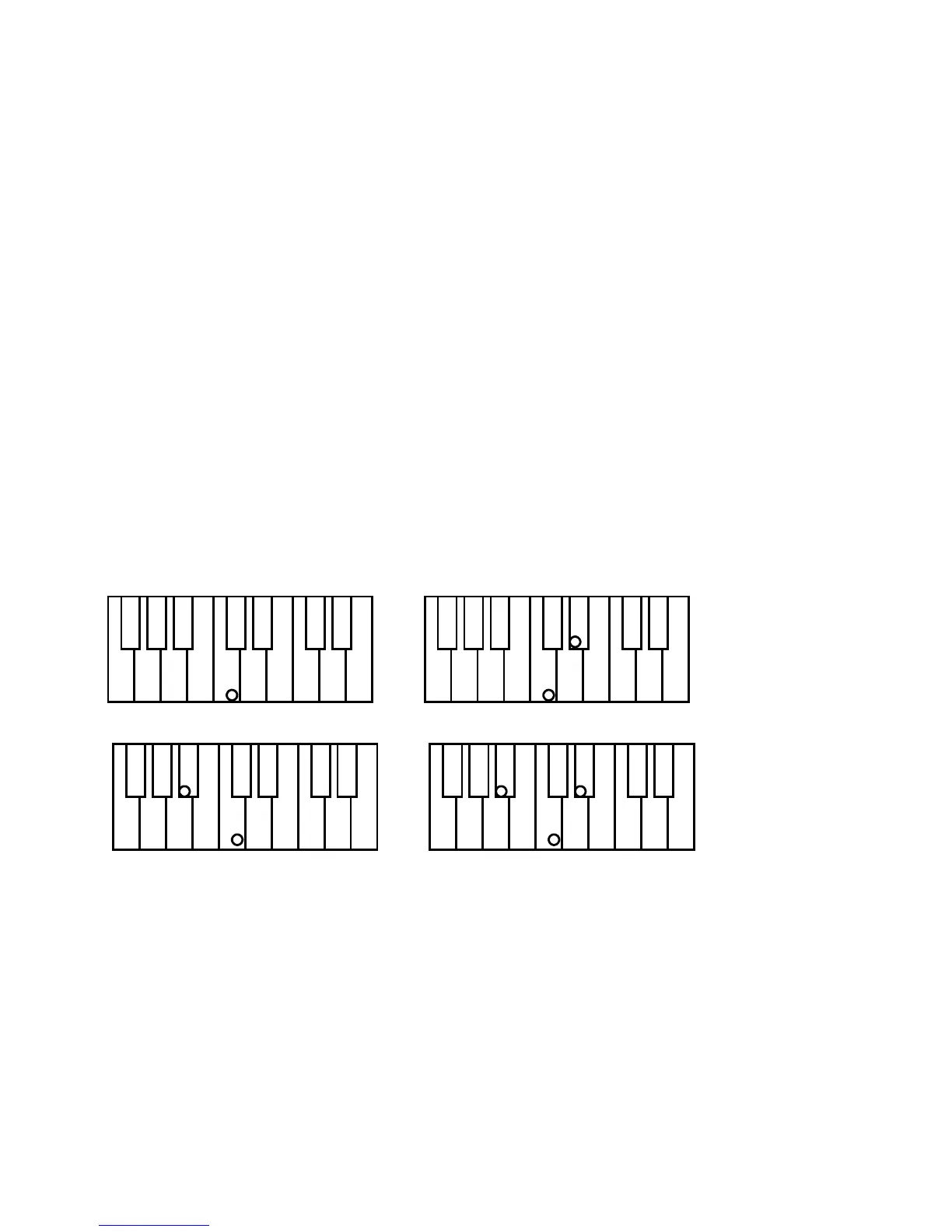
The OFC feature allows you to play using a very simple chord recognition system called ONE
FINGER CHORD system. The OFC systems can be set to be compatible with other brands system.
Type 1 C Major Press the key C.
C minor Press the key C + the 3rd key to the right
C Seventh Press the key C + the 2nd key to the left
C Diminished Press the key C + the 3rd key to the right + 4th key to the left
C chord - press C key C minor - press C + 3rd key to right
C 7th - press C + 2nd key to left C m 7th - press C + 2nd key to left and 3rd to right



 To Next Page