AUTOMATIC SET UP
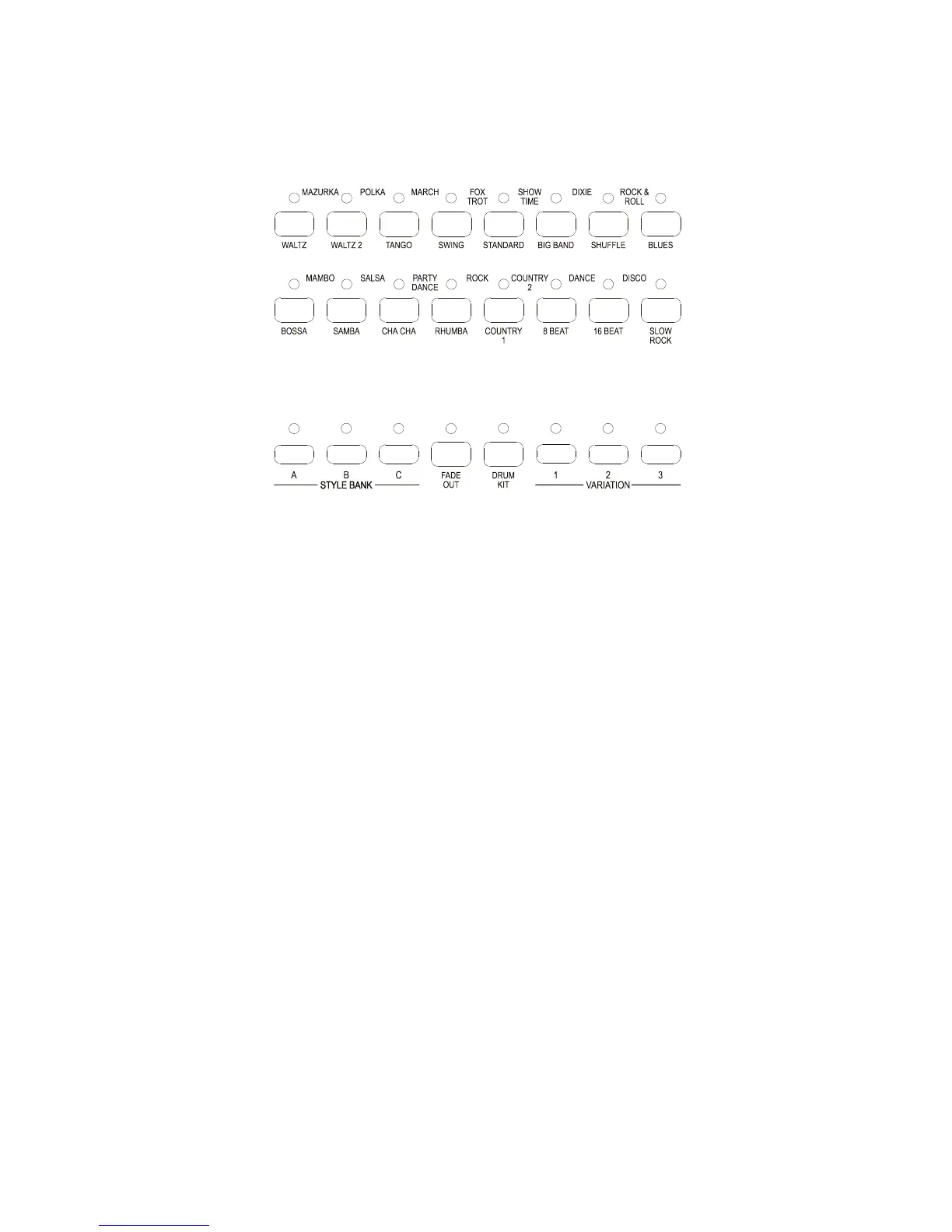
This function sets up a registration for each style that is selected. There are 90 different styles built into
the instrument and they are selected using the 16 buttons located in the centre of the control panel to the
lower left hand side of the screen.
They are used in conjunction with the three Style Bank buttons that are situated to the lower left hand
side of the style buttons.
To select the 90 different styles using only 16 buttons the following system of operation is necessary.
If the first left hand button labeled WALTZ is selected and Style Bank A is selected the screen will
show that the STDWALTZ is selected.
If Style Bank A is changed to Style Bank B by depressing the button the rhythm will change to a Slow
Waltz and the screen will change to SL_WALTZ.
If Style Bank B is changed to Style Bank C by depressing the button the rhythm will change to a
Viennese Waltz and the screen will change to VIENNESE.
There are therefore 3 styles on each button.
Should 2 buttons be depressed at the same time, for example the SWING and STANDARD button then
the style written across the top of the two buttons will be selected and both of the LED’s will be
illuminated.
In this case in Style Bank A, a FOX TROT will be selected. In Style Bank B a SING SONG FOX
TROT . In Style Bank C a BARNDANCE.
The following chart shows the location of the styles that are available.



 To Next Page