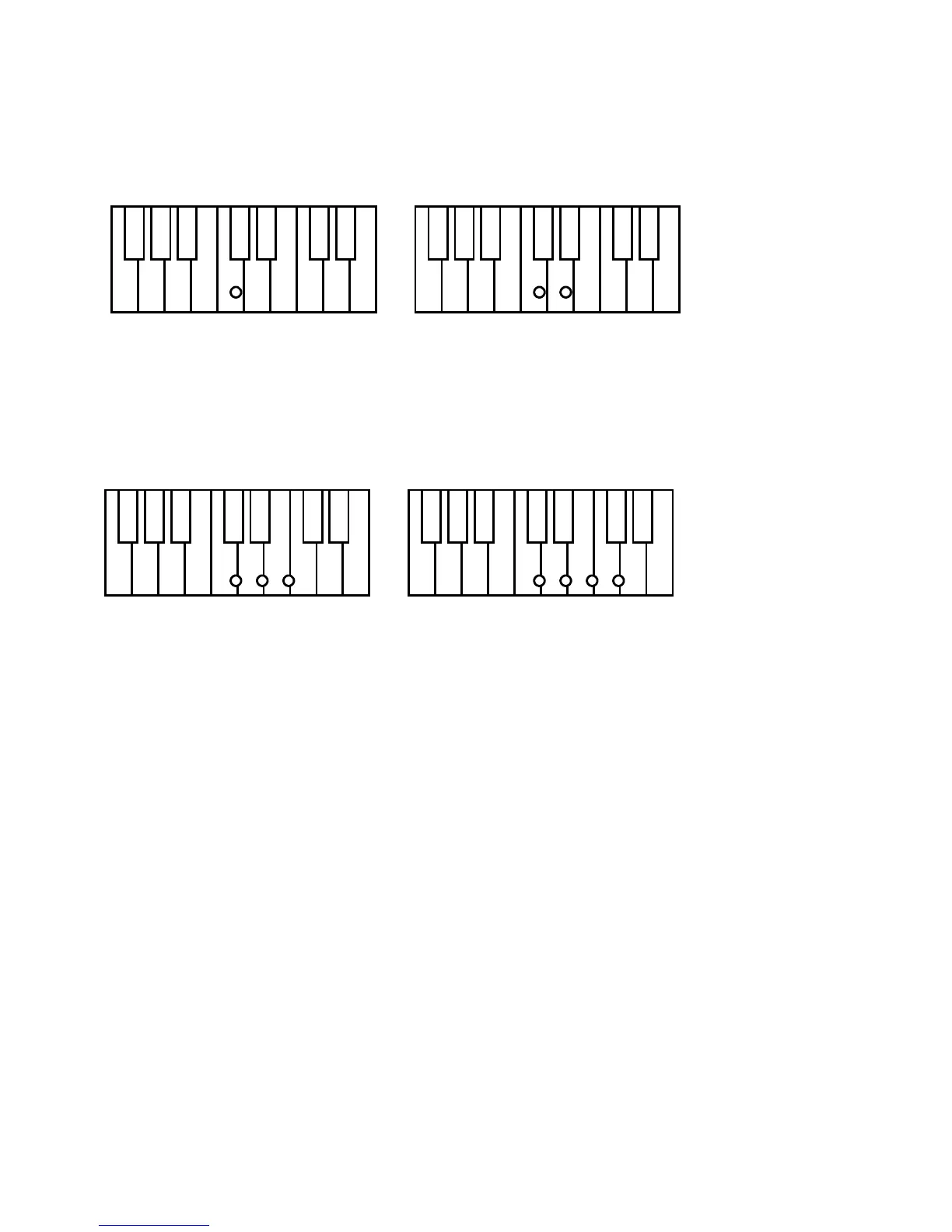
Type 4 C Major Press the key C.
C minor Press the key C + the next key to the right
C Seventh Press the key C + the next two keys to the right
C minor seventh Press the key C + the next three keys to the right
C chord - press C key C minor - press C + next key to right
C 7th - press C key + next 2 keys to right C min7th - press C + next 3 keys to right
Type 5
C Major Press the key C.
C minor Press the key C + any black bass pedal
C Seventh Press the key C + any brown (natural ) bass pedal
C minor seventh Press the key C + any natural and black bass pedal.
The ONE FINGER CHORD type can be easily set as follows:
- press the SET button. All the programmable features of the instrument will start blinking.
- press the ONE FINGER button. Its Led will start blinking.
- select the desired OFC type (see list below) using the (/\) and (\/) DATA buttons.
- to store the new configuration, simply press the SET button to exit the function.
AUTOMATIC SET-UP REPROGRAMMING
The AUTOMATIC SET-UPS can be easily be reset set as follows:
- select desired style to be changed.
- set up new registration the desired Tempo and select the sounds in the different sections
selecting effects, octaves and volumes.
- press the SET button. All the programmable features of the instrument will start blinking.
- press the AUTOMATIC SET-UP button Its Led will continue blinking.
- to store the new configuration, simply switch off the SET button to exit the function.


 To Next Page