Operation
30
DTX-2200-3000 AC/DC
14.3.3
Electrode welding (MMA)
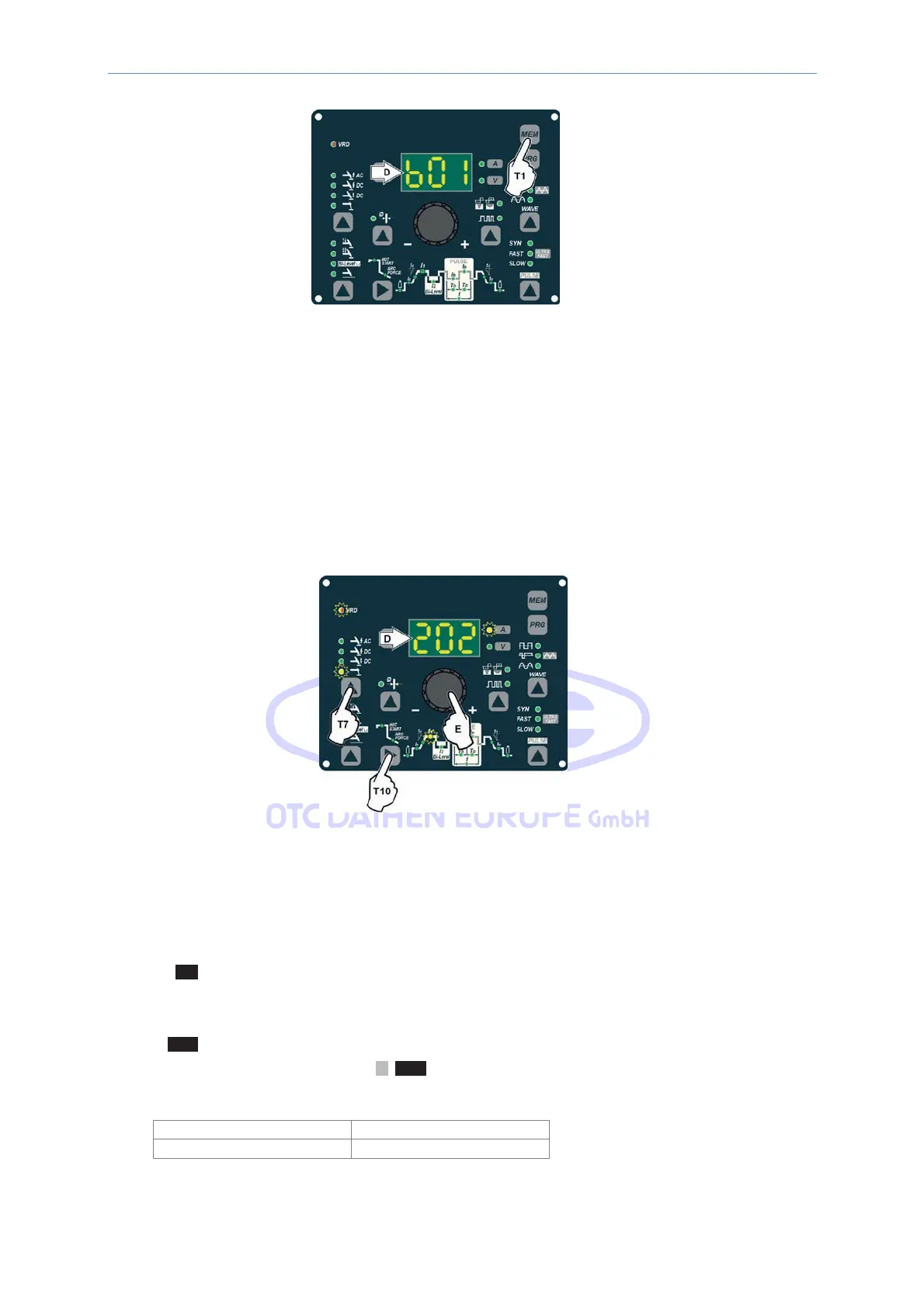
1) Start the welding machine by turning the power supply switch to position I.
2) WELDING PROCESS SELECTION
Push the WELDING PROCESS SELECTION key (T7) to select the ELECTRODE welding processes for
welding with “HOT START” or “ARC FORCE” devices that can be programmed by the user.
3) Turn the ENCODER knob (E) until the DISPLAY shows the CURRENT VALUE at which you wish to weld, in
relation to the diameter of the electrode you are using.
4) WELDING PARAMETERS SELECTION
To refine the weld quality, the following parameters can be set by pushing the WELDING
PARAMETERS SELECTION key (T10) in succession:
• HOT START - This increases the welding current, in percentage terms, for a time interval that can be
set at the start of the welding process, thereby reducing the risk of poor fusion at the start of the joint
( L9 – HOT START - 00-100).
• ARC FORCE MMA - Regulates, in percentage terms, the dynamic characteristics of the arc
( L10 - ARC FORCE – 00-100).
• MAIN WELDING CURRENT I
1
( L11 ):
2200 AC/DC 3000 AC/DC
10 - 180 A 10 - 250 A



 To Next Page