Operation
58
DTX-2200-3000 AC/DC
14.3.14
Viewing the p
arameters set
1) Call up the program required (see the “Calling up saved programs” paragraph).
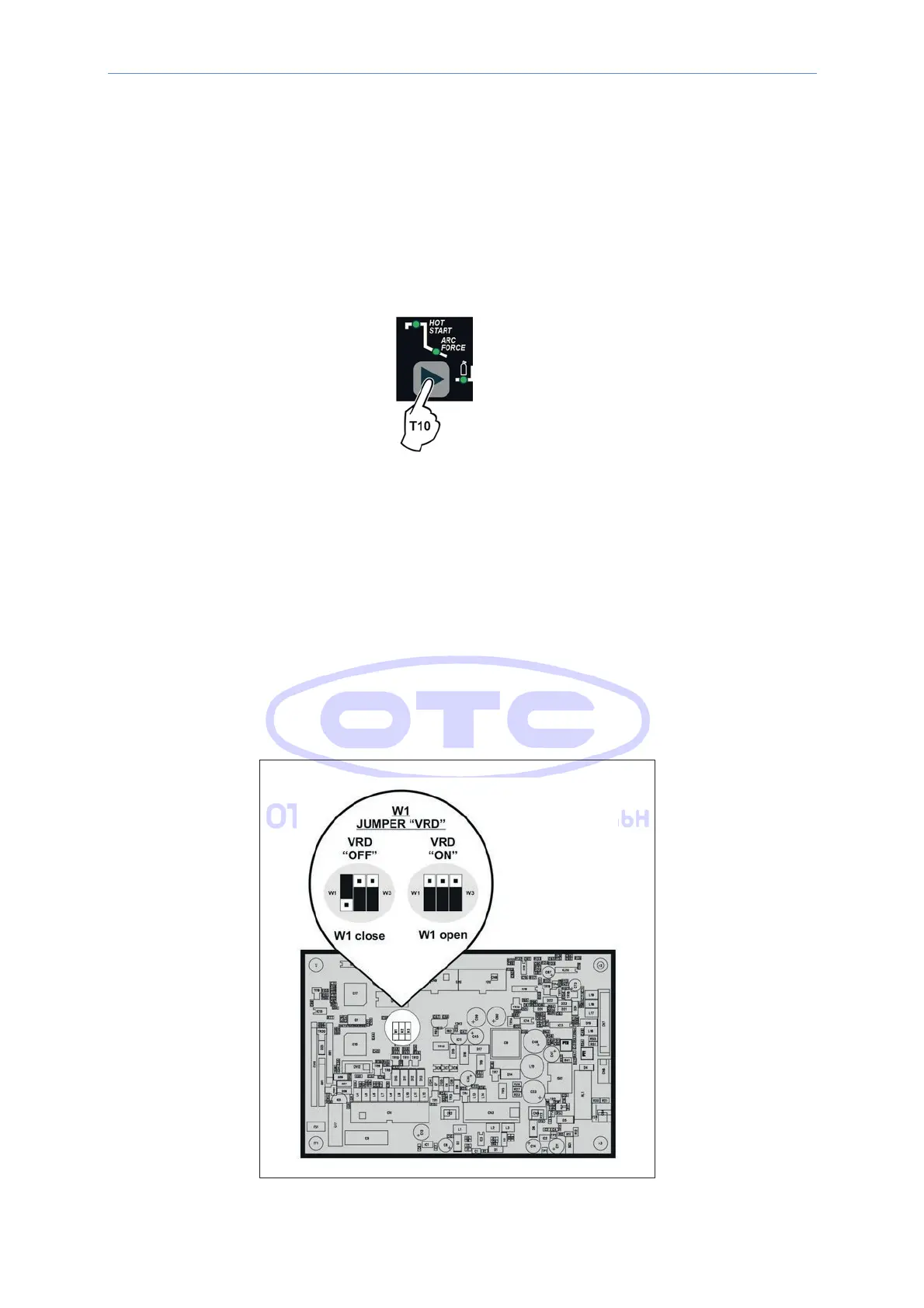
2) Press and release the WELDING PARAMETERS SELECTION key (T10) to view the parameters set in
sequence.
3) Hold the WELDING PARAMETERS SELECTION key (T10) down for more than 1 second to go back to the
program selected.
HINWEIS: In dem Fall, in dem die eingestellten Parameter geändert werden, verlässt man den Programmiermodus
automatisch.
14.3.15 Activating the VRD-device
To activate the VRD device, which must be done when the welding machine is switched off:
1) Use a suitable screwdriver to unscrew the 4 screws that fix the MTH control panel to the welding machine.
2) Position JUMPER W1 on the DIGITAL INTERFACE BOARD in the correct position, following the instructions
given in Image 8.
3) Use a suitable screwdriver to tighten the 4 screws that fix the MTH control panel to the welding machine.
4) Start the welding machine by pushing the switch on the rear panel to position I.
Image 8



 To Next Page