3
Calibration
10
Calibration of the concentration mode will only replace the previous
concentration calibration and does not affect the % saturation calibration.
To offset your % saturation reading to match another instrument, see
Section 5.8 - % Saturation Offset Adjustment.
New calibration values will automatically override the existing data. Perform
daily calibration for best results. To completely recalibrate the meter and
when installing a replacement electrode, it is best to clear all calibration
data. See Section 5.7 Reset to Factory Default.
3.2 Temperature Calibration
For best DO accuracy, ensure that the
temperature is accurate. The temperature
sensor of the probe has been factory calibrated,
however if it changes over time or if the probe
is replaced, calibration may be necessary.
To protect from erroneous calibrations, the
allowable tolerance is limited to ±5°C
adjustment of the factory default value.
Most users utilise automatic temperature
compensation using the sensor that is built
into the probe. However, manual temperature
compensation can be used to input a fixed,
known temperature.
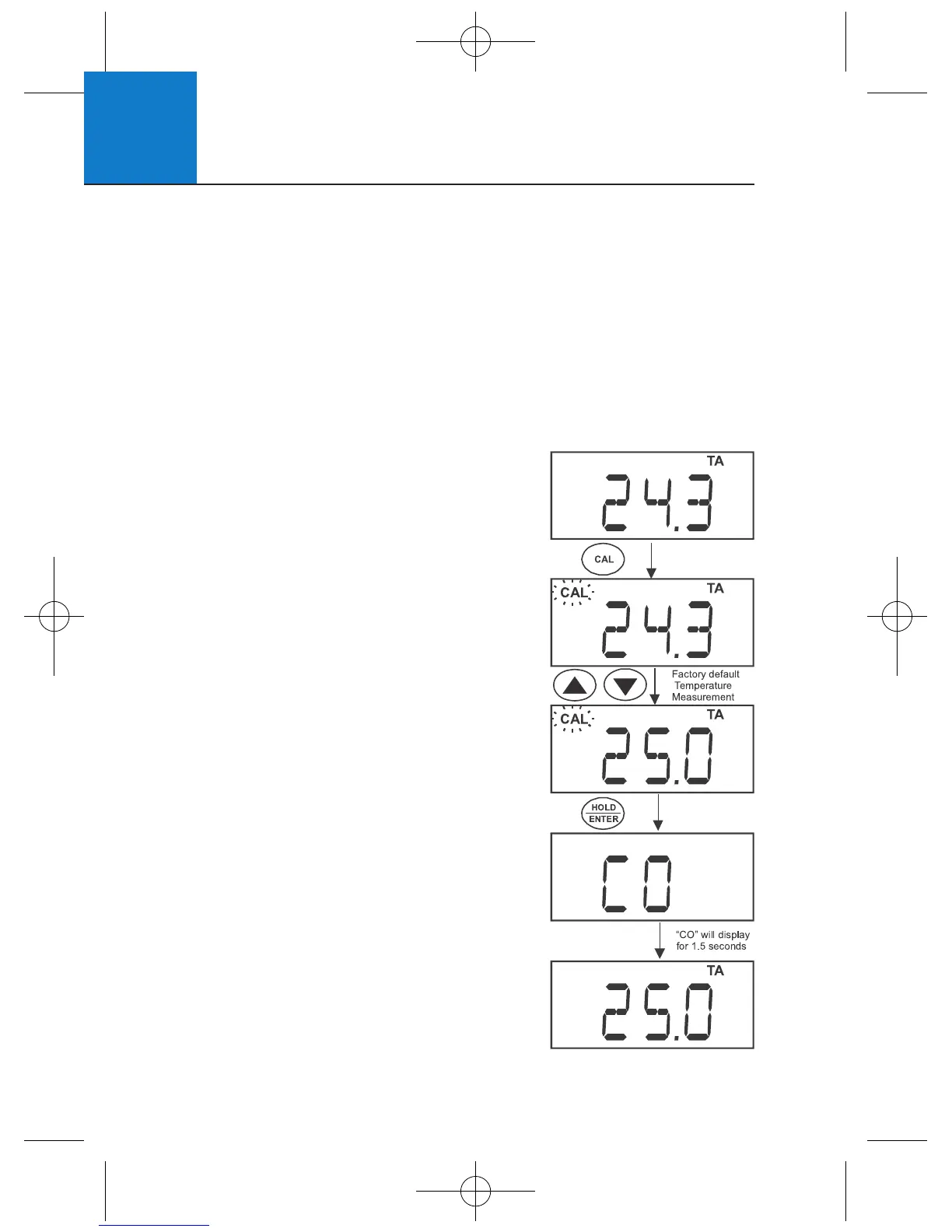
1 Press MODE to select temperature mode. The
display should show “T” for temperature and
“A” for automatic temperature compensation.
2 Dip the probe into a solution with a known,
accurate temperature (i.e. a temperature
bath). Allow enough time for the temperature
reading to stabilise.
3 Press CAL. The CAL indicator will blink above
the display. The temperature value shown
is the value based on the factory default.












 To Next Page