5
Setup
24
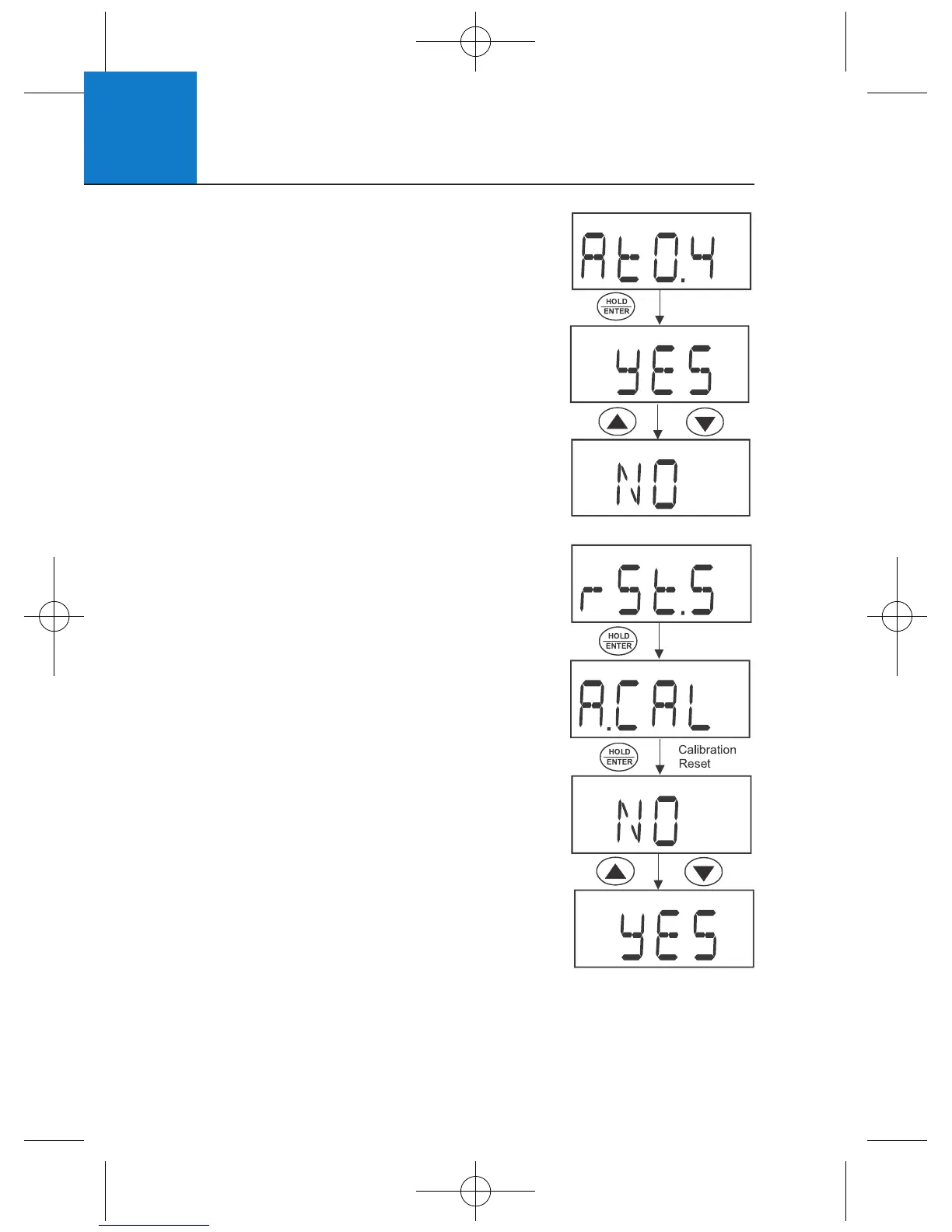
5.6 Automatic Shut Off (AtO.4)
Use this feature to conserve batteries. When
active, the meter will automatically shut off
20 minutes after the last key press.
1 From the setup menu, press ▲▼
to select “AtO.4”.
2 Press HOLD/ENTER to enter the menu.
3 Use ▲▼ to select YES (activate automatic
off) or NO (activate automatic off).
4 Press HOLD/ENTER to confirm.
5 Press CAL to return to measurement mode.
5.7 Reset to Factory Default (rSt.5)
Use this mode to reset the meter to factory
default settings. There are two levels of reset.
Calibration (A.CAL) resets calibration
values only.
User (b.USR) resets all data, calibration,
and other customised setup functions.
1 From the setup menu, press ▲▼
to select “rSt.5”.
2 Press HOLD/ENTER to enter the menu.
3 Press HOLD/ENTER to enter calibration
reset “A.CAL”.
4 Use ▲▼ to select YES (reset calibration)
or NO (do not reset calibration).
5 Press HOLD/ENTER to confirm. If “YES”,
the meter returns to measurement mode
after resetting.
Note: Both % and concentration calibrations are reset when
from the % saturation setup. However, when calibration reset
occurs from the concentration setup, only concentration is reset.












 To Next Page