4
Measurement
14
4.0 Measurement
The Micro 600 DO offers
automatic or manual
temperature compensation.
See Section 5.2 -
Automatic Temperature
Compensation.
4.1 Temperature Compensation
Insert the phono plug of the probe for Automatic
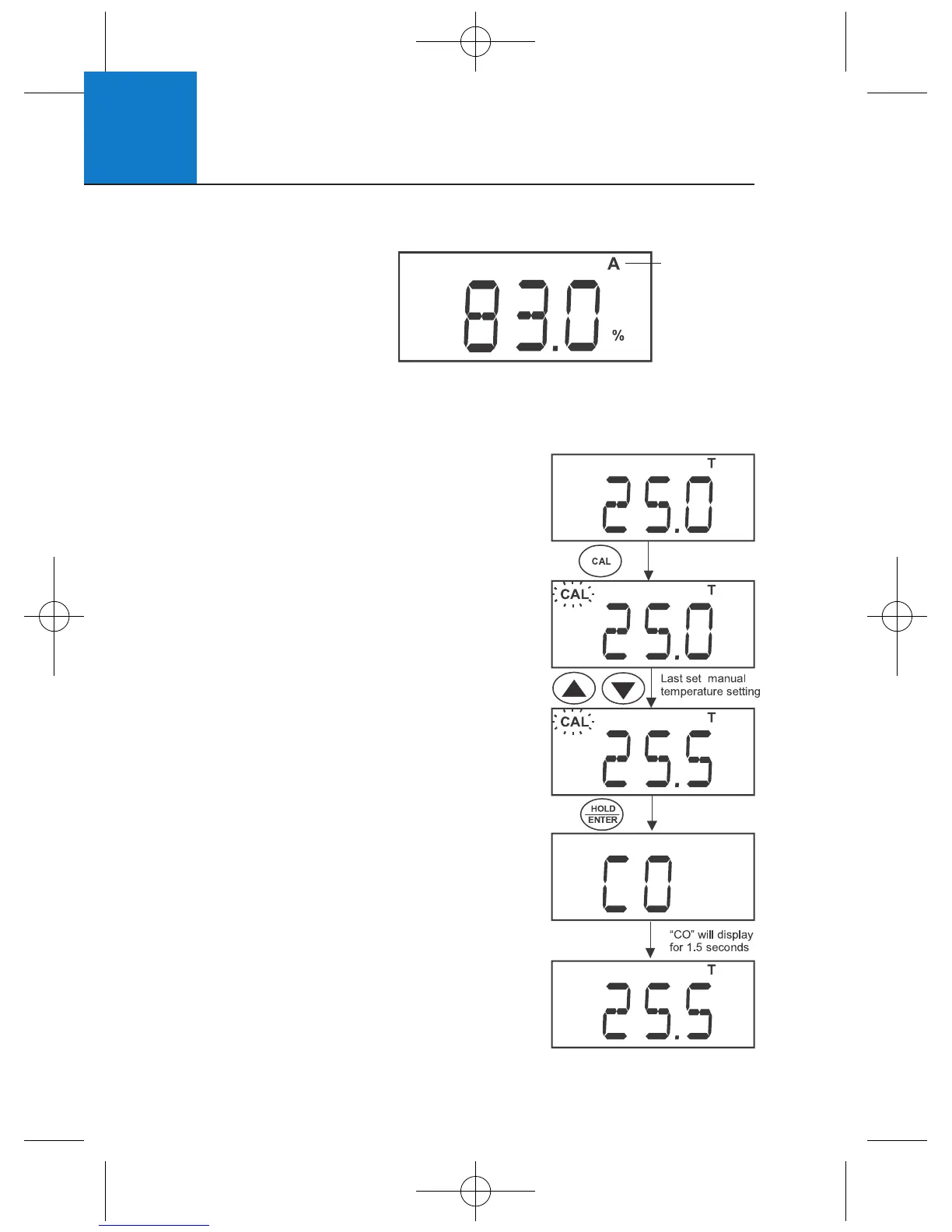
Temperature Compensation (ATC). The “A”
annunciator will display normally when active,
or blink if the phono plug is disconnected.
Deactivate “A.ATC” for manual temperature
compensation. The “A” annunciator is not
displayed when the meter is in manual
temperature compensation mode. For manual
temperature compensation, manually enter
the desired process temperature into the
meter from 0 and 50°C. Default is 25°C.
1 Press MODE to select temperature.
2 Press CAL. The “CAL” indicator will start
blinking and the display will show the
last manually set temperature value.
3 Check the temperature of your sample
using an accurate reference thermometer.
Wait for the value to stabilise. Press ▲▼
to manually set the temperature value.
4 Press HOLD/ENTER to confirm the
calibration. The meter displays “CO”,
automatically sets the entered value,
then returns to measurement mode.
Automatic
Temperature
Compensation
activated












 To Next Page