2
Getting Started
8
The pre-assembled cap must be completely submersed to obtain an accurate
reading in solutions. Provide simple stirring for best results - ideally achieve
a minimum water flow rate of 2 inch/second on the membrane. The probe
is not recommended beyond 0 to 50°C.
Shaking will aid to remove bubbles if needed before taking a reading. When
calibrating in air, shake to remove water from the membrane.
The membrane is thin and can not be repaired if damaged. Use care to protect
from scratches, abrasion, or contact with solids. For best results keep membrane
clean by rinsing after daily use. See Section 6 - PROBE MAINTENANCE.
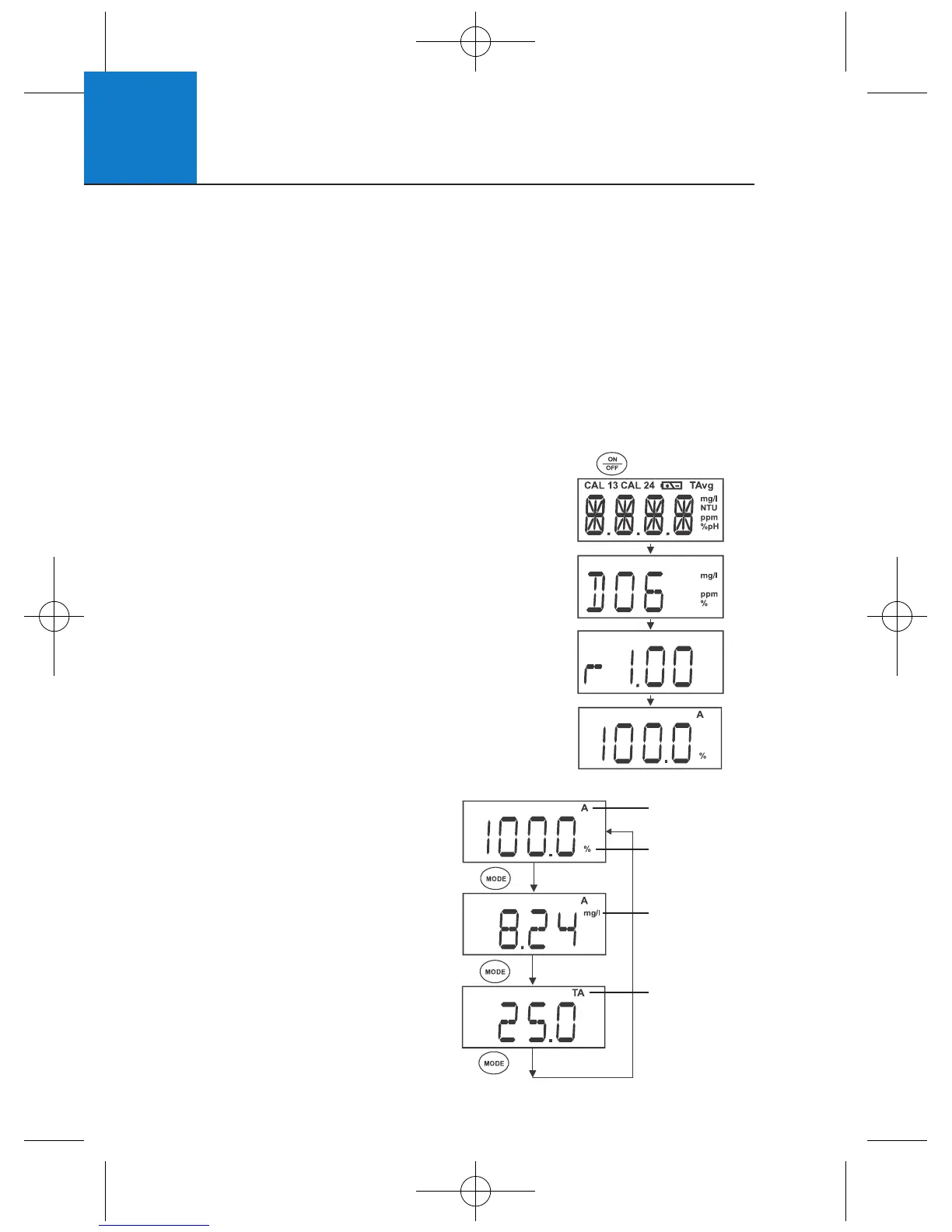
Press ON/OFF to power up your meter. Your
meter will cycle through various setup parameters
when switched on.
1 All LCD segments will briefly illuminate.
2 The model Micro 600 DO will display next
along with mg/l, ppm, and % annunciators.
3 Next, the meter revision number [r #.##] is
shown briefly before beginning measurement.
4 The meter begins with the measurement
mode that was in use when it was previously
powered off - %, mg/l, ppm, or T.
2.8 Switching the Meter On
Press MODE to switch between
percentage saturation (%),
concentration (mg/L)(ppm), and
temperature (T) measurement.
2.9 Changing Mode
Automatic
Temperature
Compensation
Percentage
Saturation
Concentration
Mode
Temperature
Mode












 To Next Page