5
Setup
21
Selection of Automatic or
Manual Temperature
Compensation
5.1 Configuration Menu (COF.1)
This menu allows the selection/deselection of
Automatic Temperature Compensation and
selecting the unit of measure (mg/L or ppm)
for concentration mode. See sections 5.2
and 5.3 below for further details.
5.2 Automatic Temperature
Compensation (A.ATC)
Use this menu to change automatic
temperature compensation (A) or units
of concentration (mg/L or ppm). ATC is
recommended for most applications.
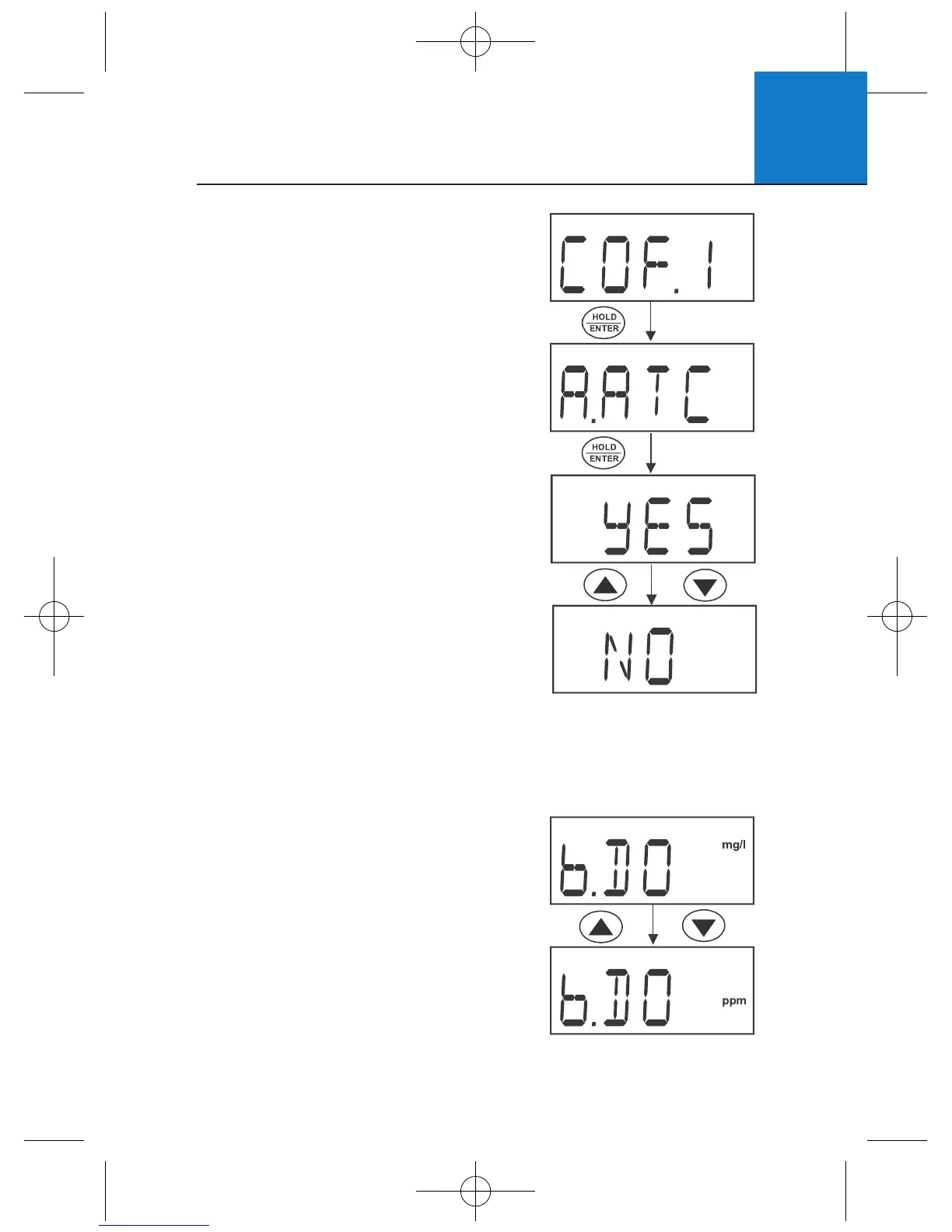
1 From “COF.1” of either setup menu,
press HOLD/ENTER to display “A.ATC”.
2 Press HOLD/ENTER to enter
the selection menu.
3 Use ▲▼ to select YES (activate ATC)
or NO (deactivate ATC and activate
manual temperature compensation).
4 Press HOLD/ENTER to confirm.
5 Press CAL to return to measurement mode.
5.3 Selection of mg/L or ppm (b.DO)
1 From “COF.1” of the mg/L (ppm)
setup menu, press HOLD/ENTER
three times to display “b.DO”.
2 Use ▲▼ to select the desired
units of measurement.
3 Press HOLD/ENTER to confirm.
4 Press CAL to return to measurement mode.




 To Next Page