3
Calibration
13
1 Perform 100% saturation calibration.
See Section 3.3.1 - 100% Calibration.
2 Rinse the probe well with DI water
or rinse solution.
3 Dip the probe into a sample of known
oxygen concentration (i.e. determined by
titration or another instrument). Wait for
the reading to stabilise.
4 Press MODE to select the mg/L (ppm).
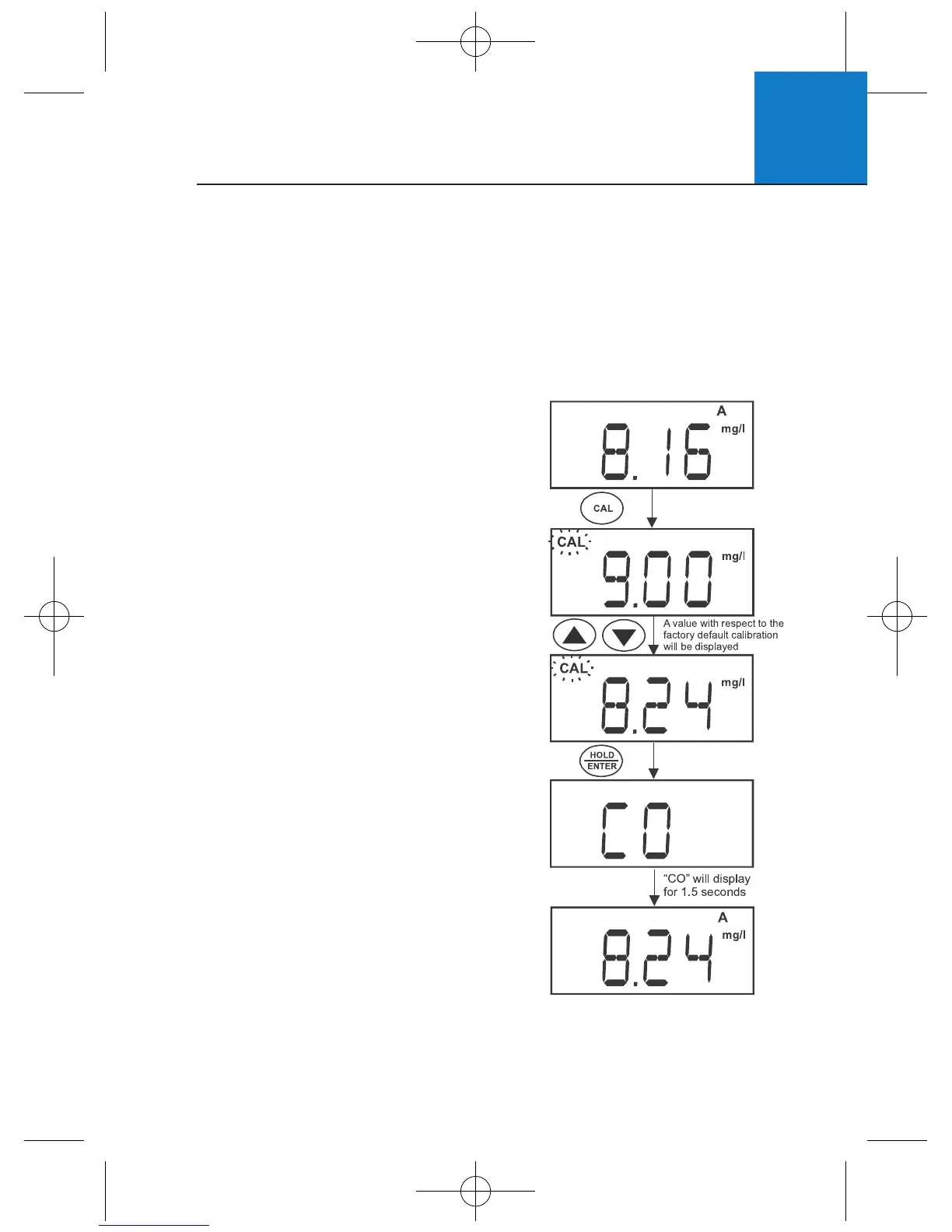
5 Press CAL. The CAL indicator and current
concentration display briefly, before CAL
flashes. The concentration value based on
the factory default calibration is shown.
6 Press ▲▼ to adjust the reading to match
the known oxygen concentration value.
7 Press HOLD/ENTER to confirm the
calibration. The meter displays “CO”,
automatically calibrates to the entered
value, then returns to measurement mode.
NOTE: The minimum calibration value is 2
mg/L. To prevent erroneous calibrations, the
calibration is limited to ±40% adjustment
of the factory default value.
3.4 mg/L or ppm Calibration
Performing a 100% saturation calibration will simultaneously calibrate the
corresponding mg/L (ppm) concentration value. Therefore, additional mg/L
(ppm) calibration isn’t required in most circumstances.
If desired, you can perform a calibration adjustment in mg/L (ppm) without
affecting your % saturation calibration value.












 To Next Page