4.3.2b Pressure #1 background gases
Note: If you are not using background gas compensation,
this menu does not appear. Proceed directly to the next
section.
To begin entering your data points for each of the pressure
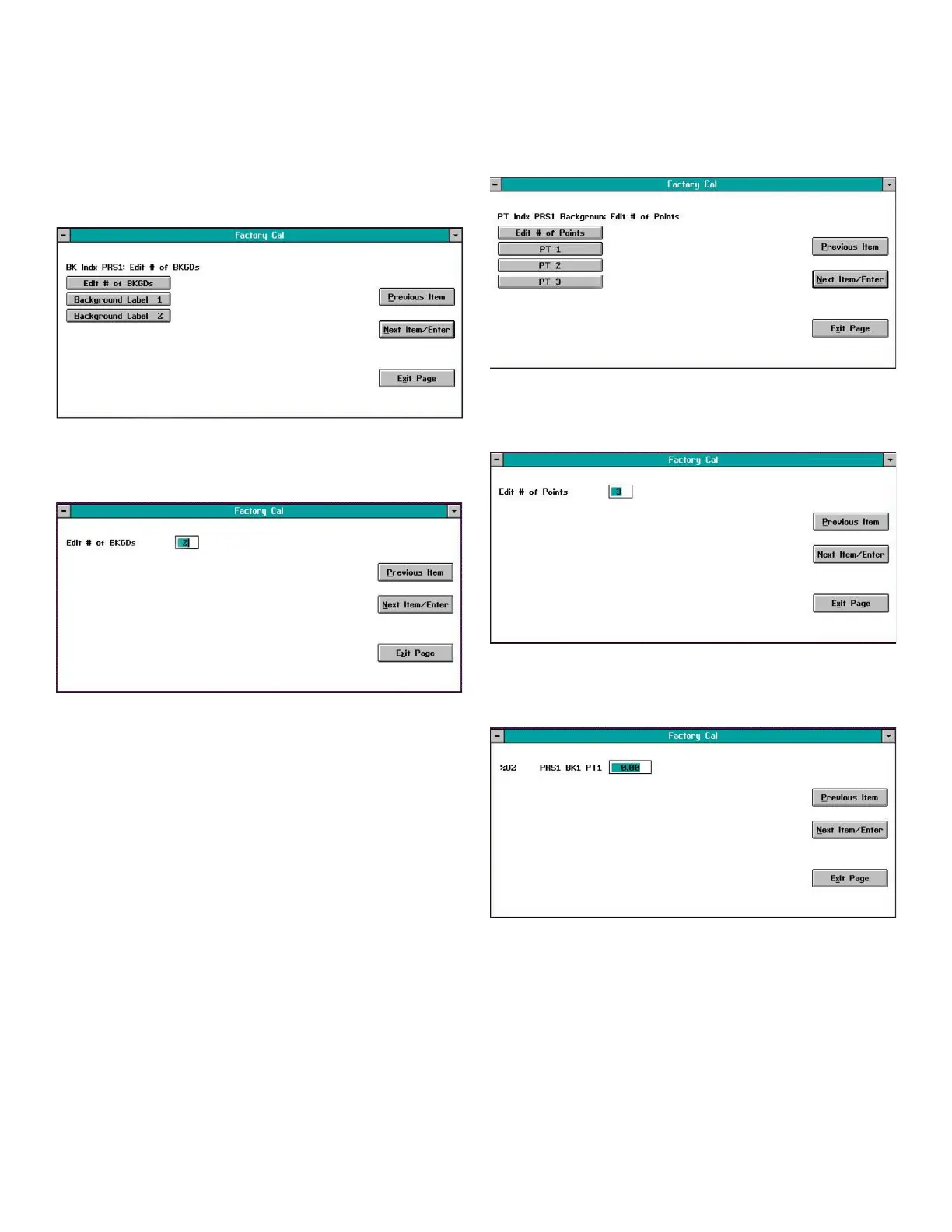
compensation curves, click on the PRS1 button in Figure 43
on page 29 to open a window similar to Figure 45 below.
Figure 45: Background gas window
In the above window, click on the Edit # of BKGDs button to
open a window similar to Figure 46 below.
Figure 46: Edit # of BKGDs window
In the above window, enter the number of background
gases for which you have compensation data at the first
compensated pressure. Then, click on the Next Item/Enter
button to confirm your entry and return to the window in
Figure 45 above.
Entering data points
In the window shown in Figure 45 on page 30, click on the
Background Label 1 button (the actual text on this button will
correspond to the label you entered in the previous section)
to open a window similar to Figure 47 below.
Figure 47: PRS1 BKGD points window
In the above window, click on the Edit # of Points button to
open a window similar to Figure 48 below.
Figure 48: PRS1 BKGD points window
To begin entering your data, click on the PT 1 button in Figure
47 above to open a window similar to Figure 49 below.
Figure 49: %O2 data window
30


 To Next Page