36 (E)
ENGLISH
3. Setting the multi view display
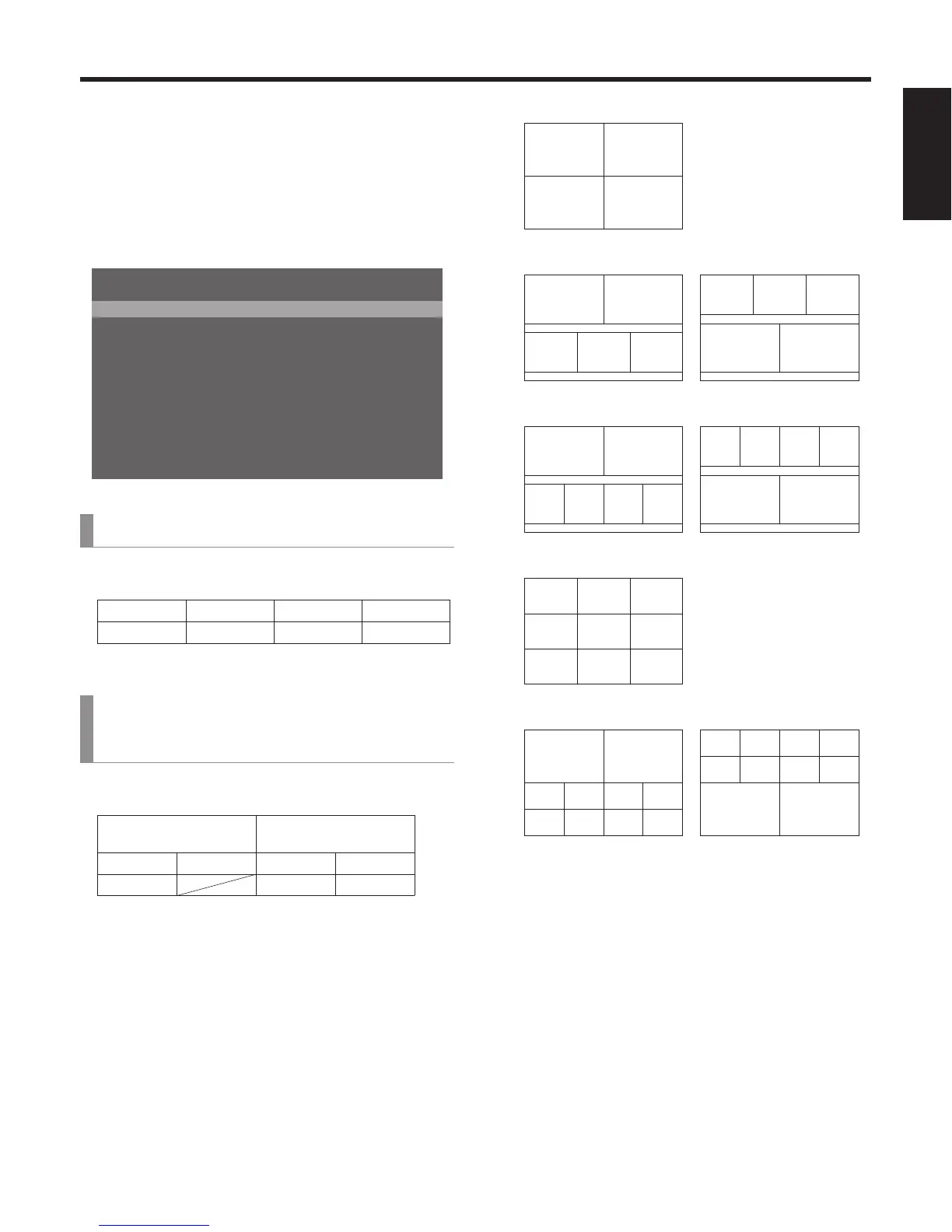
The screen of an external monitor can be split into a
number of sections, and images such as input images and
programme image can be positioned in the sections and
displayed.
3-1. Screen layout
The multi view display layout is set using the [7] MultiView
Pattern Menu of the OSD menu.
5RNKV C5RNKV
2QU5QWTEG 2)/
2QU5QWTEG 289
2QU5QWTEG 5&++0+0276
2QU5QWTEG 5&++0+0276
2QU5QWTEG 5&++0+0276
2QU5QWTEG 5&++0+0276
2QU5QWTEG &8++0+0276
2QU5QWTEG (/'/
2QU5QWTEG (/'/
2QU5QWTEG #7:
=?/WNVK8KGY2CVVGTP/GPW
[7] MultiView Pattern Menu
1. Split
The following eight options are available as split screen
layouts.
4Split 5-aSplit 5-bSplit 6-aSplit
6-bSplit 9Split 10-aSplit 10-bSplit
[7] MultiView Pattern Menu
2. Pos1 Source
to
11. Pos10 Source
This is used to set the signals to be displayed in split
screens 1 to 10.
SDI-IN1 to 4
(material names)
DVI-IN
(material names)
CBGD FMEM1 FMEM2 PGM
PVW KEY OUT AUX
Depending on the setting selected for the “1. Split” item,
the “6. Pos5 Source” to “11. Pos10 Source” items may not
be displayed.
<Split screen layouts>
43
21
4Split
21
534
5-bSplit
21
534
5-aSplit
21
6345
6-bSplit
21
6534
6-aSplit
789
456
123
9Split
1
789 10
3456
2
10-bSplit
1
3456
789 10
2
10-aSplit















 To Next Page