EasyManua.ls Logo

Panasonic KX-NT700 - User Manual

Panasonic KX-NT700
78 pages
Print Icon
To Next Page IconTo Next Page
Loading...
Document Version 2010/02
Operating Instructions
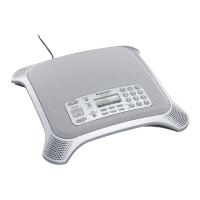
IP Conferencing Phone
Model No. KX-NT700
Thank you for purchasing this Panasonic product.
Please read this document carefully before using this product and save for future use.
KX-NT700: Version 2.1 or later

Table of Contents

Other manuals for Panasonic KX-NT700

Questions and Answers

  • C
    Christina ColonSep 7, 2025
    Why can't I record to the SD memory card on my Panasonic IP Phone?
    • V
      Victor SmithSep 7, 2025
      If you cannot record to the SD memory card using your Panasonic IP Phone, ensure that you are using a compatible SD memory card. SDHC, miniSDHC, and microSDHC memory cards are not compatible. Format SD memory cards for use with this unit in FAT format (FAT16) using a computer. Also, make sure that the SD memory card is inserted properly by gently pushing it securely toward the back of the SD memory card slot. Finally, check if the switch on the side of the SD memory card is in the "LOCK" position; if so, remove the card, slide the switch to unlock it, and then reinsert the card.
  • R
    Rebecca SmithAug 25, 2025
    What to do if I cannot make TEL calls on my Panasonic Conference Phone?
    • J
      Jonathan SharpAug 25, 2025
      If you cannot make TEL calls, consider the following: * Ensure that "TEL" is shown in the upper-right corner of the display before dialing. If not, press the center function button ([F2]) to change the line. * Make sure the "Line Selection" setting is set to "IP + TEL". * When the operation mode is set to "USB Audio", you cannot make or receive IP, TEL, PS or PC calls. Change the setting to "Peer to Peer" or "IP-PBX". * Make sure that the dial mode matches the type of telephone service you have (i.e., tone or pulse).
  • R
    robertsjillAug 25, 2025
    How to fix a blank display on my Panasonic KX-NT700?
    • J
      Jeffrey HughesAug 26, 2025
      If your Panasonic IP Phone display is blank, the unit might not be receiving power. Ensure the unit is connected to the AC outlet and is receiving power. If you're using PoE (Power over Ethernet), verify that the device supplying PoE is powered on and that the LAN cable is properly connected.
  • J
    Jordan CarneySep 17, 2025
    How to fix Panasonic Conference Phone if I cannot receive IP calls?
    • J
      John RiosSep 18, 2025
      If you cannot receive IP calls on your Panasonic Conference Phone, ensure that the 'Operation Mode' setting is set to 'Peer to Peer' or 'IP-PBX'. The 'USB Audio' setting prevents IP calls.
  • E
    elizabethtravisSep 23, 2025
    How to fix Panasonic KX-NT700 IP Phone if it cannot connect to the unit?
    • D
      Darin RobertsSep 23, 2025
      If you cannot connect to the unit, first check the connection between the unit and the computer, ensuring the USB cable is properly connected. Also, verify that the operation mode is correctly set. If it is set to [USB Audio], change it to [Peer to Peer] or [IP-PBX].
  • B
    Brandon JonesSep 12, 2025
    Why can't I receive TEL calls on my Panasonic KX-NT700 IP Phone?
    • M
      Michael EdwardsSep 12, 2025
      If you are unable to receive TEL calls on your Panasonic IP Phone, the unit may not be set to receive TEL calls. Make sure the 'Line Selection' setting is set to 'IP + TEL'.
  • T
    Tanya WilliamsSep 2, 2025
    What does 'Memory Full' mean on my Panasonic Conference Phone?
    • D
      Donald DicksonSep 3, 2025
      The 'Memory Full' message indicates that the SD memory card cannot be used for recording because it is full. Erase unneeded recordings to free up space.
  • J
    Jeffrey BarnettSep 3, 2025
    What does 'Write Protected' mean on my Panasonic Conference Phone?
    • P
      Pamela GallagherSep 3, 2025
      The 'Write Protected' message indicates that the switch on the side of the SD memory card is in the "LOCK" position. Remove the card, slide the switch to unlock the card, then insert the card again.
  • M
    Meagan OconnorSep 23, 2025
    What to do if I cannot receive IP calls on my Panasonic IP Phone?
    • B
      Betty RodriguezSep 23, 2025
      If you cannot receive IP calls, the [Operation Mode] setting may be incorrect. Change the setting to [Peer to Peer] if you want to make or receive peer to peer IP calls (calls made by specifying the called party's IP address). Change the setting to [IP-PBX] if you want to make or receive intercom and outside calls as a SIP extension of the connected PBX.
  • C
    Cheryl SandersAug 29, 2025
    Why can't the other party hear my voice on the Panasonic Conference Phone?
    • K
      Katherine KnightAug 29, 2025
      The other party might not be able to hear you because the unit is muted. If "Mute" is displayed, press the indicated button to turn off the mute feature.

Panasonic KX-NT700 Specifications

General IconGeneral
CategoryIP Phone
ProtocolsSIP
Power over EthernetYes (IEEE 802.3af)
MicrophonesBuilt-in
BluetoothNo
Operating Temperature0 °C to 40 °C
DisplayLCD
Supported ProtocolsSIP
Audio CodecsG.711, G.722, G.729
Power SupplyAC Adapter
SpeakerphoneYes
Headset JackYes
Operating Humidity10% to 90% (non-condensing)

Related product manuals