145
[Adjustment]
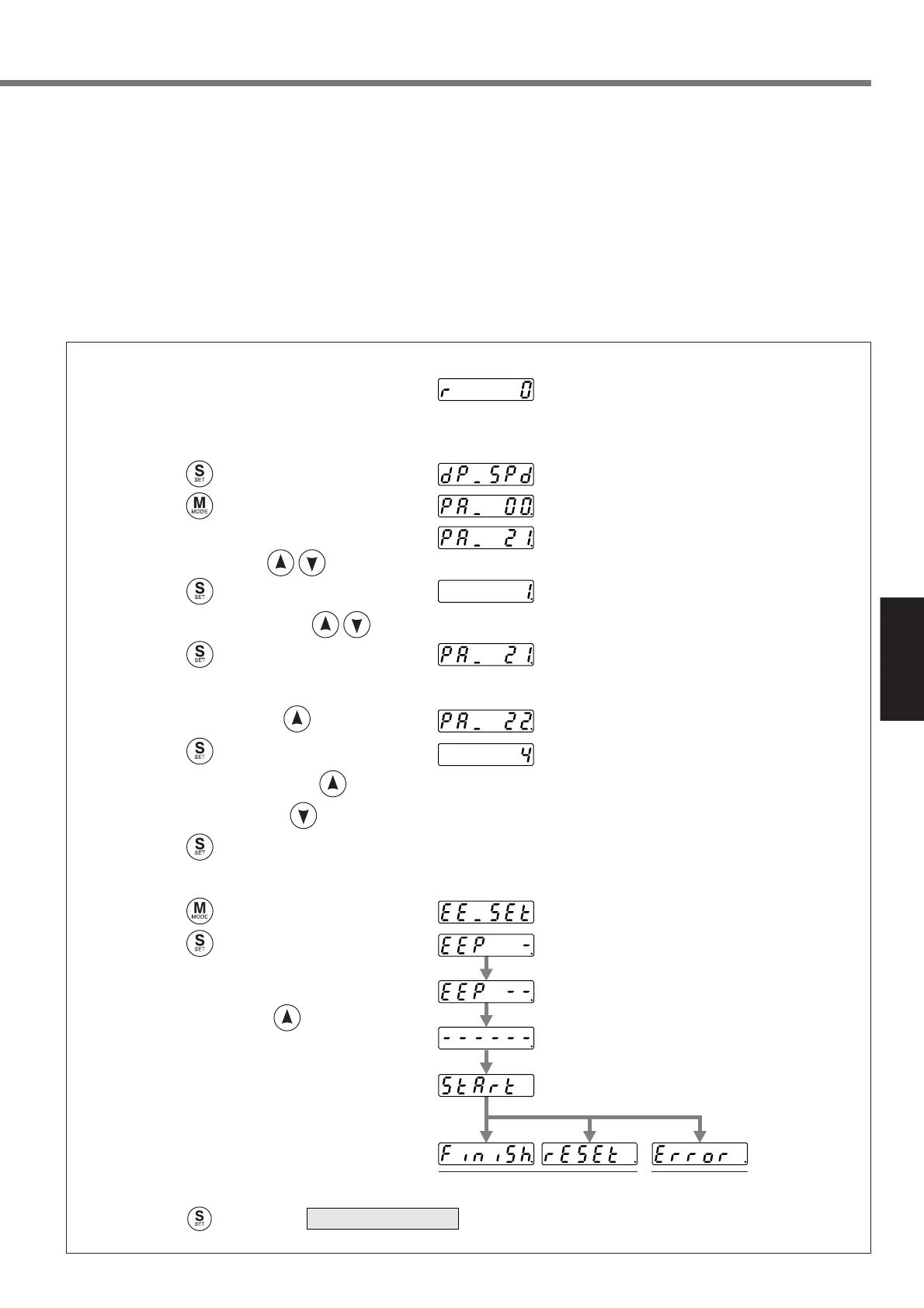
Setup of parameter, Pr21
Press .
Press .
Match to the parameter No.
to be set up with . (Here match to Pr21.)
Press .
Change the setup with .
Press .
Setup of parameter, Pr22
Match to Pr22 with .
Press .
Numeral increases with ,
and decreases with .
Press .
(default values)
Writing to EEPROM
Press .
Press .
Bars increase as the right fig. shows
by keep pressing (approx. 5sec).
Writing starts (temporary display).
Finish
Writing completes Writing error
occurs
Insert the console connector to
CN X6 of the driver, then turn
on the driver power.
Press to return to , after writing finishes.
SELECTION display
3) Set up SV.Pr22 (Machine stiffness at auto tuning) to 0 or smaller value.
4) Turn to Servo-ON to run the machine normally.
5) Gradually increase SV.Pr22 (Machine stiffness at auto tuning) when you want to obtain a better response.
Lower the value (0 to 3) when you experience abnormal noise or oscillation.
6) Write the result to EEPROM when you want to save it.






 To Next Page