90
How to Use the Console
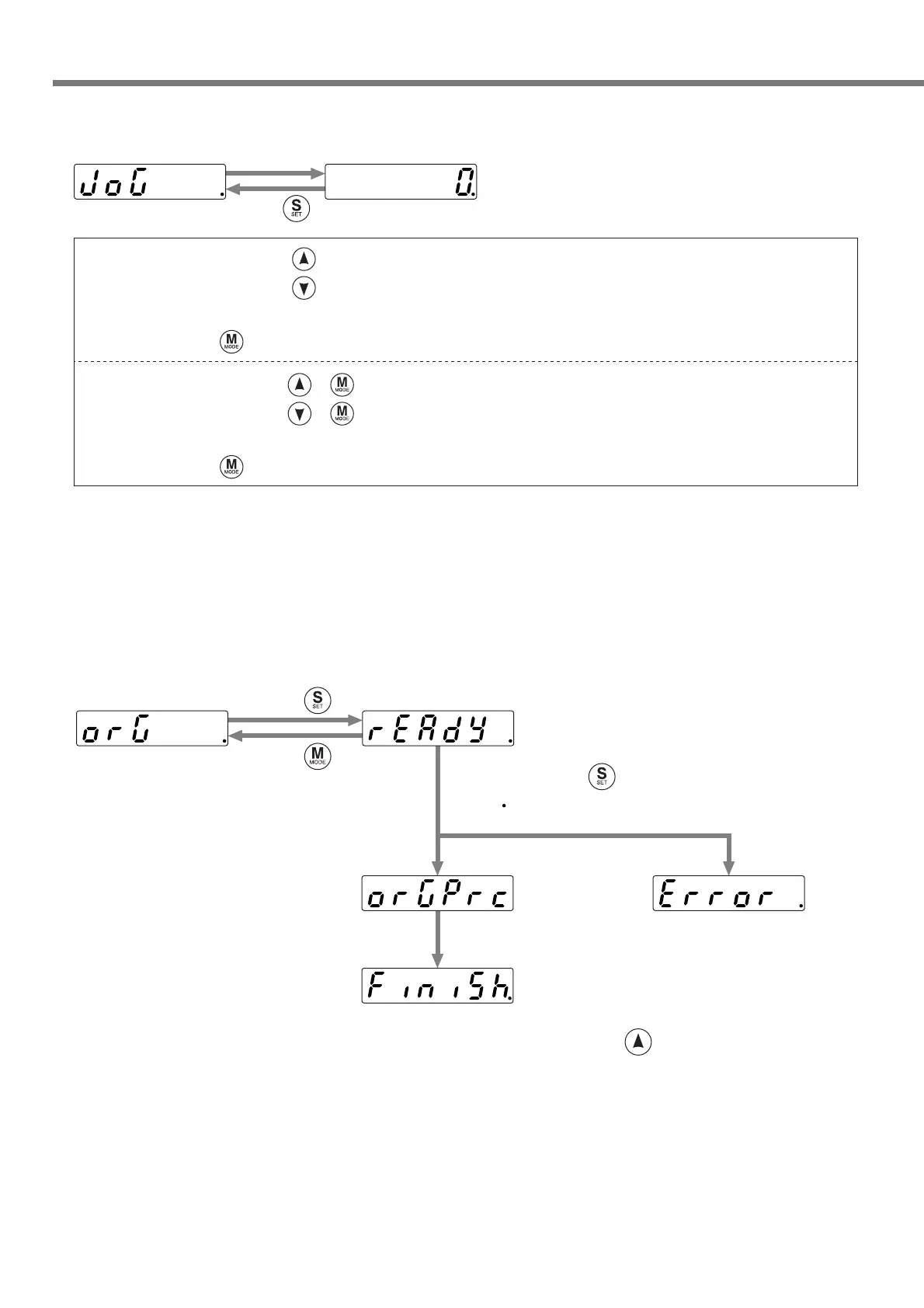
• Jog operation
The motor can be operated by the jog operation.
• Homing
Homing is performed as follows.
...A current position is shown during an operation.
Press .
When you keep on pressing , the motor rotates continuously in a positive direction while pressing it.
When you keep on pressing , the motor rotates continuously in a negative direction while pressing it.
The rotation speed can be set by 16.Pr40 (jog speed [low]).
When you press during rotation, the rotation speed changes to a jog speed (low).
When you keep on pressing + , the motor rotates continuously in a positive direction while pressing it.
When you keep on pressing + , the motor rotates continuously in a negative direction while pressing it.
The rotation speed can be set by 16.Pr41 (jog speed [high]).
When you press during rotation, the rotation speed changes to a jog speed (high).
* Definition of positive or negative direction of rotation depends on the setting of 16.Pr50
(operating direction setting).
* If “Error” is shown, it may be caused by any of the factors below.
• The servo turns off.
• Operation by I/O etc.
Error occurred
Keep on pressing .
A dot ( ) moves to the left.
Press .
Press .
Movement completed.
Homing
An error occurs if any
parameter related to
homing is not set.
To move to the next process, press .






 To Next Page