92
How to Use the Console
Step Parameter
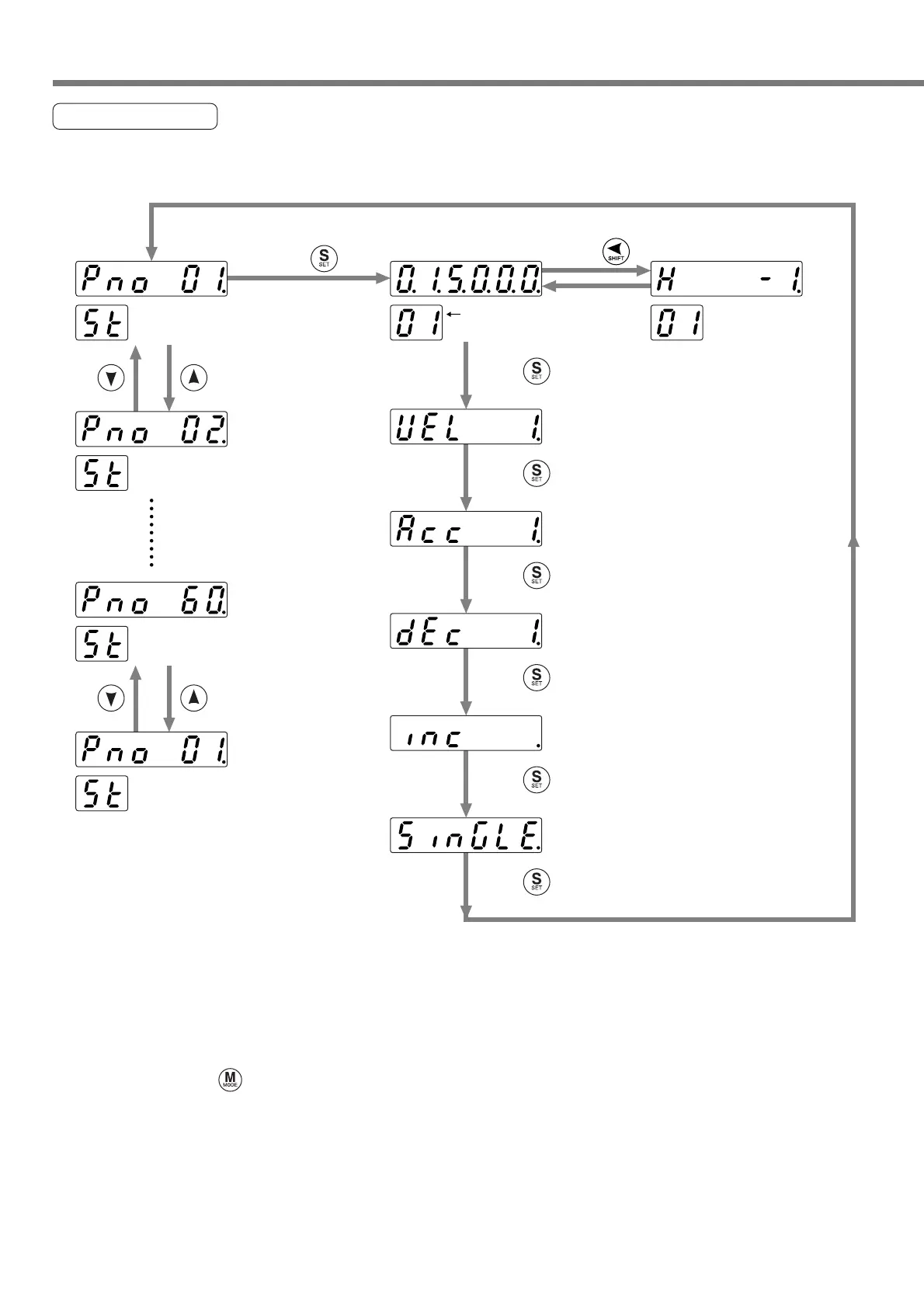
Step parameter can be set.
* An example to set in ST.Pr1 is shown below.
Press .
Press .
Press .
Press .
Press .
Press .
Press .
Press .
Step data
(low order)
Step data
(high order)
.....ST.Pr02
.....ST.Pr01
.....Speed number selection
A selected parameter
is shown.
* The data is shown on the
two screens because of a
large number of displayed
digits.
.....Acceleration number selection
.....Deceleration number selection
.....Operation mode selection
.....Block selection
.....ST.Pr60
.....ST.Pr01
<Notice>
Select an input digit (a dot blinks) by the [SHIFT] key and a parameter by the [UP]/[DOWN] key.
The step data is shown on the two screens because of a large number of displayed digits.
If the parameter is a negative value, a dot lights.
When you press the [SET] key, the parameter is modified.
* When you press during parameter setting, any parameter in process is not changed and “No.”
display is shown again.
* When you have set the parameters, write the parameters into EEPROM. If you turn the power supply
off before writing the parameters into EEPROM, those parameters are cleared.






 To Next Page