116
Parameter Setting
Parameter for Selection of Functions
Standard Default Setup: [ ]
PrNo. Parameter Name Function/Content
In communications with a host such as a personal computer that uses RS232C
with multiple axes, you should identify to which axis the host is accessing. With
this parameter, you can see an axis name by number.
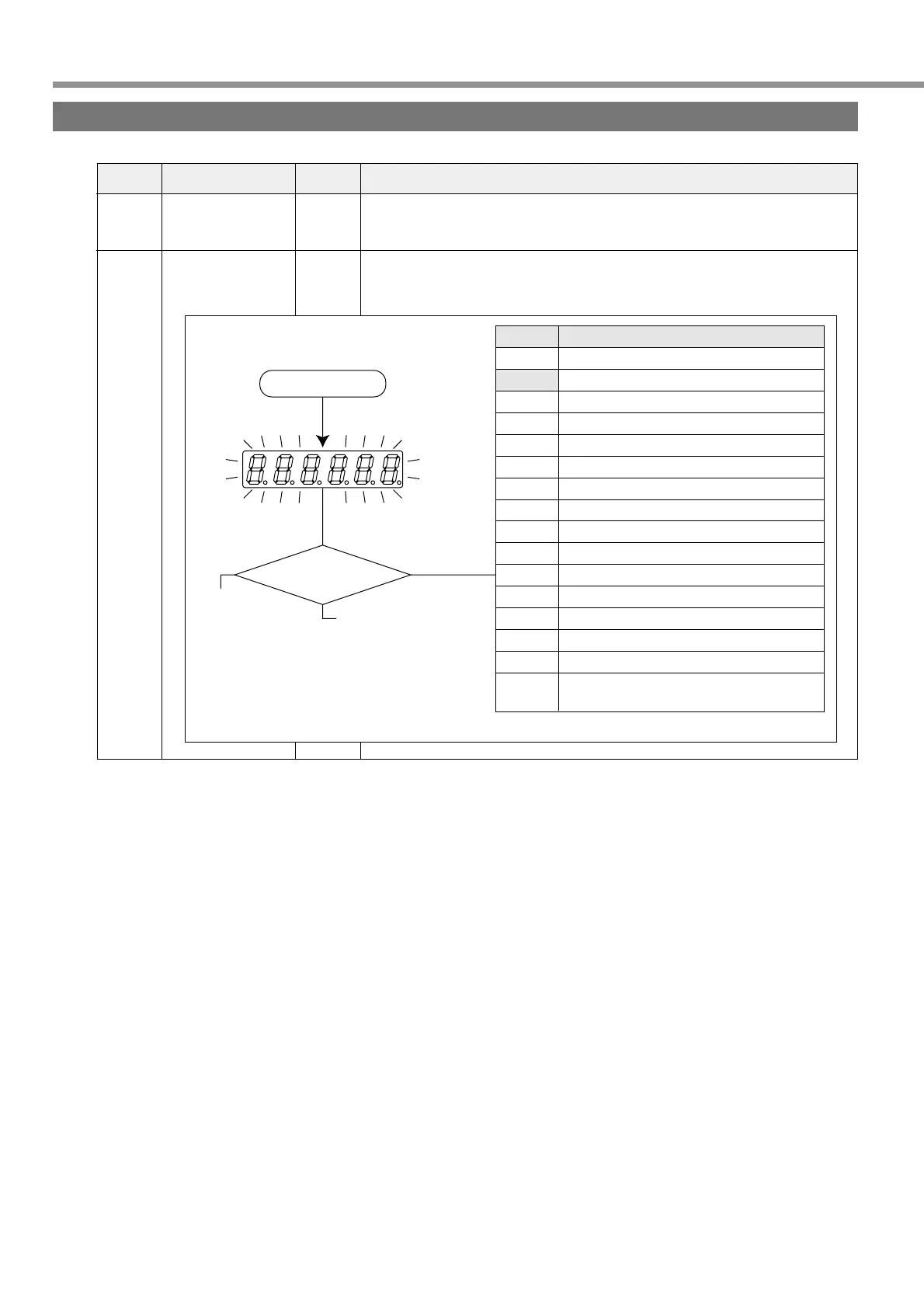
In the initial state after power-on, you can select any type of data displayed by 7
segment LEDs on the console.
00
01
Axis address
LED for console,
initial condition
display
0 - 15
[1]
0 - 15
Range of
Settings
Turn on the power
Setting of Pr01
This blinks during initialize
operation (about 2 seconds).
Setting Content
0
[1]
2
3
4
5
6
7
8
9
10
11
12
13
14
15
Position deviation
Motor rotation speed
Torque output
Control mode
Input/output signal condition
Error factor, history
To be used by the manufacturer
Warning
Regenerative Load Ratio
Overload factor
Inertia ratio
Feedback pulse total
Command pulse total
Not available
Not available
Checking if there is motor automatic
recognition function
For details of displays, refer to “Monitor Mode” on Page 51 of Preparation edition.
Buy: www.ValinOnline.com | Phone 844-385-3099 | Email: CustomerService@valin.com


 To Next Page