207
[Reference]
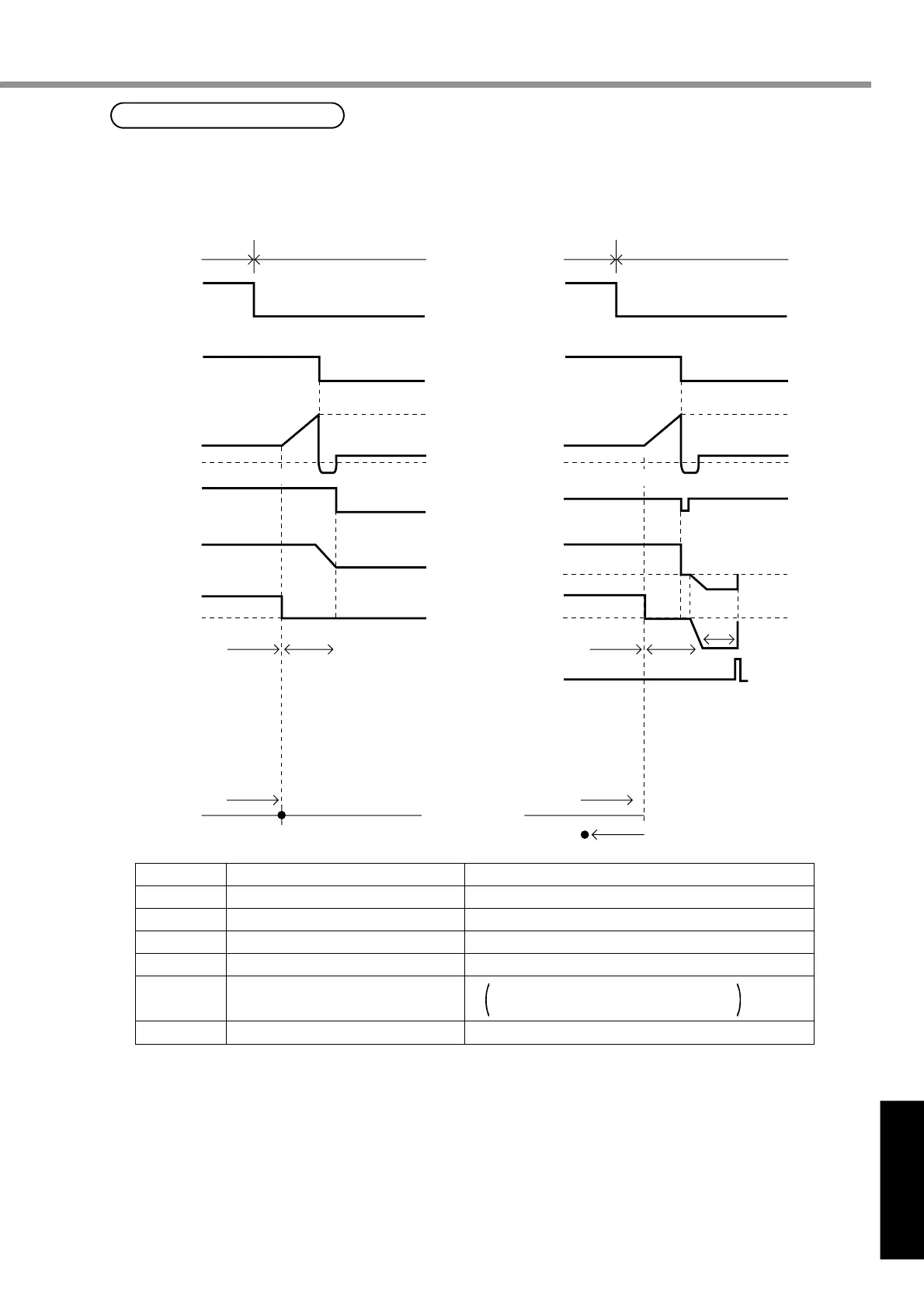
Hit-and-stop Initialization
(1) When you set a point where the motor hits,
as the origin:
1st
Initial Point
Initial Point (3)
2nd Torque Limit 2nd Torque Limit
1st
WARN
(Torque being limited)
Pin 5
(ZEROSPD/TC)
Pin 5
(ZEROSPD/TC)
Torque
Counter
clear
command
50%
Motor
rotation
speed
WARN
(Torque being limited)
When you stop the motor using phase Z
with the hit point as a starting point, and
make it an origin
Torque
Counter
clear
command
Phase Z
Motor
rotation
speed
ON
ON
ON
ON
ON
ON
Parameter No.
70
71
72
73
06
09
<Note>
Set pin 5 "H (OFF)" after hit-and-stop initialization completes.
Name
1st over-speed level set-up
2nd torque limit set-up
2nd position over-deviation set-up
2nd over-speed level set-up
ZEROSPD/TC input selection
Warning output selection
Example of Settings
6000
50 (Set it 100% or less)
1875
(Same as No.1)
6000
2
0 (Torque being limited)
Hitting
Hitting
(1) (2) (1)
(1)
(1)
(2)
(2)
(2)
(3)
When you find it difficult to install a sensor as the surroundings are not good, Hit-and-stop
Initialization can be used.
(2)
Speed zero clamp disabled.
Torque limit switching input enabled.
Hit-and-stop Initialization and Load Pressing Control
Buy: www.ValinOnline.com | Phone 844-385-3099 | Email: CustomerService@valin.com


 To Next Page