31
[Preparations]
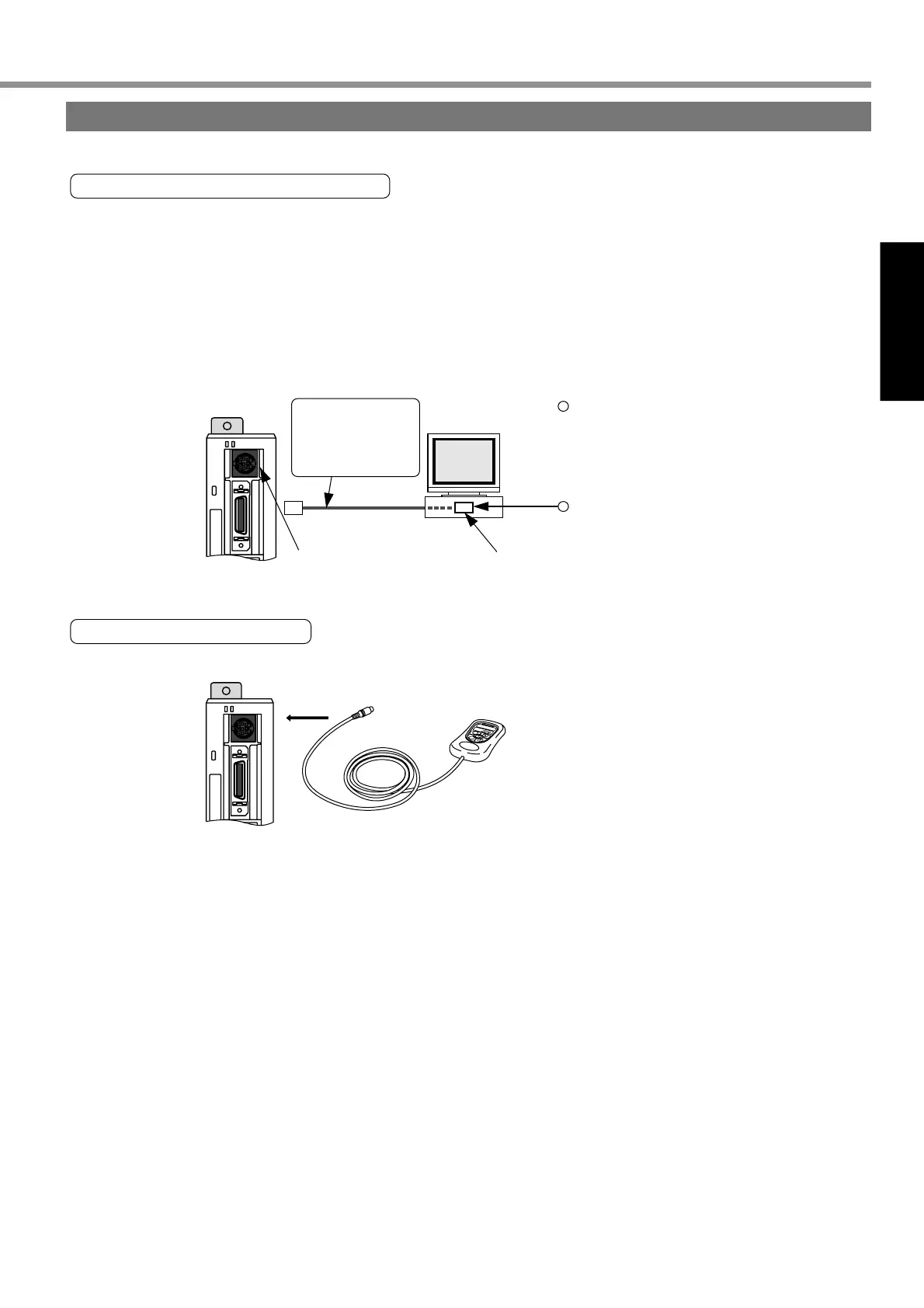
CN X6
Back Plane of Connector for RS232C
Refer to "Optional
Parts" of dedicated
connecting cables.
Insert or pull out a connector
only after cutting power off
both personal computer and driver.
Tighten stop screws firmly.
Connection
Wiring of Connector CN X6 (Connection with Personal Computer/Console)
• It is capable of RS232C communications.
For RS232C communications only
1) Connect the personal computer and driver 1:1 through RS-232C, and use “PANATERM®” (optional component),
the setup supporting software. Running “PANATERM®” on your personal computer, you can have convenient
functions with excellent operability, such as various types of monitors, parameter settings/changes, waveform
graphic displays, etc.
2) You can connect a host (personal computer, or host controller) and driver through RS 232C for communications.
For detailed information, refer to “Communications” on Page 158 of Reference edition.
Connection with Console
M
O
D
E
S
H
I
F
T
S
E
T
S
M
Connect to CN X6.
Buy: www.ValinOnline.com | Phone 844-385-3099 | Email: CustomerService@valin.com


 To Next Page