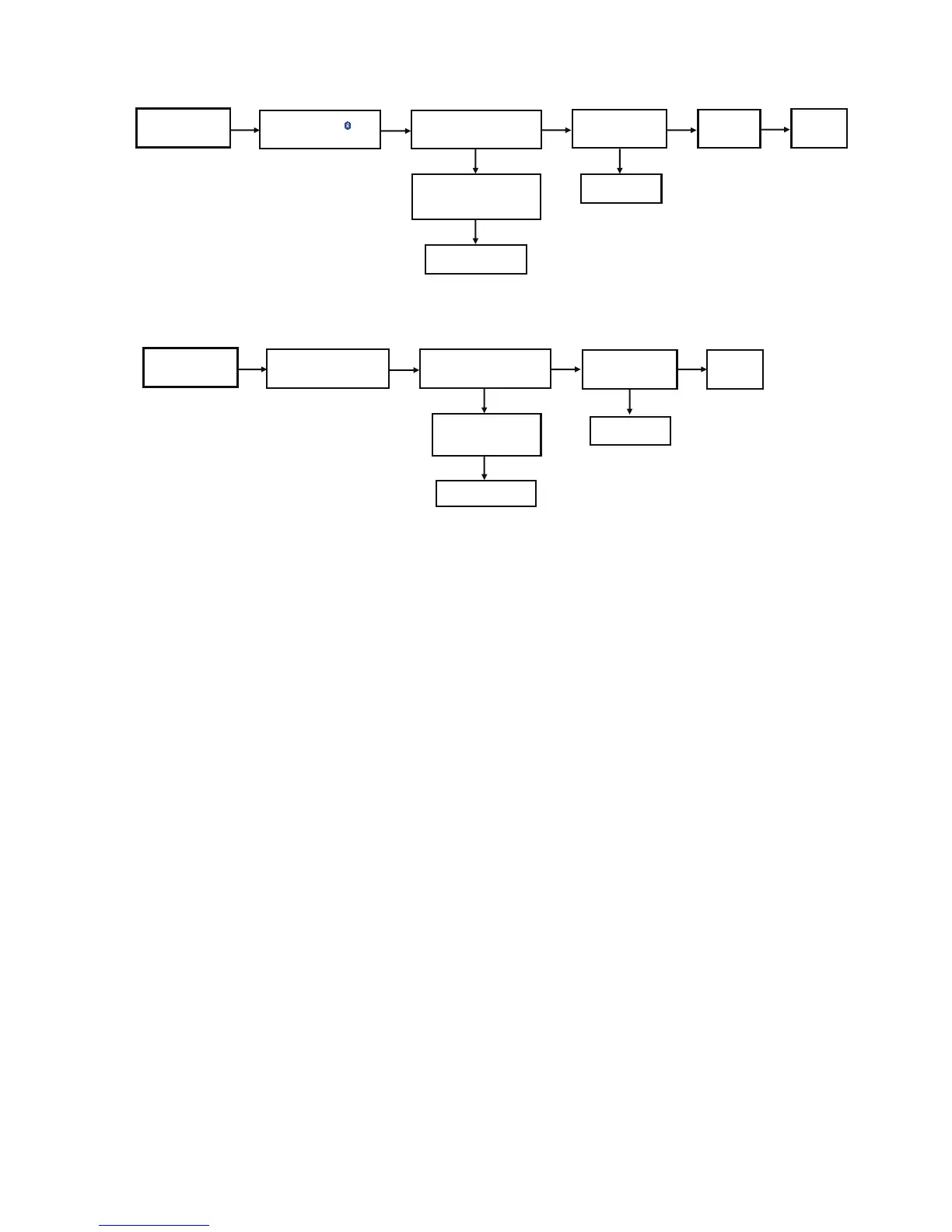
Press Power Button
of Unit or Remote Control
to Turn ON the Unit
Press [SELECTOR and choose
BLUETOOTH]
on the Set or Remote Control
Display "BLUETOOTH"
Change FFC Connection
(P7701) on NFC PCB
& BT P.C.B
NG
Check and Do Setting of NFC.
OFF the Set and Tap the Phone
on NFC Logo to ON the Set.
Set will ON at BLUETOOTH Mode
NG
Change IC2101
NG
Set ON when Tap the
Phone on NFC Logo
Set will Display
"BLUETOOTH"
No Problem
Found
OK KOKOKO
Check DC-DC Regulator IC
(IC2101)
Measured 5.3V at L2102
[refer to check point 7 ]
Press Power Button
of Unit or Remote Control
to Turn ON the Unit
Check Main PCB
NG
Plug-in USB Device
FL Display "USB"
NG
Change IC2101
NG
Press Play
FL Display
"Music Name or Title"
No Problem
Found
KKOOKO
Press [SELECTOR and
choose USB mode] on the Set
or Use Remote Control
Display "USB and NO DEVICE"
Check DC-DC Regulator IC
(IC2101)
Measured 5.3V at L2102
[refer to check point 7 ]




 To Next Page