16
6.4. Self-Diagnostic Mode
6.5. Self-Diagnostic Error Code Table
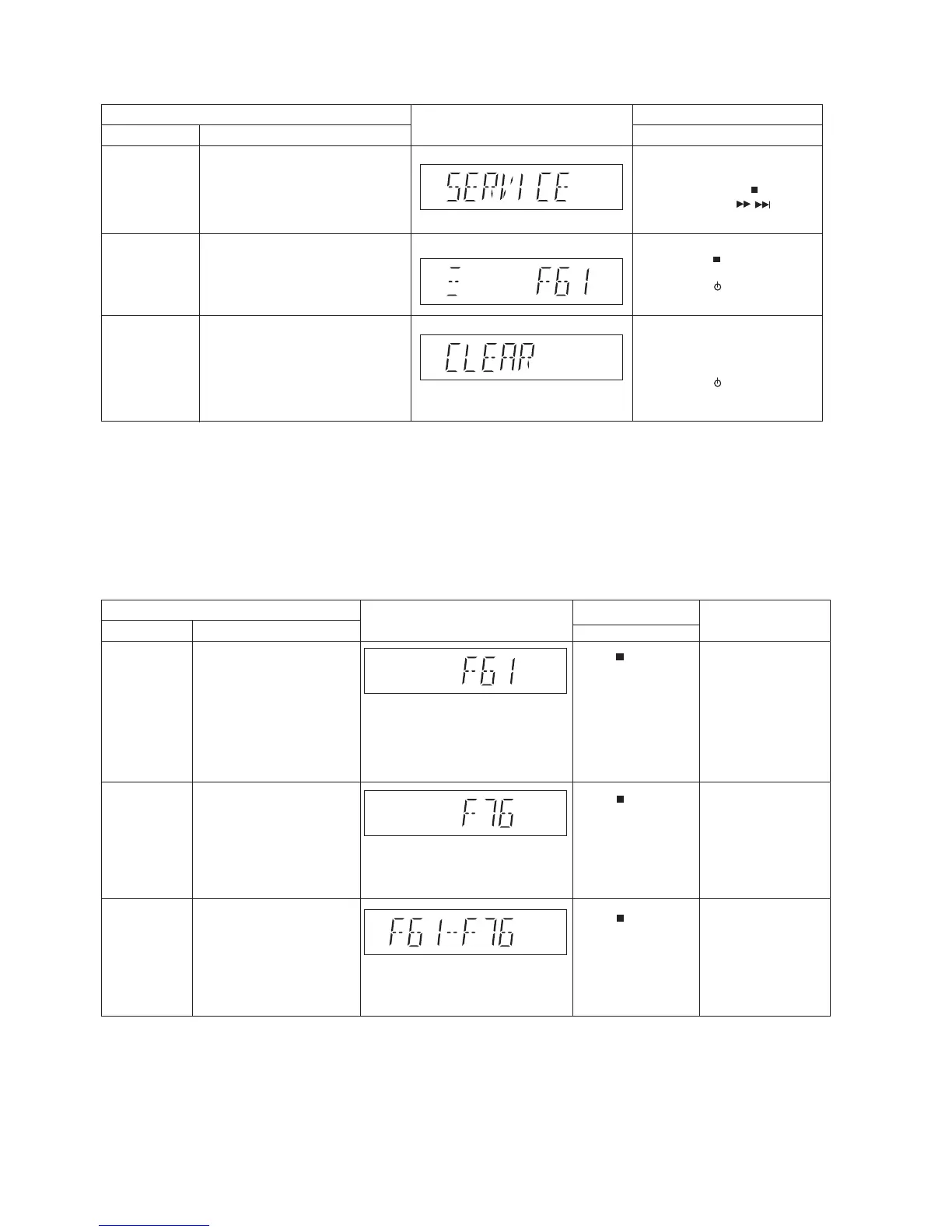
Self-Diagnostic Function (Refer Section 6.4. Self-Diagnostic Mode) provides information on any problems occurring for the unit and
its respective components by displaying the error codes. These error code such as U**, H** and F** are stored in memory and held
unless it is cleared.
The error code is automatically display after entering into self-diagnostic mode.
6.5.1. Power Supply Error Code Table
FL Display
Key Operation
Front Key
Item
DescriptionMode Name
Self Diagnostic
Mode
edomDCtceleS:1petSgnikcehccitsongaidflesotniretneoT
(Ensure no disc is inserted).
To exit, press [ I] on main unit or
remote control.
Step 2: Press & hold [ ] button
follow by [ /
/
] on
main unit for 2 seconds.
Error Code
Information
System will perform a check on
any unusual/error code from the
memory
,edomcitsongaidflesnI:1petS:elpmaxE
Press [ ] on main unit.
Delete error code To clear the stored in memory
(EEPROM IC)
Step 1: In self diagnostic mode,
Press [OK] on remote
control for 5 seconds.
To exit, press [ I] on main unit or
remote control.
/
FL Display
Key Operation
Front Key
Item
DescriptionMode Name
Error Code F61
Power Amp IC output abnormal.
Upon power on, PCONT=HIGH,
DC_DET_AMP after checking LSI.
Error Code F76
Power Amp IC output abnormal.
DC_DET_PWR.
Error Code
F61-76
Diagnosis Contents:
Power Amp IC output abnormal.
Both DCDET (NG).
Press [ ] on main unit
for next error.
Press [ ] on main unit
for next error.
Press [ ] on main unit
for next error.
Diagnosis Contents:
Diagnosis Contents:
Solution
(PCB exchange repair)
Check following:
1. Fan Unit
2. SMPS P.C.B.
3. Speaker Connection
Check supply voltages
on Main P.C.B.
ņ




 To Next Page