18
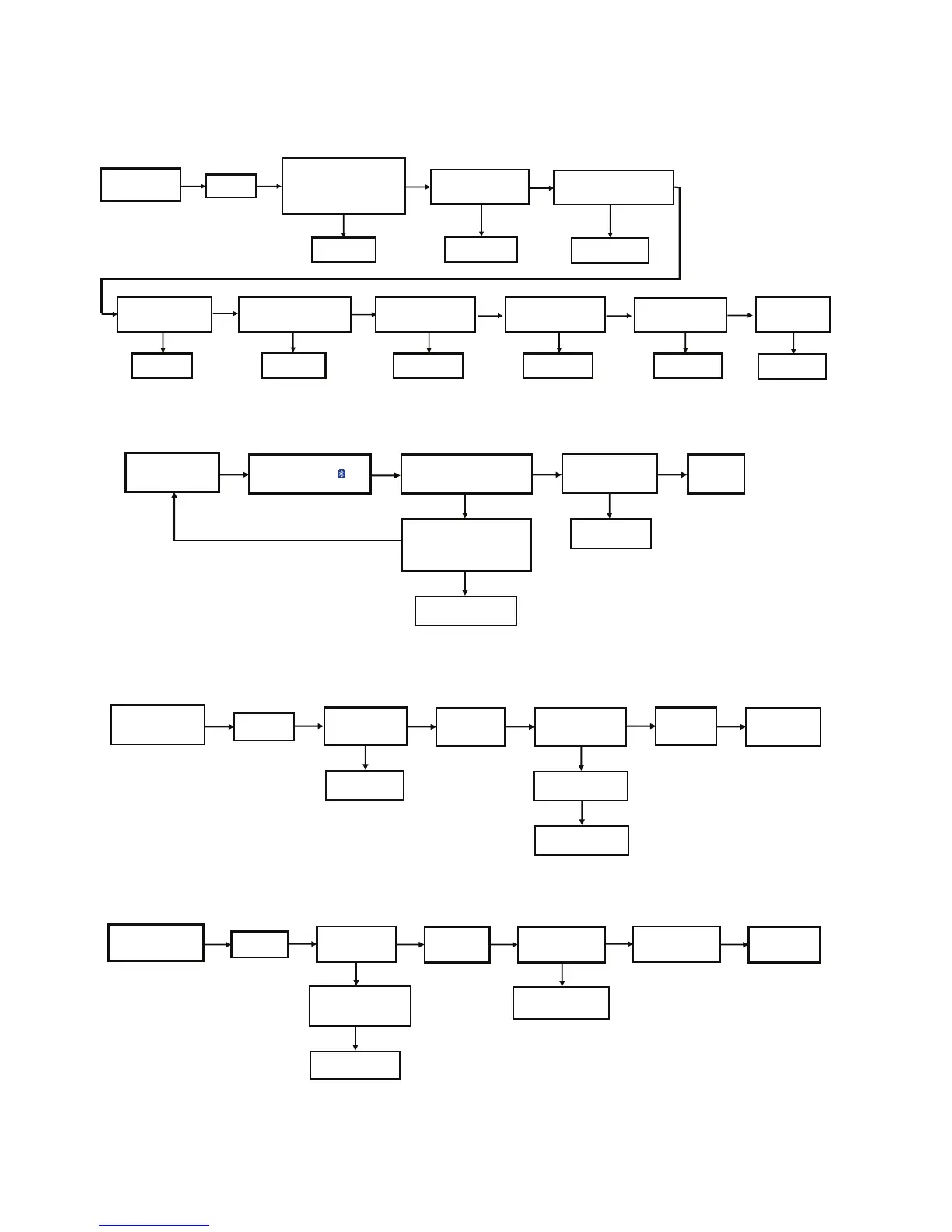
7 Troubleshooting Guide
7.1. No Power or No Display
7.2. Bluetooth
®
Pairing Failure
7.3. No Key Function
7.4. No Remote Control Function
Press Power Button
of Unit or Remote Control
to Turn ON the Unit
No Display on
FL Panel
Caution:
1. AC Cord Plug-out
2. Check Fuse(F1001) = 0 ohm
3. Check Fuse(F1401) = 0 ohm
4. Check Fuse(F1501) = 0 ohm
[refer to check point 1]
Check Fuse and
SMPS PCB
Check Primary E-Cap (C1224)
Measured 400V or more
[refer to check point 4 ]
Check SMPS PCB Change D1601, C1601
Check SMPS PCB
Check SMPS PCB
Check Standby Regulator IC
IC2108 (Solder Side)
Measured 3.3V at Pin 2
[refer to check point 6 ]
Change IC2101 Change IC2103
KOKO
OKOK KOKO
Check Primary E-Cap (C1403)
Measured 200V or more
[refer to check point 2 ]
Check Secondary Cap. (C1601)
or Secondary Diode (D1601)
Measured +5
[refer to check point 3 ]
Check DC-DC Regulator IC
(IC2101)
Measured 5.3V at L2102
[refer to check point 7 ]
If No Display on
FL Panel
Check DC-DC Regulator IC
(IC2103)
Measured 12V at L2101
[refer to check point 8 ]
OK
Check Panel PCB
Check Secondary Cap. (C1706)
or Secondary Diode (D17043, D1705)
Measured -40
[refer to check point 5 ]
Check IC2108
OK
Press Power Button
of Unit or Remote Control
to Turn ON the Unit
Press [PAIRING] on the Set
or Remote Control
Display "BLUETOOTH"
Check Main PCB,
BT P.C.B
NG
"PAIRING" will display and
blinking while handphone or other
devices are Connecting to the Set
Do the Cold Start
AC Plug-out. Press and Hold
Power Button then
AC Plug-IN, wait to display "-------"
then will OFF the Set, back to start.
NG
Check Main PCB
NG
option 1
option 2
The set will displayed the
"CONNECTED" followed
by "BLUETOOTH"
No Problem
Found
KKOOKO
Press Power Button
or CD Door Open of Unit
to Turn ON the Unit
If Cannot
Power ON
(No Display)
Check Main PCB
and Panel P.C.B
OK
NG
Use Remote Control
to Turn ON the Set
FL Display
Show "HELLO"
OK
Press the Power Buttons
or Other Buttons
Check and Ensure that
Touch Panel Connector is
Properly Insert
NG
OK
All Buttons
are Working
If Buttons are not working
Check Panel PCB
NG
OK
No Problem Found
Press Remote Control
Power Button
to Power ON the Unit
(Ensure have Battery & New)
If Cannot
Power ON
(No Display)
OK
NG
Press Power Button
of the Unit
to Turn ON the Set
FL Display
Show "HELLO"
OK
Press Remote
Control Buttons
Check IR Sensor /Panel
PCB
NG
OK
All Remote Control
Buttons are Working
Change IC2108
NG
OK
No Problem Found
Check Standby Regulator IC
(IC2108)
Measured 3.3V at Pin 2
[refer to check point 6 ]




 To Next Page