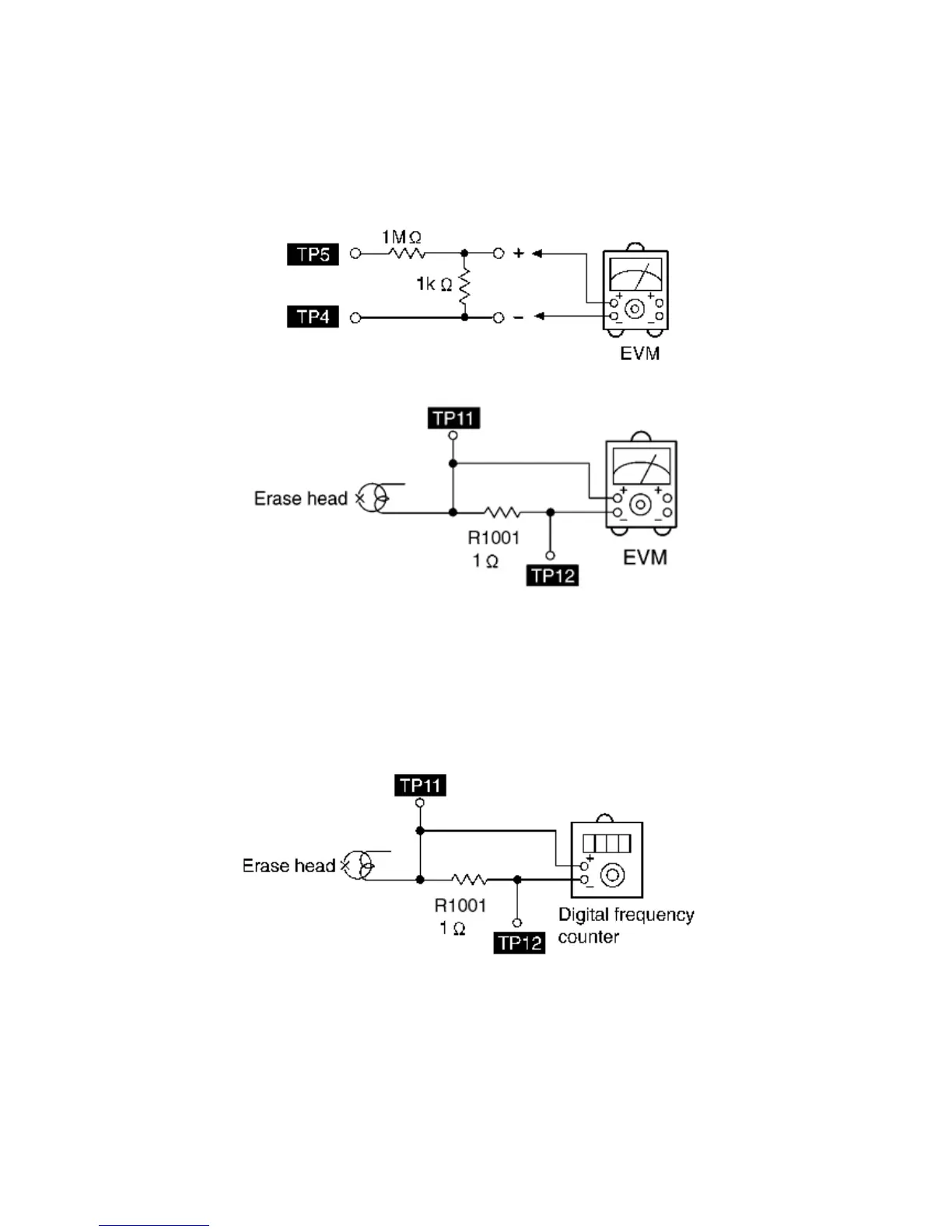
19.1.3 Bias and Erase Voltage Check
1. Set the unit “AUX” position.
2. Insert the Normal blank tape (QZZCRA) into DECK 2 and the unit to “REC” mode (use “• REC/STOP” key).
3. Measure and make sure that the output is within the standard value.
Bias voltage for Deck 2 14±4mV (Normal)
Erase voltage for Deck 2 80mV (Normal)
Fig. 2
19.1.4 Bias Frequency Adjustment (Deck 1/2)
1. Set the unit to “AUX” position.
2. Insert the Normal blank tape (QZZCRA) into DECK 2 and set the unit to “REC” mode (• use “REC/STOP” key).
3. Adjust L1002 so that the output frequency is within the standard value.
Standard Value: 97 ±8 kHz
Fig. 4





 To Next Page