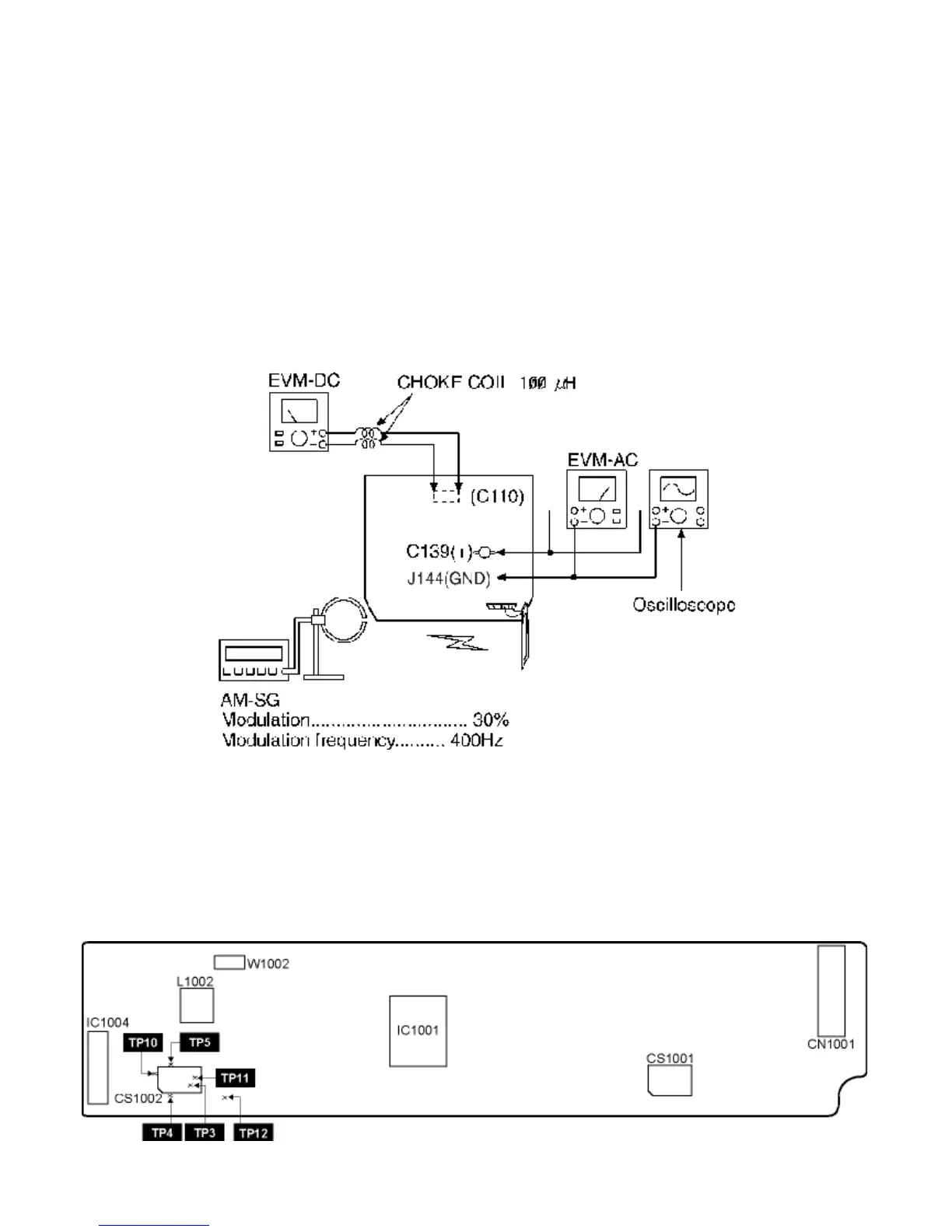
19.2.2 AM RF Adjustment
1. Connect the instrument as shown in Fig. 7.
2. Set the unit to AM mode.
3. Set AM-SG to 520kHz.
4. Receive 520kHz in the unit.
5. Adjust Z101 (OSC) so that the EVM-AC is maximized.
6. Set AM-SG to 600Hz.
7. Receive 600Hz in the unit.
8. Adjust Z101 (ANT) so that the EVM-SG is maximized.
9. Set AM-SG to 520kHz.
10. Receive 520kHz in the unit.
11. Adjust Z101 (OSC) so that the EVM-DC value is with 1.1±0.5V.
Fig. 7
19.3 Alignment Points
19.3.1 Cassette Deck Section
19.3.2 Adjustment Point
19.3.1 Cassette Deck Section









 To Next Page