38
4
Taking Pictures
Taking Pictures
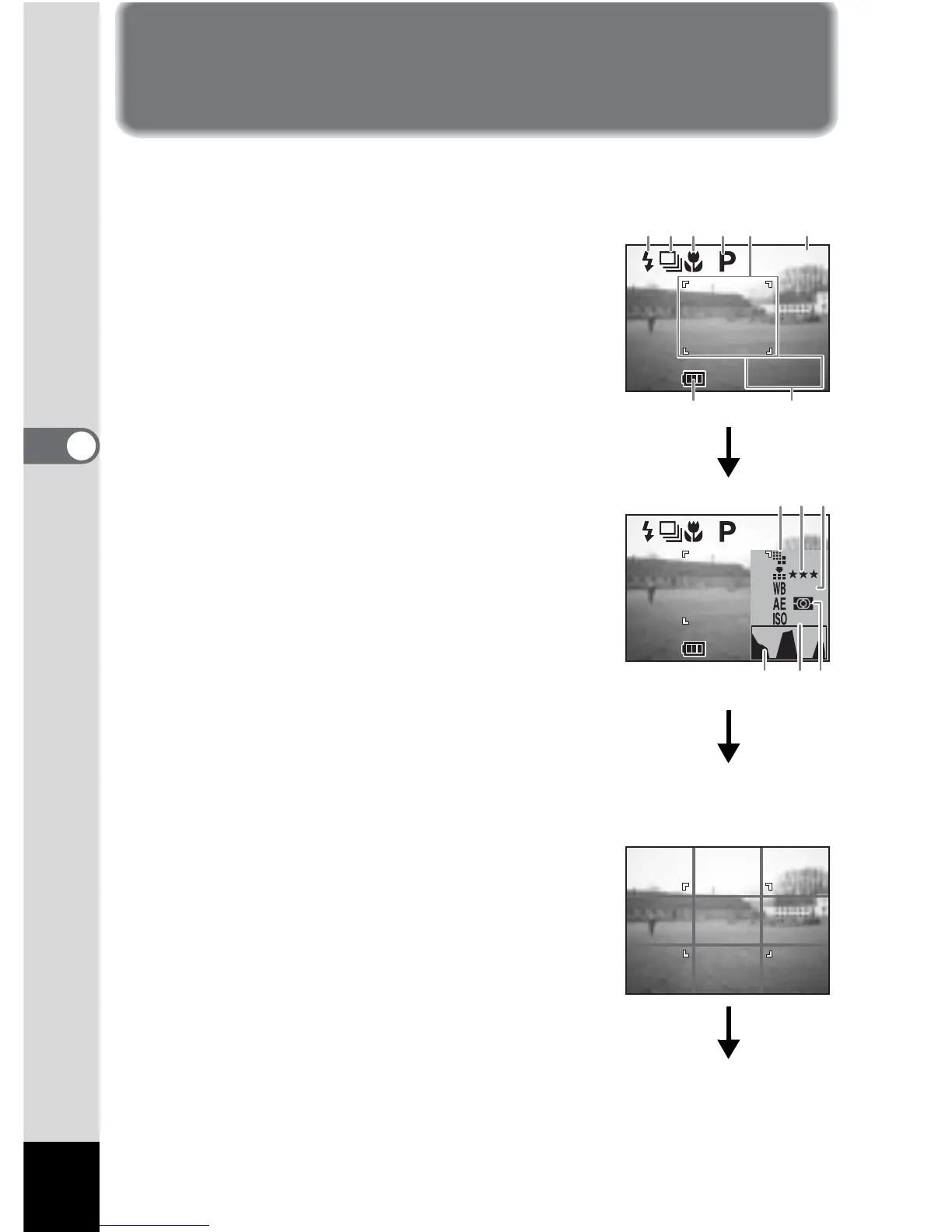
Displaying Shooting Information (Capture Mode)
You can display information on the LCD monitor when shooting.
The display mode can be changed by pressing the Display button.
Display On
Shooting information is displayed.
1 Flash mode
2 Drive mode
3 Focus mode
4 Capture mode
5 AF area
6 Number of images can be taken
7 Data & time
8 Battery indicator
Histogram Display
The brightness distribution of the image is
displayed.
The x-axis shows the brightness (darkest at the
left end and brightest at the right end) and the y-
axis shows the pixel numbers.
1 Recorded pixels
2 Quality level
3 White balance
4 AE metering
5 Sensitivity
6 Histogram
• The AF area will be displayed in the
autofocus mode.
Grid Display
The grid is displayed. This is useful for
composing detailed pictures.
• The AF area will be displayed in the
autofocus mode.
198



 To Next Page