2014-02
18
IC-KP2-2HB17-2V1D
Installation
5.4.3 Ground connection
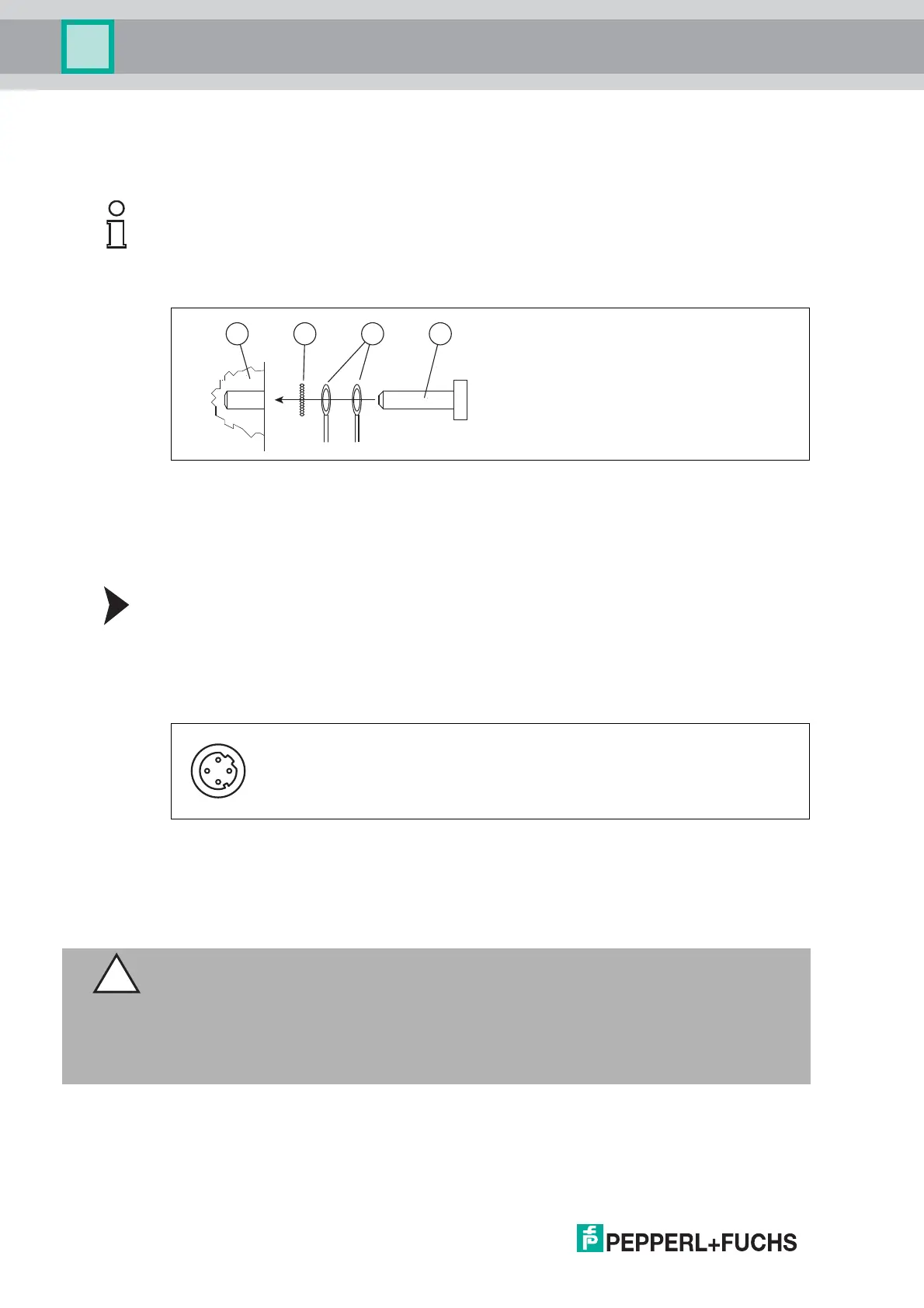
Connect the IDENTControl Compact unit to ground via a screw on the right under the housing.
Connecting the IDENTControl Compact to ground
Screw the ground conductor to the housing with a crimp connector.
5.4.4 Ethernet connection guide
Use the D-coded M12 socket and the V1SD-G-5M-PUR-ABG-V45-G cable to connect the
IDENTControl Compact unit to an Ethernet network.
Note!
In order to guarantee safe grounding, mount the serrated washer between the crimp connector
and the housing.
Use a ground conductor lead with a cross-section of at least 4 mm
2
.
1 Housing
2 Serrated lock washer
3 Crimp connector
4 Lock screw
1 Tx+
2 Rx+
3 Tx-
4 Rx-
Caution!
Electromagnetic interference
Device malfunction caused by EMC effects.
The M12 socket is connected galvanically to the grounded housing. The EtherNet/IP
specification recommends not using cables with a shield connected to the plug at both ends.
However, we recommend using cables with a continuous shield to avoid malfunctions.


 To Next Page