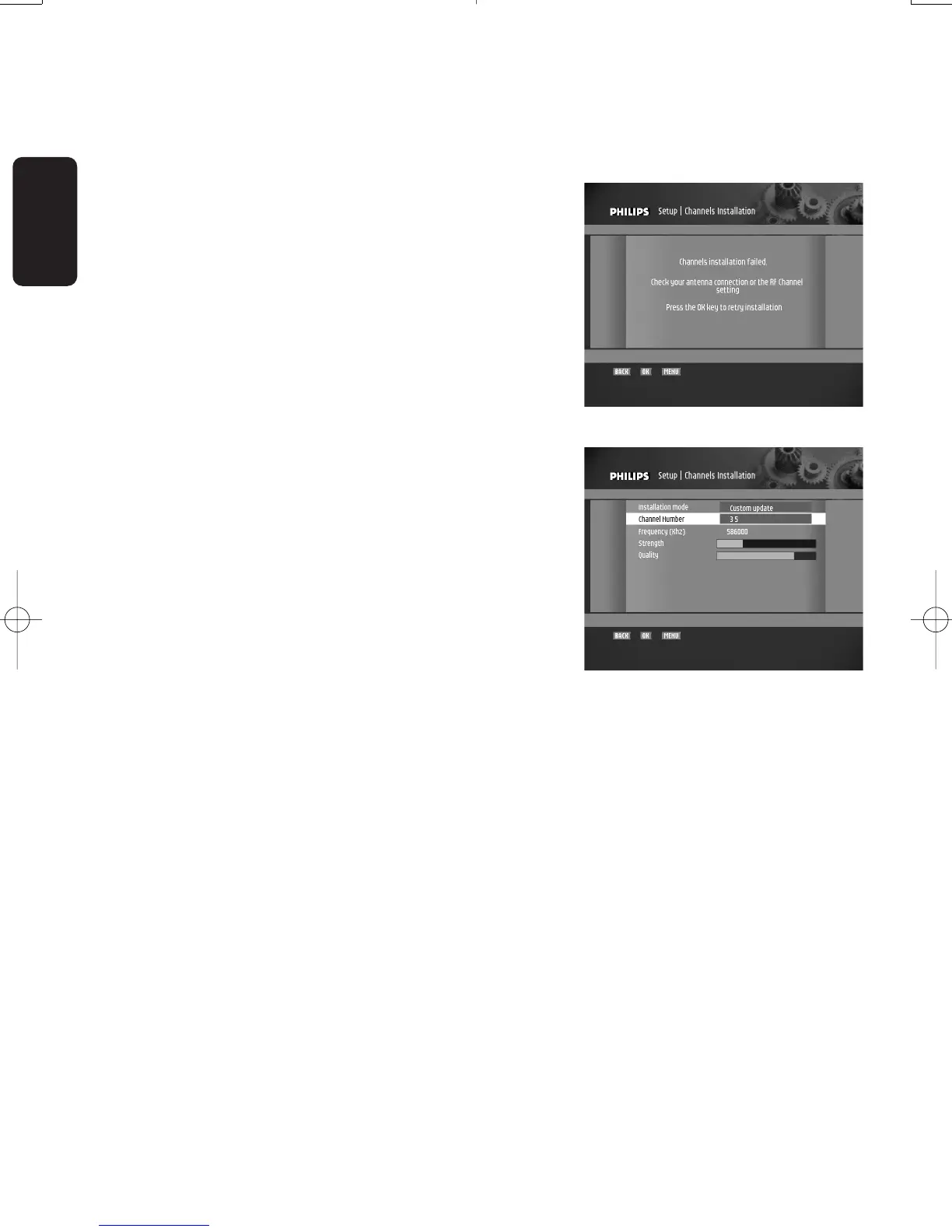
4 SCANNING FAILURE
English
SCANNING FAILURE
Scanning failed.Before starting a new scanning,check:
- the aerial cable,
- the aerial cable connection to your digital receiver.Refer
to the connection diagrams in chapter 5.1 or 5.2.
- channel(s) availability in the region corresponding to your
area.
To exit the “Channel installation” failure screen:
- Press “OK”.The “Signal quality testing” screen is displayed,
with bargraphs indicating the signal strength and quality.
- Select a channel number using the remote control
numerical keys and press “OK”.
If the signal is good enough (indicated by green bar meters),
press OK to launch a new scanning.When scanning ends
successfully, the channels found are displayed and the digital
receiver tunes the first channel in the list.If so proceed to
chapter 7.
Note: If you could still not install the channels after checking the
quality of the signal delivered by your aerial, either your aerial is
not pointing properly at the digital TV transmitter, or your aerial
installation needs to be upgraded, or you are not in the coverage
area to correctly receive digital television.
For a proper diagnosis, call your electrical retailer.
Doc.DTR2000 version N/B 19/12/03 9:01 Page 4



 To Next Page