Chapter 4 Operation
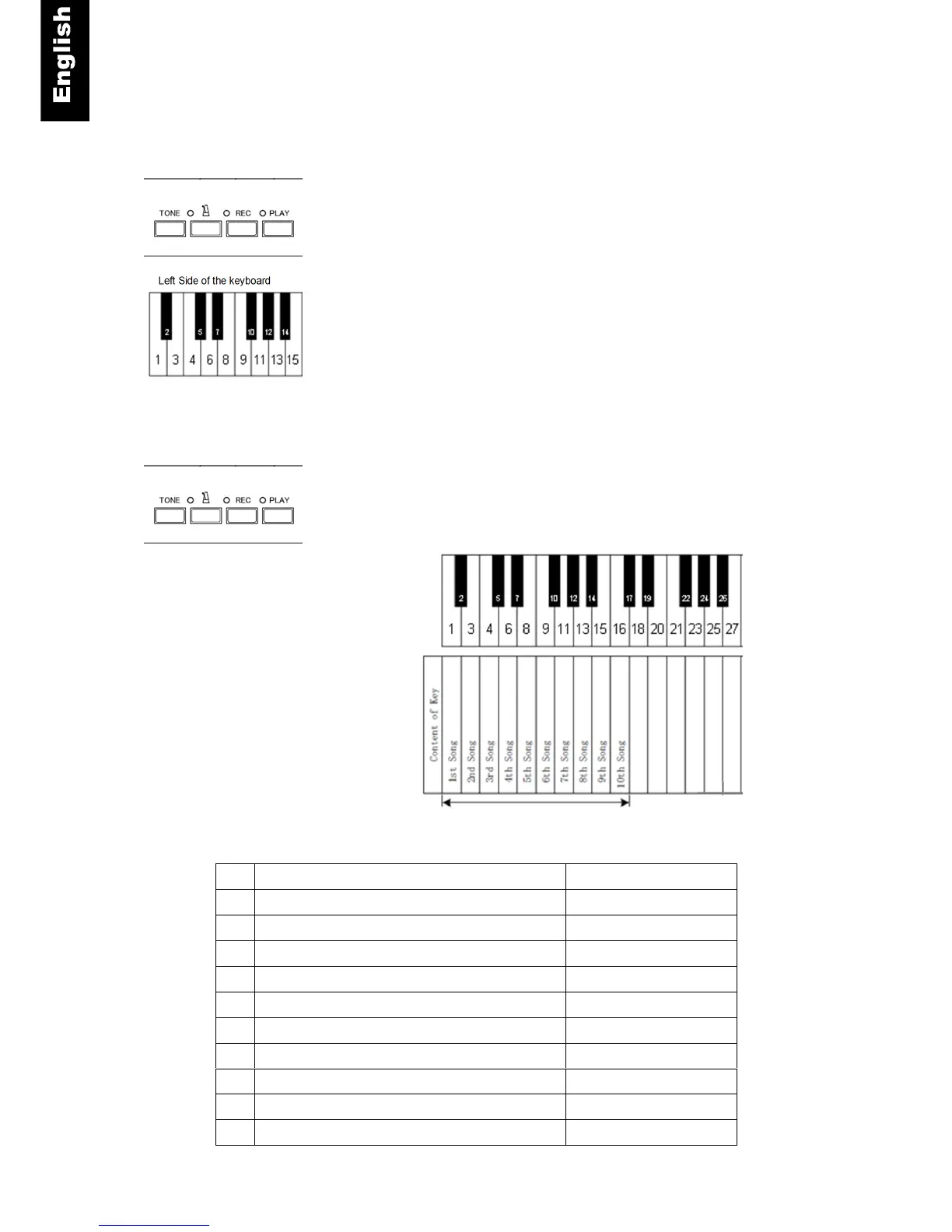
Start - Push the “PLAY” button for about 2 seconds. The “PLAY”
lamp will start flashing.
Auto play or Selecting a demo song - When the “PLAY” lamp
stops flashing, playback will begin, starting with the first demo
song and continue in order through all demo songs. To select
another demo song, press one of the white keys that corresponds
to the song desired (see chart below).
Note:
When the EXT connector is in use, and you would like to select
a demo song, you need to complete your selection before the
“PLAY” lamp stops flashing and before auto playback starts.
Stop - To stop playback, push the “PLAY” button.
No.
Title Composer
1 Prelude (Wohltemperiertes Klavier I, No. 1) Johann Sebastian Bach
2 Für Elise Ludwig van Beethoven
3 Piano Sonate op. 72-2 “Mondschein” 1
st
mov. Ludwig van Beethoven
4 Shenandoah American folk song
5 Danny boy Ireland folk song
6 I love you, porgy George Gershwin
7 Someday my prince will come Frank Churchill
8 All the things you are Jerome Kern
9 Someone to watch over me George Gershwin
10 My wild Irish rose Chancellor Olcott
List of Demo Songs



 To Next Page