Reset to Factory Defaults
Caution!
When this process is performed, ProRecord will cease to operate normally. An initial setup is required
in order to continue using. The initial setup procedure is outlined on the next page. The following
charts show the default settings:
Reset to Factory Defaults
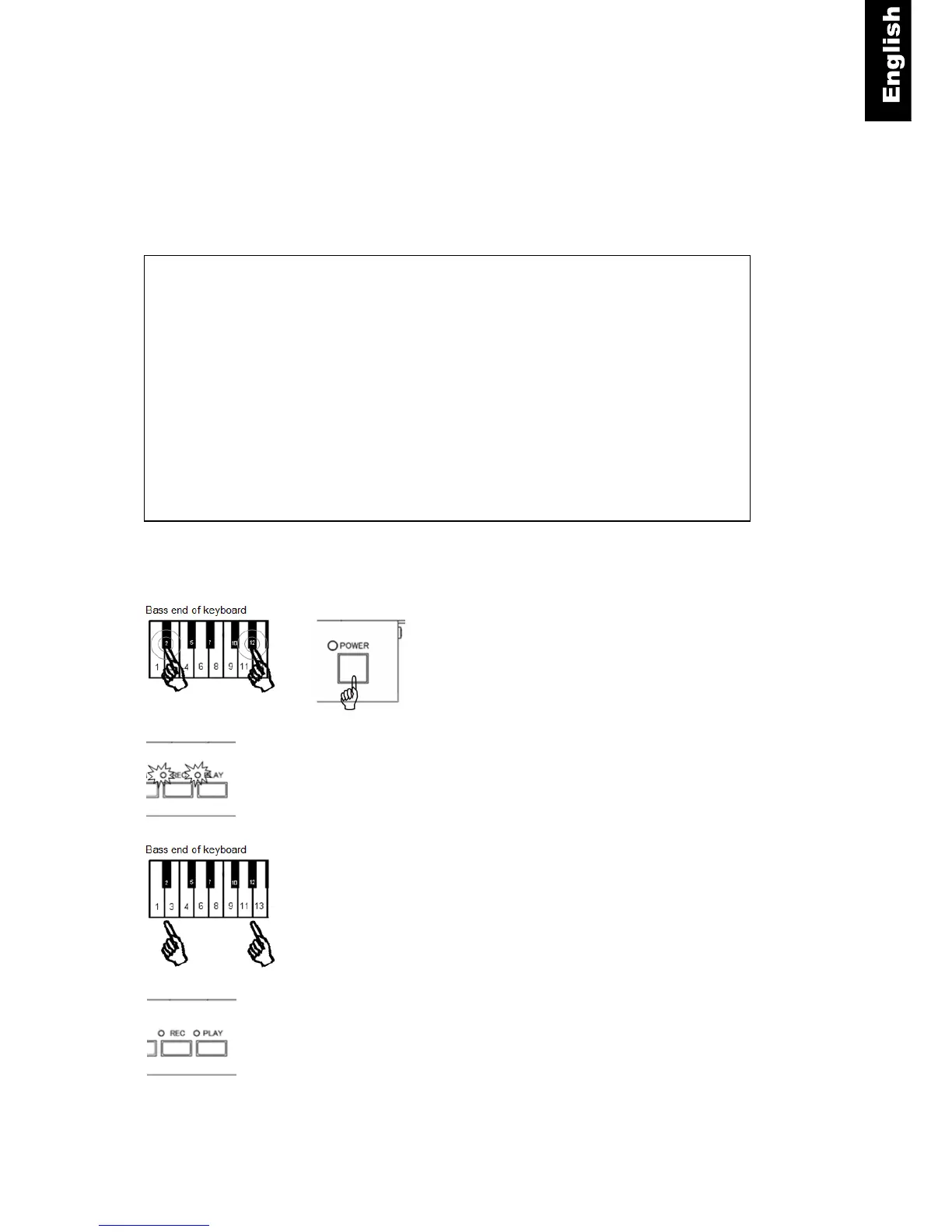
Piano keys 2 and 12 + Power ON -.Press and hold keys 2
and 12 while turning the power on (see figure below). A
MIDI signal will sound and the
“PLAY” and “REC” lamps will flash alternately.
Piano keys 2 and 12 - Release the two keys.
The “PLAY” and “REC” lamps will stop flashing and the
system as been reset to default values.
Recorded song:All Deleted
Number of Re-strikes Per Second:18
Initial Setting:Clear
Sensor Calibration:Clear
Sensor Automatic Calibration:ON
Touch Control:4
Pedal Positioning:Clear
Damper pedal function:ON/OFF
Adjusting the Depth to Sound:0
Continuous note-on MIDI commands:disabled
Black Keys Volume Control:0
Volume Control for Each Key:All 88 keys= “0”
+



 To Next Page