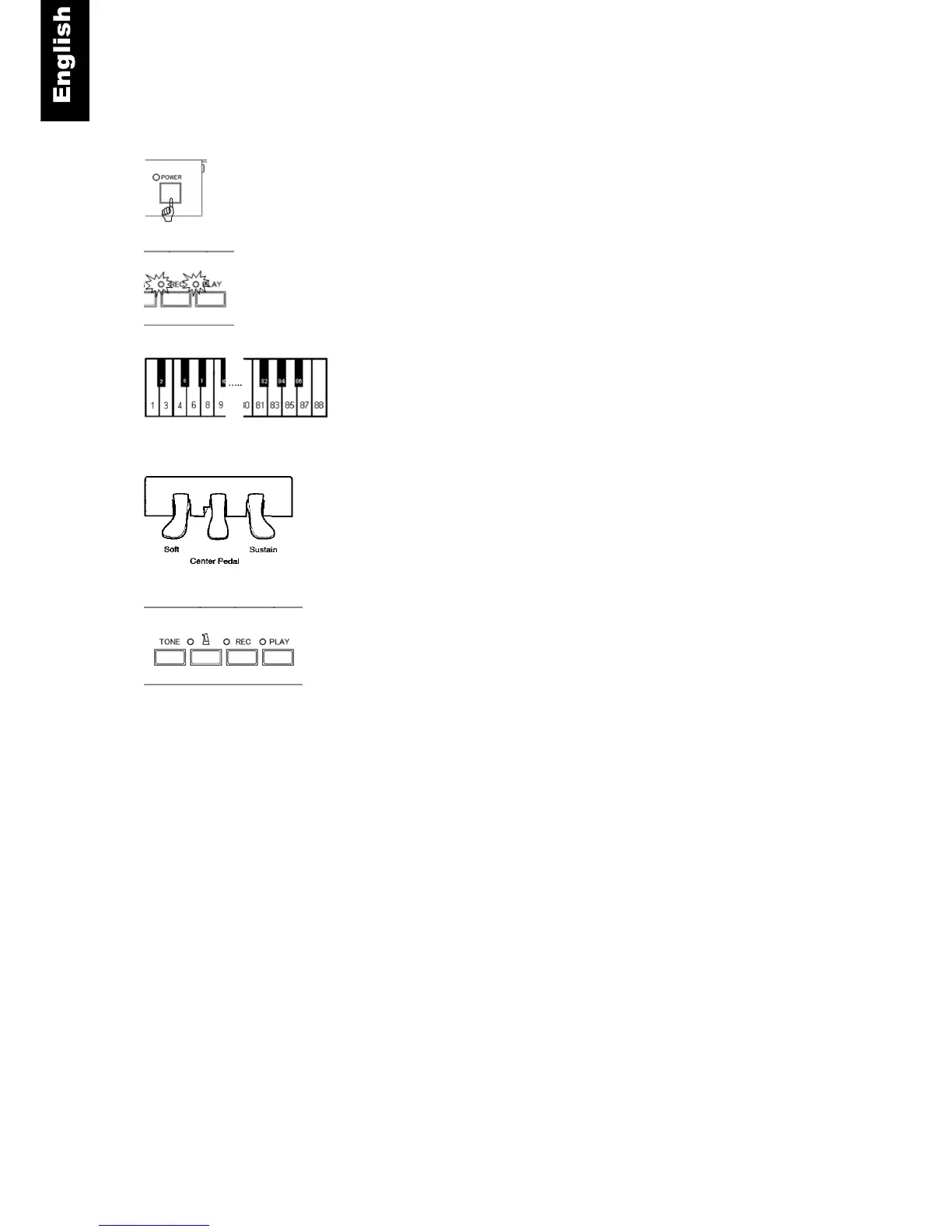
Initial Setup Instructions
1. Power On - Turn the power on.
2. A chime will be heard and the “PLAY” and “REC” lamps will
flash alternately indicating that the system is in “Initial Setup
Mode”.
3. Piano keys 1 to 88 - Play each note of the keyboard with
equal force, making sure each key goes to full depth. When
each note is released, the note will sound slightly delayed
indicating that each key was calibrated.
4. Left, center and right pedal - Press each pedal with equal
force and full depth. A chime will sound after each pedal is
press indicating that the pedal was calibrated. The chime for
each pedal will be a different pitch.
5. PLAY - Push the “PLAY” button. If the calibration of all keys
and pedals was successful, a chime will be heard and the
“PLAY” and “REC” lamps will stop flashing.
Notes:
o If the system is powered off before the “PLAY” button is pressed, the calibration procedure will not
be completed and must be done again.
o It may be helpful to pause a moment between each note to ensure that the note calibrates
properly.
o If any key or pedal did not calibrate properly, setup cannot be completed until the keys and/or
pedals have been calibrated. The system will play the MIDI note of the keys or pedals that need to
be calibrated. Play the keys or pedals again and then push “PLAY”.
o The Initial setup procedure will reset the touch control setting. Therefore, you must repeat the
procedures outlined for touch control to restore to your desired setting



 To Next Page