Tuning (Adjusting the Pitch)
The Pitch of this instrument is set at A4 = 440 Hz. You can fine-tune the pitch up or down in 0.5 Hz
steps. The maximum adjustment either direction is 13 Hz.
Tuning Instructions
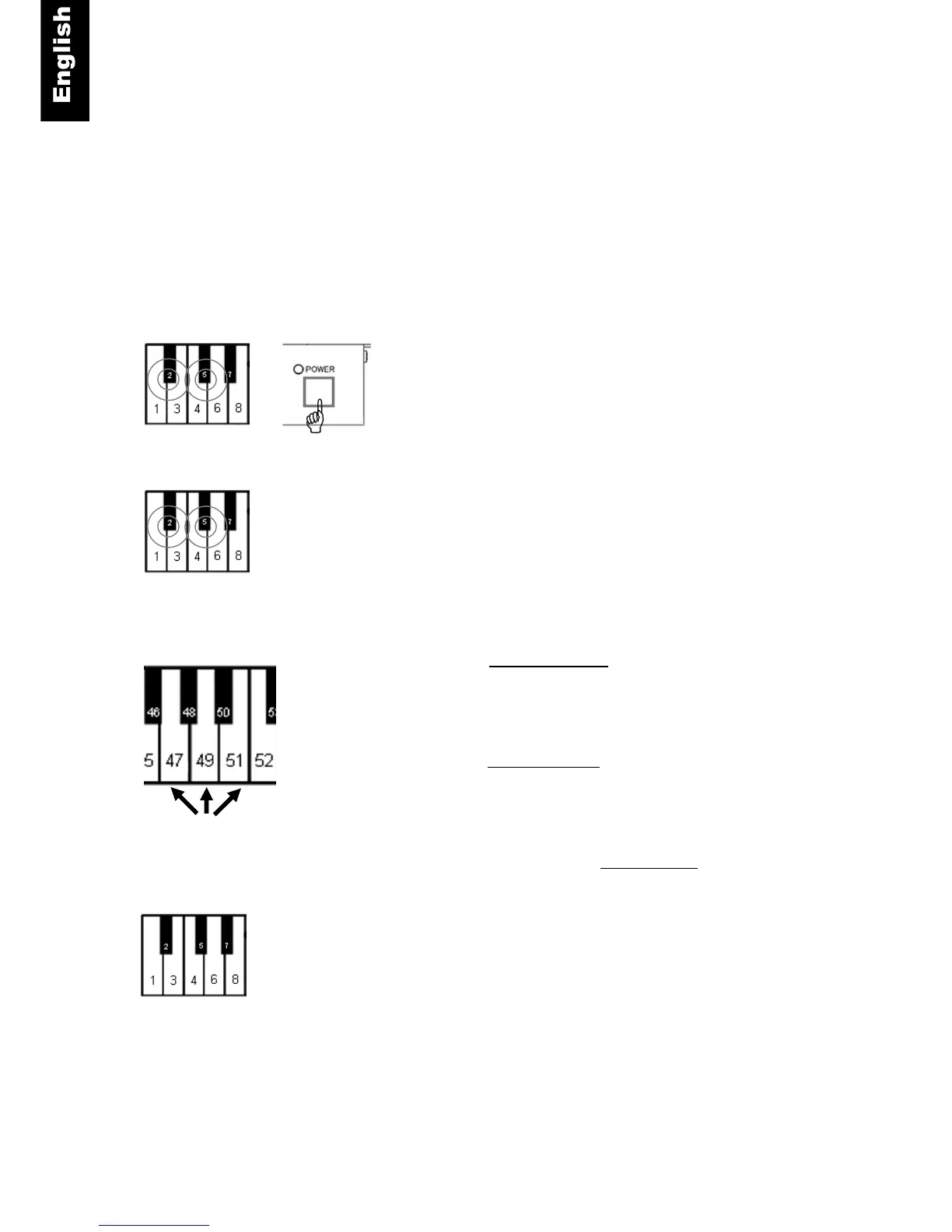
Piano keys 2 and 5 + Power ON - Press and hold keys 2 and 5
while turning the power on. A chime will sound confirming that
you are in setup mode.
Piano keys 2 and 5 - Continue holding the two keys.
Piano key 47 - To lower the pitch, press key 47 repeatedly until
the desired pitch is established. Key 47 lowers pitch by about -0.5
Hz per step (maximum of -13 Hz).
Piano key 51 – To raise the pitch, press key 51 repeatedly until
the desired pitch is established. Key 51 raises pitch by about +0.5
Hz per step (maximum of +13 Hz).
Piano key 49 – Use piano key to return to A.440, press key 49.
Piano Keys 2 and 5 - Release the two keys 2 and 5 to save your
setting and exit setup.
Note:
In some pianos the tuning effect may not be available.
Setting will be retained when the unit is powered off.



 To Next Page