Recording and Playback
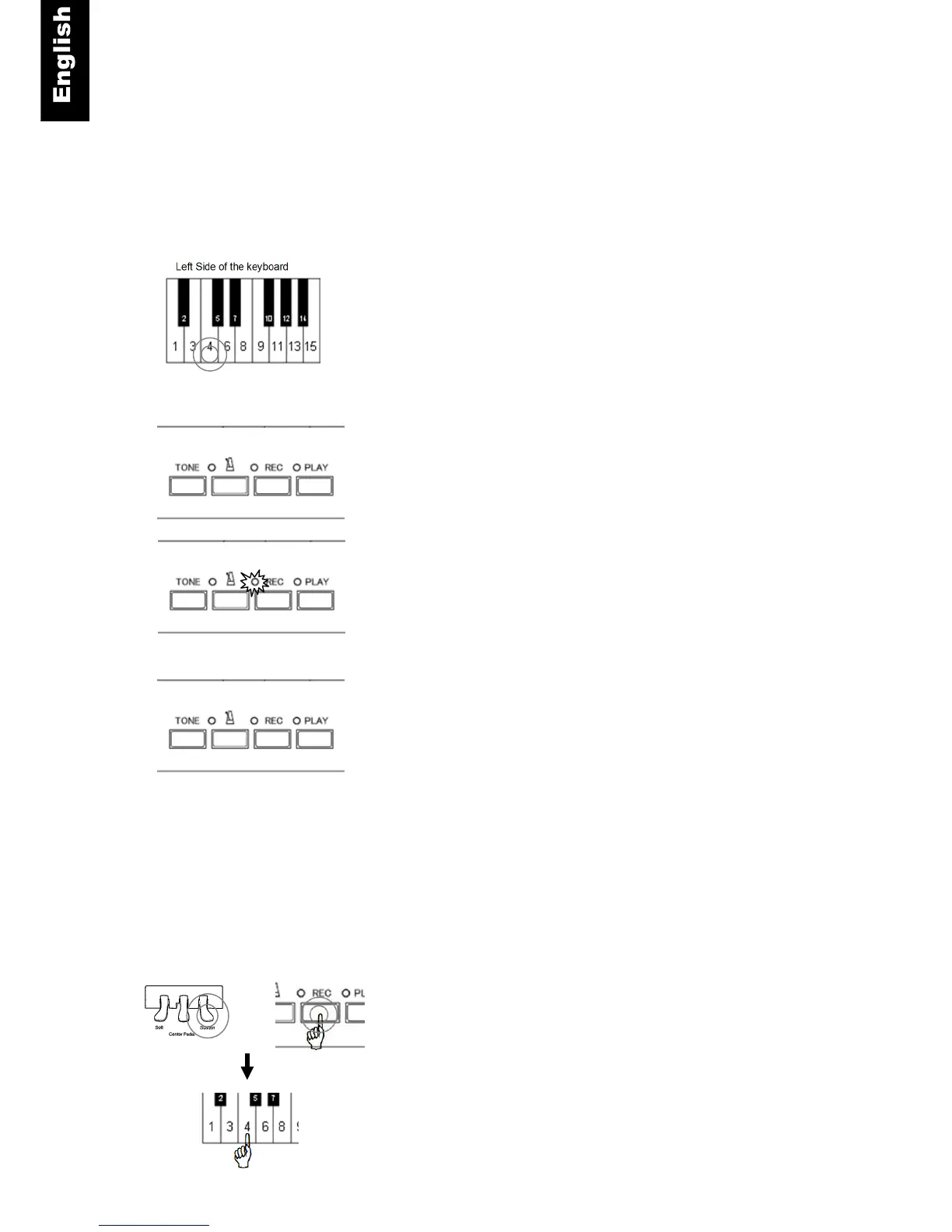
QuietTime can record your piano performance and play it back at a later time. There are 10 banks that
act as memory storage for the recorded song. The figure on the next page shows which piano keys
are used to access the storage banks.
Record Instructions
Piano key - Press and hold the piano key for the bank you wish
to record to.
REC- Then press the “REC” button.
The “REC” lamp will light up to indicate that you are in the record
mode.
Note: - If you do not select a bank to record to, bank 1 will be selected
by default.
- Recording will start when you play the first note or press a
pedal.
REC – Stop recording. When you are finished, press the “REC”
button. The “REC” lamp will turn off and data will be saved in the
selected bank.
NOTE
• Recording to a bank that already has data will cause the previously stored data to be overwritten.
• Any instrument can be setup to record. However it cannot be changed during the recording.
• The metronome can be used during recording but the sound is not recorded.
• Each bank can store about 10, 000 key or pedal strokes. Once this limit is reached, recording will be
stopped automatically.
• The recorded data is saved when power is turned off.
Delete a Recorded Song
Sustain Pedal + REC - Press and hold the sustain pedal, then
press and hold the “REC” button.
Piano key - Press the piano key for the bank you wish to delete (see the
figure on the next page). A chime will sound confirming that the data has
been deleted. Performing a System Default (see Capter 10.10) deletes
any data stored in all 10 banks.



 To Next Page