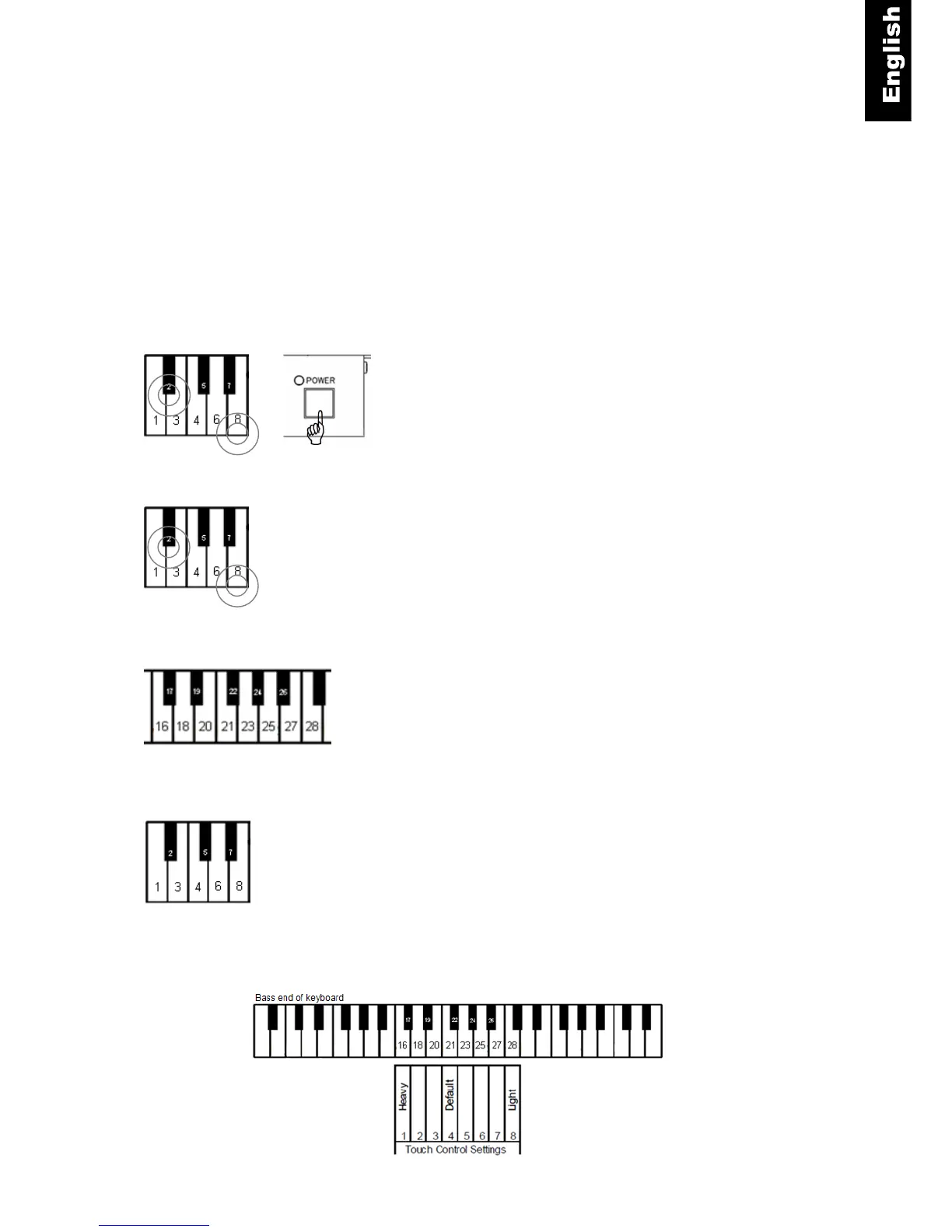
Bass end of keyboard
Touch Control (Adjusting the touch)
ProRecord has the capability of changing the touch of the keyboard (lighter or heavier). While it does
not actually change the touch of the piano action, it can give the impression that the action is lighter or
heavier. The idea is to match the feel of your acoustic piano. A heavier action would use a setting of 1
or 2 and a lighter action would be set to 7 or 8. The factory default for Touch Control is 4, this is
applies e.g. to a Yamaha U3.
Touch Control Instructions
Piano keys 2 and 8 + Power ON - Press and hold down keys 2
and 8 (see figure below) while turning the power on. You will hear
a MIDI signal that confirms that the system is in the setup mode.
Piano keys 2 and 8 - Continue holding the two keys.
Piano key 16, 17 … 27 or 28 - Select the desired touch control
setting by playing the matching piano key. (Refer to the figure
below). Here are some typical settings:
YAMAHA :3~5
KAWAI : 2~3
Piano keys 2 and 8 - Release the two keys to store your setting
and to exit setup. The setting is retained when the power is
turned off.
+



 To Next Page