wlan
25
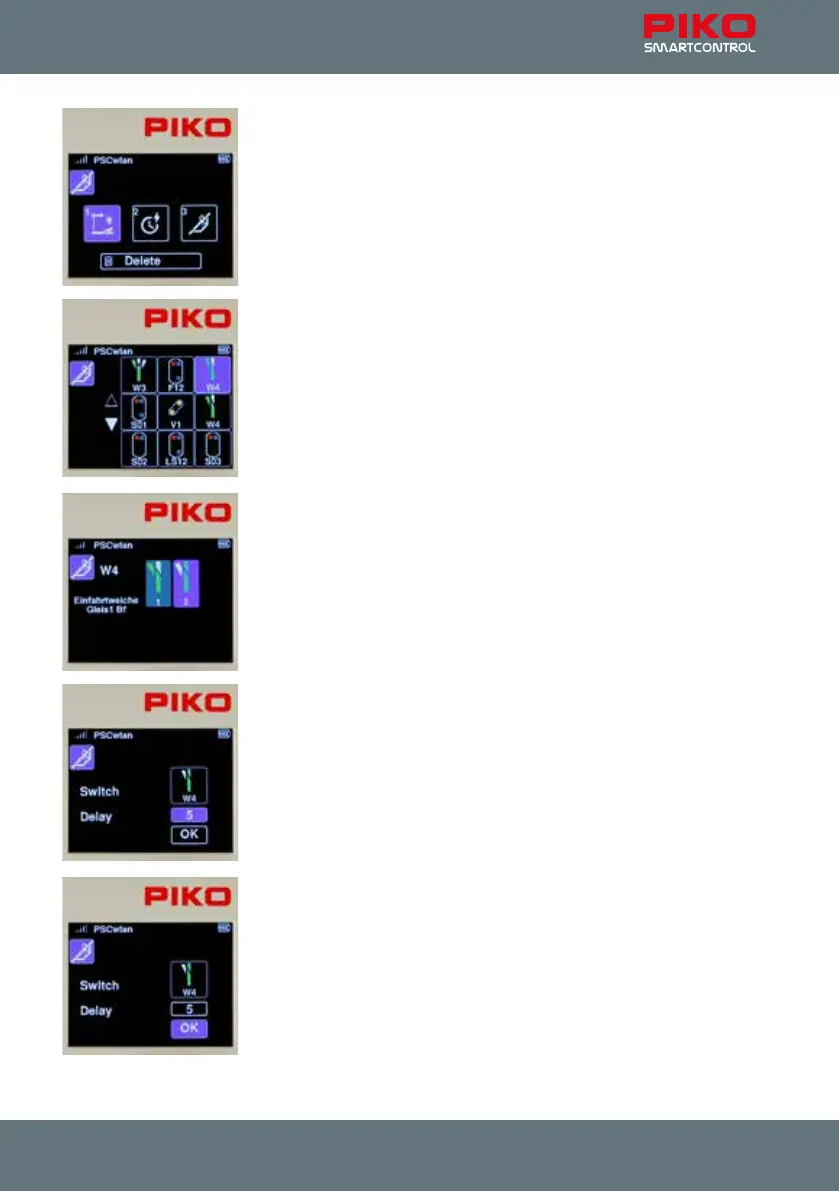
In the following view we can now decide which type of route command
should be entered as the rst step. There are “accessory circuits”, “pauses”
and previously edited “routes” (sub-routes) to choose from.
The selection can be made using the navigation keys or using the number
shown in each eld.
Since the rst step is a switch command for turnout W4, the eld for acces-
sories is highlighted.
After the accessory symbol has been conrmed, the accessories already
entered into the system are displayed as options.
Left-hand turnout W4 is selected using key 3 or using the navigation keys
followed by the OK button.
Now we can decide what direction the turnout should be aligned to. The
turnout needs be set to "straight". To do this, we either use key 1 or the
navigation keys to highlight the relevant eld and conrm with the OK
button.
To keep the turnout motors from overheating, we set a delay time in 100ms
increments in the input window that now appears and conrm it with the OK
button.
Finally, we highlight the OK symbol and complete this step by pressing the
OK button.



 To Next Page