System
wlan
26
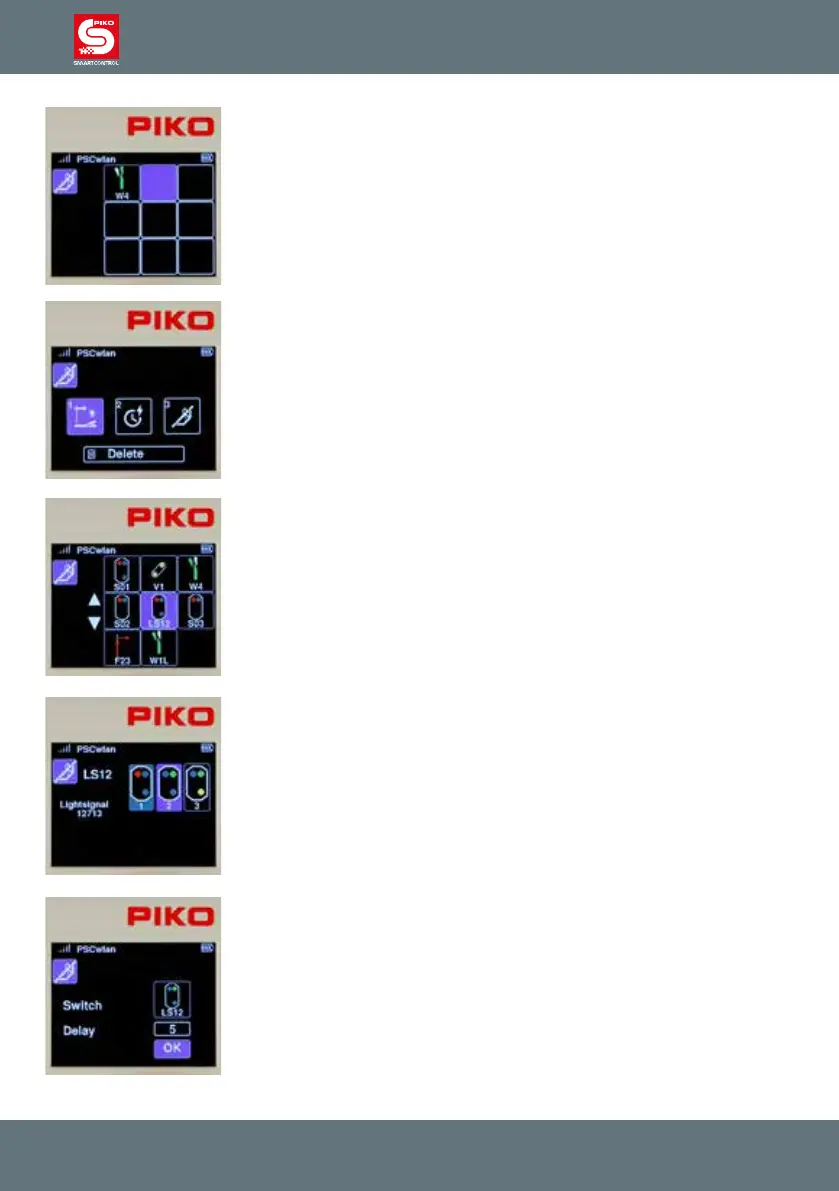
The rst step of our route now appears in the command sequence.
In the second step, light signal LS12 needs to be added. To do this, we
select the second eld with key 2 on the keypad ...
... and in the next window we activate symbol 1, which is the symbol for
accessories.
Accessories already stored in the system are displayed again.
Light signal LS12 is selected according to its position using key 6 or by
using the navigation keys followed by the OK button.
Now we decide which signal aspect should be activated. The signal should
display "green" (Hp1). To do this, we either use key 2 or the navigation keys
to highlight the relevant eld and conrm with the OK button.
Then we enter a delay time in 100ms increments and conrm it with the OK
button and complete the entire step via the OK button in the "OK" eld.



 To Next Page