System
wlan
28
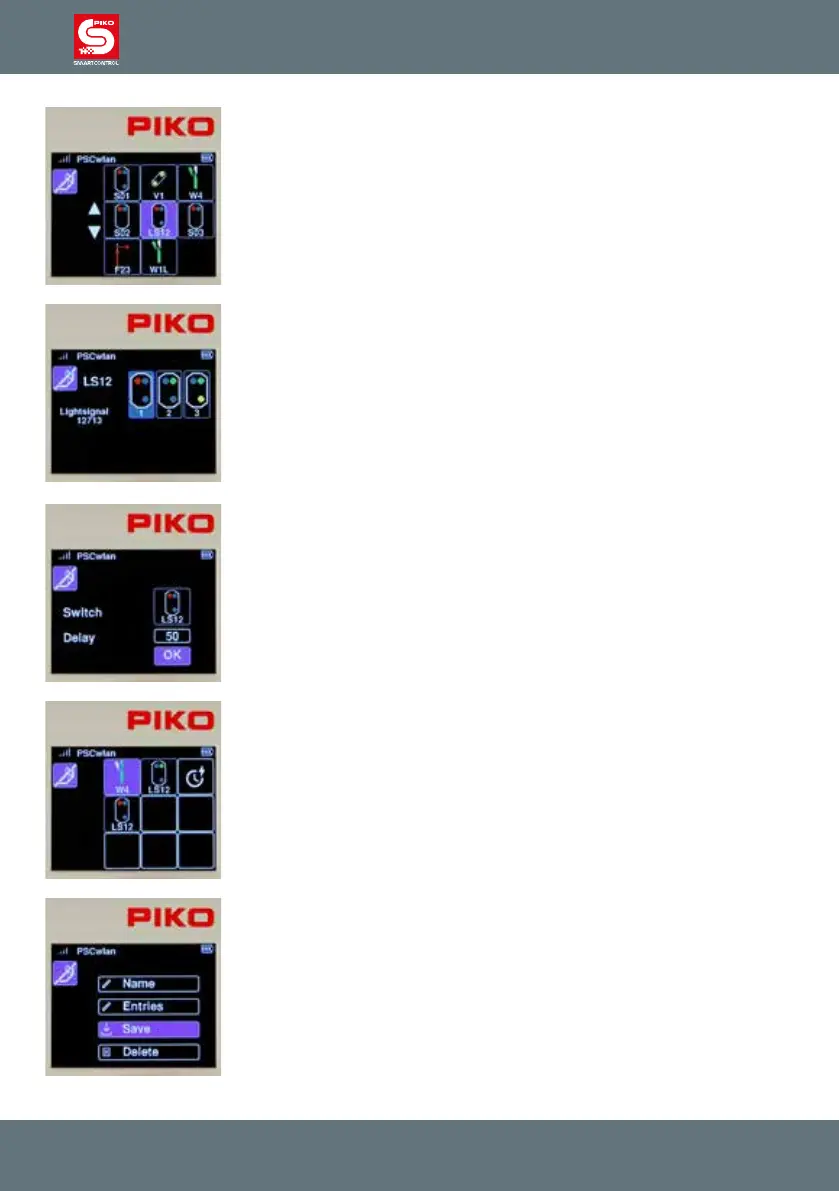
In the selection, we select light signal LS12 using key 6 on the keypad or by
using the navigation keys followed by the OK button.
Now we can decide which signal aspect to switch. The signal should be set
to "red" (Hp0). To do this, we either use key 1 or the navigation keys to
highlight the relevant eld and conrm it with the OK button.
We now enter a delay time in 100ms increments and conrm it with the OK
button and complete the entire step by highlighting the "OK" eld.
The window that now appears displays all the accessory commands of our
completed route.
The last step is to press the "back button" to save the new route in the
following window via the "save" symbol.
This window also allows us to delete a route (that has been called up in the
editing menu) by using the "Recycle bin" icon.



 To Next Page