12
Control
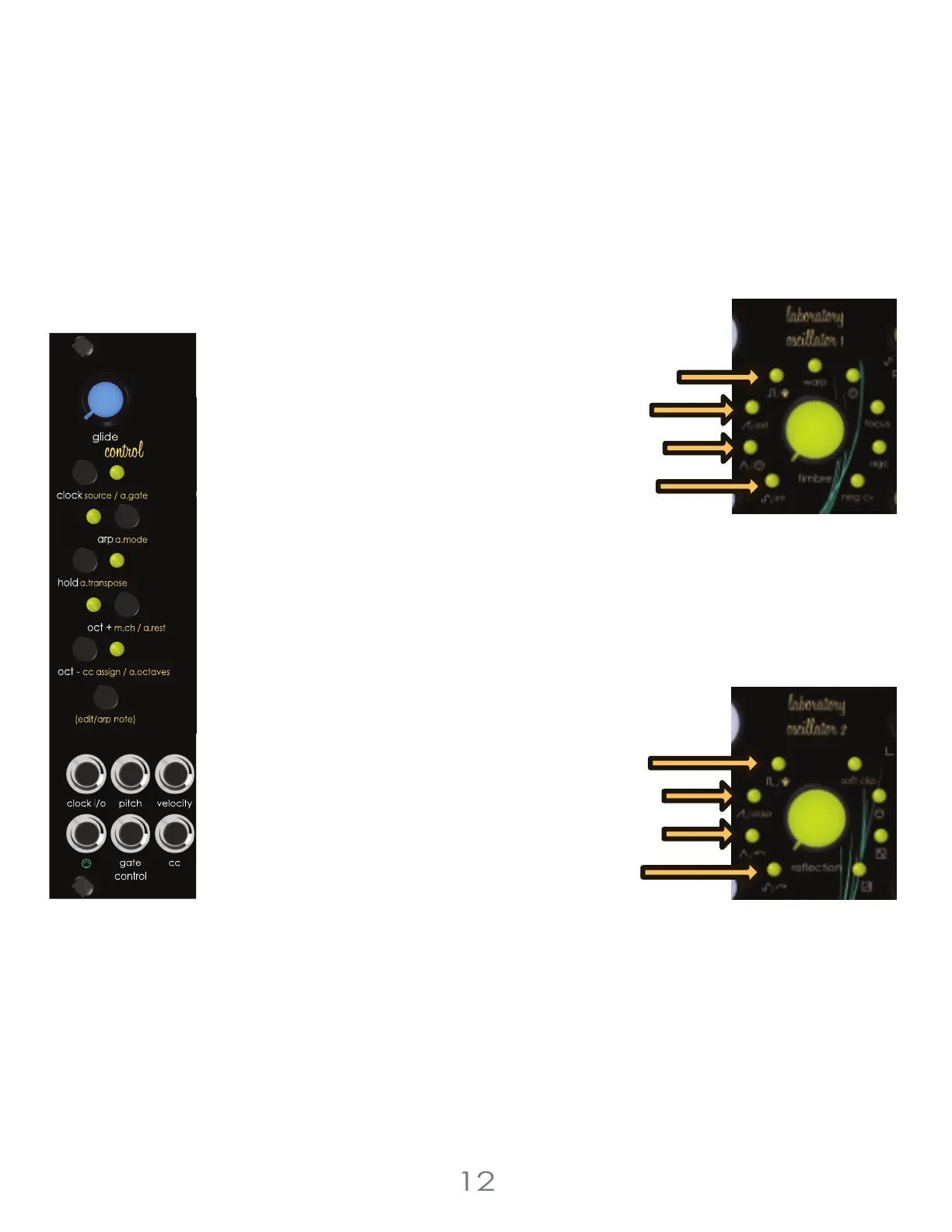
Arpeggiator Octave Range
The Arpeggiator Range function sets the number of octaves the active arpeggiated sequence
will cycle through. The Arpeggiator Range can be set to 1, 2, or 3 octaves. Set the range by
pressing and holding the voice section’s [EDIT BUTTON] then pressing the [OCTAVE DOWN
BUTTON] to cycle through 1 octave, 2 octaves, or 3 octaves. Press once to check current mode.
Press again to advance through the available options. The arpeggiator range can only be
changed when arpeggiator mode is active.
Arpeggiator Octave Range Options :
Random Octave [Square LED]
3 Octaves [Saw LED]
2 Octaves [Triangle LED]
1 Octave [Sine LED]
Arpeggiator Direction
The Arpeggiator can operate in a few different modes, playing notes back in different orders.
holding the voice section’s [EDIT BUTTON] then pressing the [ARP BUTTON] will cycle between
modes. press once to check current mode. Press again to advance through the available
options. The arpeggiator mode can only be changed when arpeggiator mode is active.
Arpeggiator Mode Options :
Random [Square LED]
Order Played [Saw LED]
Descend [Triangle LED]
Ascend [Sine LED]
3 Voltage Lab 2 Voice Modules



 To Next Page